
TextImport Mod
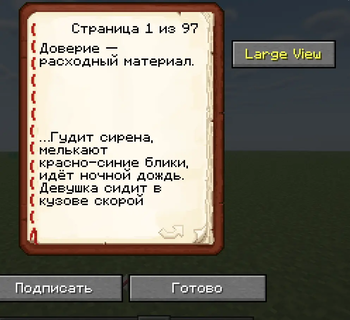
TextImport — Fabric Mod for Minecraft 1.21.11 for reading and writing books more efficient.
Screenshots
About this Mod
TextImport — Fabric Mod for Minecraft 1.21.11
English
TextImport is a client-side Fabric mod that enhances the book editing and reading experience in Minecraft.
Features:
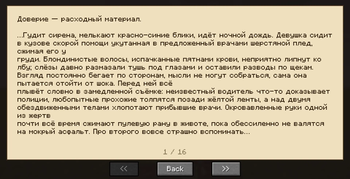
Large View — a full-screen reading mode for both signed and unsigned books. Text is repaginated to fill the entire screen, making long books much more comfortable to read. Navigate with arrow keys, mouse scroll, or Home/End.
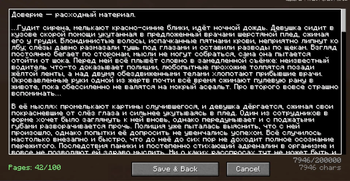
Large Edit — a full-screen text editor for Book & Quill. All pages are merged into a single large text area where you can write or paste freely. When you save, the text is automatically split into pages that fit the vanilla book UI perfectly. A live page counter shows how many pages your text will produce (max 100).
Smart Paste (Ctrl+V) — paste large texts directly into a Book & Quill and they automatically spread across multiple pages. The splitter uses Minecraft's font renderer to ensure every page looks correct in vanilla — no text overflow, no scrollbars.
The mod is entirely client-side — it works on any server without installation. Other players can read your books normally even without the mod.
Русский
TextImport — клиентский мод для Fabric, который улучшает работу с книгами в Minecraft.
Возможности:
Large View — полноэкранный режим чтения для подписанных и неподписанных книг. Текст перепагинируется под размер экрана — длинные книги читать намного удобнее. Навигация стрелками, колёсиком мыши, Home/End.
Large Edit — полноэкранный текстовый редактор для Книги с Пером. Все страницы объединяются в одно большое текстовое поле — пиши и вставляй сколько угодно. При сохранении текст автоматически разбивается на страницы, которые корректно отображаются в ванильном интерфейсе. Живой счётчик показывает сколько страниц получится (максимум 100).
Умная вставка (Ctrl+V) — вставляй большие тексты прямо в Книгу с Пером, и они автоматически распределятся по страницам. Разбивка использует рендерер шрифтов Minecraft, поэтому каждая страница выглядит идеально в ванильной игре — без обрезки текста и скроллбаров.
Мод полностью клиентский — работает на любом сервере без установки. Другие игроки смогут нормально читать ваши книги даже без мода.
Available Versions
How to Install TextImport Mod on Your Server
Order Server
Order a Minecraft Java server with at least 3 GB RAM (4 GB recommended).
Set fabric Loader
In the panel under "Egg", select the fabric loader and matching Minecraft version (1.21.11).
Install Mod
Open the mod browser in the dashboard and search for "TextImport Mod". Click "Install" – done! Alternatively, upload the .jar via SFTP to the /mods folder.
Compatibility
Mod Loaders
Minecraft Versions
1.21.11
Server-side
✗ UnsupportedRecommended RAM
4 GB(min. 3 GB)Frequently Asked Questions
TextImport Mod server crashes on startup – what to do?
Most common cause: wrong fabric version or insufficient RAM. Check the server log (latest.log) for "OutOfMemoryError" or "Mixin" errors. With Mado Hosting: ensure at least 3 GB RAM is allocated and the loader matches the mod version (1.21.11). You can switch loaders with one click in the panel.
Is TextImport Mod compatible with fabric?
TextImport Mod officially supports fabric for Minecraft 1.21.11. The Mado dashboard automatically detects incompatible loader combinations.
Server lagging with TextImport Mod – how to optimize performance?
Recommended RAM: 4 GB (per 8 players). Use /spark profiler to check if TextImport Mod consumes the most tick time. Common fixes: reduce server view-distance to 8-10, install "performant" or "starlight" as supplementary mods on Forge. With Mado Hosting, your server runs on NVMe SSDs with dedicated CPU cores for minimal latency.
Similar Mods




Rent Modded Server
Install TextImport Mod with just one click on your server.