
TextMod
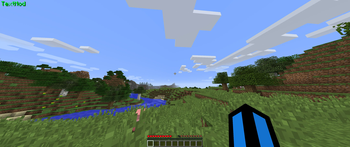
A simple forge/fabric mod that allows you to display any custom text on your screen!
Screenshots
About this Mod
TextMod
Textmod 1.5 for forge 1.8.9 is now released!
Textmod is a mod that allows you to render customizable text on your screen.
Note: Fabric API is required for 1.21 fabric versions of this mod
Download Fabric API here
Features:
- Customize the text
- Custom Color support (Hex code support)
- Color Cycling (rainbow) mode
- Custom text position
- Placeholders (Forge 1.8.9 only!)
Custom Commands:
- /textmod text
- changes the text - /textmod color rainbow - changes the color to default color cycle (rainbow) mode
- /textmod color custom
- changes the color to a custom color (Tutorial bellow) - /textmod pos
- Changes the text position - /textmod help - displays all commands
- /textmod info - displays info about your textmod release
Available placeholders (Forge 1.8.9 only!)
Note: Placeholders are only available for forge 1.8.9 in the moment, im not sure if i will be bringing the feature to newever fabric versions.
There are only a couple of placeholders available, however, if you wish to add your own, the best way is to modify the source. Another way by contacting me on discord, or opening an issue, i will gladly implement your ideas!
- {coordX} - Displays your X coordinate
- {coordY} - Displays your Y coordinate
- {coordZ} - Displays your Z coordinate
- {health} - Displays your current health level
- {name} - Displays the player name
- {maxHealth} - Displays your maximum health
- {saturation} - Displays your current saturation
- {hunger} - Displays your current hunger level
- {heldItemName} - Displays the name of your current held item
- {score} - Displays your current score
- {hour} - Displays the current hour based on your local time
- {minute} - Displays the current minute based on your local time
- {second} - Displays the current second based on your local time
Example usage to configure textmod to display the current time:
/textmod text {hour}:{minute}:{second}
Which would look like HH:MM:SS.
The time placeholders are independent on each other.
Support & Donations:
If you wish to suggest a feature or need help with TextMod, please join this discord server and create a ticket.
Im grateful for any feature suggestions or potential improvements, so if you have one, even the slightest, please message me on discord
Join here
If you wish to support me and the project for free, the best way to do that is simply by downloading the mod.
Detailed text customization tutorial:
Setting the text:
/textmod text <Text>
How to set the position
/textmod pos <X> <Y>
How to customize the color:
Rainbow mode:
/textmod color rainbow
Custom color:
/textmod color custom <HEXCODE>
or
/textmod color custom
which will just use the color in the json config file.
Instead of HEXCODE type the hexcode of the color you want, to get the hexcode use a color picker such as this:
https://htmlcolorcodes.com/color-picker/
Copy the Hex code above the color picker, the hexcode starts with "#"
Example of setting it to pink:
/textmod set color custom #EE0DD3
Available Versions
How to Install TextMod on Your Server
Order Server
Order a Minecraft Java server with at least 3 GB RAM (4 GB recommended).
Set fabric Loader
In the panel under "Egg", select the fabric loader and matching Minecraft version (1.21.9).
Install Mod
Open the mod browser in the dashboard and search for "TextMod". Click "Install" – done! Alternatively, upload the .jar via SFTP to the /mods folder.
Compatibility
Mod Loaders
Minecraft Versions
1.21.9, 1.21.8, 1.21.7 (+4 more)
Server-side
✗ UnsupportedRecommended RAM
4 GB(min. 3 GB)Frequently Asked Questions
TextMod server crashes on startup – what to do?
Most common cause: wrong fabric version or insufficient RAM. Check the server log (latest.log) for "OutOfMemoryError" or "Mixin" errors. With Mado Hosting: ensure at least 3 GB RAM is allocated and the loader matches the mod version (1.21.9). You can switch loaders with one click in the panel.
Is TextMod compatible with fabric and forge?
TextMod officially supports fabric, forge for Minecraft 1.21.9, 1.21.8, 1.21.7. Note: Forge and Fabric mods are NOT cross-compatible – pick one loader and stick with it. The Mado dashboard automatically detects incompatible loader combinations.
Server lagging with TextMod – how to optimize performance?
Recommended RAM: 4 GB (per 8 players). Use /spark profiler to check if TextMod consumes the most tick time. Common fixes: reduce server view-distance to 8-10, install "performant" or "starlight" as supplementary mods on Forge. With Mado Hosting, your server runs on NVMe SSDs with dedicated CPU cores for minimal latency.
Similar Mods




![[ETF] Entity Texture Features](https://cdn.modrinth.com/data/BVzZfTc1/af683d206d50b05258d865b0d6e4aa2f2cee12f2_96.webp)
![[EMF] Entity Model Features](https://cdn.modrinth.com/data/4I1XuqiY/6e5bbd0d06b1741bfdab6c0cfab6de8fdaf0064c_96.webp)
Rent Modded Server
Install TextMod with just one click on your server.