
Textreader
Reads and sends text from various text sources into chat
Screenshots
About this Mod
Textreader
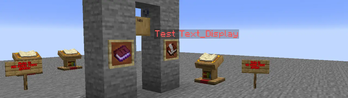
Textreader is a Datapack thats used for reading and sending various text sources such as signs, books (lecterns included) and text_display entites as chat messages.
Triggers
Textreader provides various means of sending text sources into chat with signs only being readable with each source having their unique result with the following:
- Signs
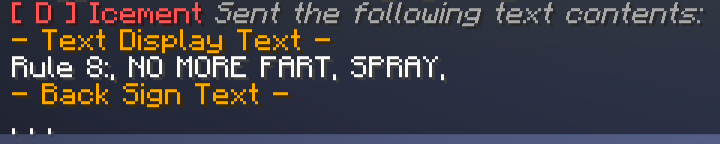
Can send both the front/back text of the Sign.textreader.a_sign.do_send and textreader.a_sign.do_read uses a cast from the player's eyes, textreader.a_sign.do_complex uses the position of the player's feet.
- Books and the Lectern
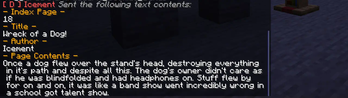
Sends the page contents of a players set index value. Title and Author included if the book is a written book. textreader.a_book.do_send checks the mainhand slot and runs if applicable, textreader.a_lectern.do_send uses the position of the player's feet.
- Text Displays
Sends the text data of the text_display entity. textreader.a_text_display.do_send uses a cast from the player's eyes to get the entity text data.
Configs
You as the player can change how some functions work by changing the following settings:
- Send Type
Affects only signs. Send Type changes how signs are read via textreader.c_send_type with 0 = Front and Back, 1 = Front Only and 2 = Back Only.
- Page Index
Changes which page of a book should the player send the contents from via textreader.c_index. Negative values are invalid!
Developer
Developer Mode allows for some more fine control over certain stuff. This can be potentially dangerous and be used for malicious intents so Debug Toggle is disabled by default!
- Developer Mode
Changes if the player can use StringLib for signs and execute commands via signs and books. textreader.zzz_config.developer_mode 0 = Run as normal, 1 = Use StringLib and execute commands.
- Debug Toggle
Determines if Developer can be used (Disabled by default) Change the #Value of textreader.zzz_config.debug to 0 = Disabled or 1 = Enabled
Credits
gu, StringLib
Available Versions
How to Install Textreader on Your Server
Order Server
Order a Minecraft Java server with at least 3 GB RAM (4 GB recommended).
Set datapack Loader
In the panel under "Egg", select the datapack loader and matching Minecraft version (1.21.8).
Install Mod
Open the mod browser in the dashboard and search for "Textreader". Click "Install" – done! Alternatively, upload the .jar via SFTP to the /mods folder.
Compatibility
Mod Loaders
Minecraft Versions
1.21.8, 1.21.7, 1.21.6 (+6 more)
Server-side
✓ RequiredRecommended RAM
4 GB(min. 3 GB)Frequently Asked Questions
Textreader server crashes on startup – what to do?
Most common cause: wrong datapack version or insufficient RAM. Check the server log (latest.log) for "OutOfMemoryError" or "Mixin" errors. With Mado Hosting: ensure at least 3 GB RAM is allocated and the loader matches the mod version (1.21.8). You can switch loaders with one click in the panel.
Is Textreader compatible with datapack and fabric and forge and neoforge and quilt?
Textreader officially supports datapack, fabric, forge, neoforge, quilt for Minecraft 1.21.8, 1.21.7, 1.21.6. Note: Forge and Fabric mods are NOT cross-compatible – pick one loader and stick with it. The Mado dashboard automatically detects incompatible loader combinations.
Server lagging with Textreader – how to optimize performance?
Recommended RAM: 4 GB (per 8 players). Use /spark profiler to check if Textreader consumes the most tick time. Common fixes: reduce server view-distance to 8-10, install "performant" or "starlight" as supplementary mods on Forge. With Mado Hosting, your server runs on NVMe SSDs with dedicated CPU cores for minimal latency.
Similar Mods

![[ETF] Entity Texture Features](https://cdn.modrinth.com/data/BVzZfTc1/af683d206d50b05258d865b0d6e4aa2f2cee12f2_96.webp)
![[EMF] Entity Model Features](https://cdn.modrinth.com/data/4I1XuqiY/6e5bbd0d06b1741bfdab6c0cfab6de8fdaf0064c_96.webp)



Rent Modded Server
Install Textreader with just one click on your server.