
TFC Astikor Carts
Adding compatibility between Astikor Carts and TerraFirmaCraft
Screenshots
About this Mod
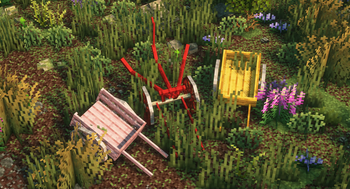
It works similarly to the main Astikor Carts mod, but adds new carts for each wood type present in TerraFirmaCraft. This compatibility mod also adds new mechanics to the plow cart, which can now be used to "mow" large quantities of shrubberies, loose rocks and more. This change also makes it possible to efficiently till soil blocks to farmland where there are a lot of plants.
General Config
These settings define how carts interact with animals, items, and players. They control what can be carried and how pulling speed is affected by nutrition, thirst, hunger, and cargo weight.
Animal Cart Settings
maxAnimalSize
The maximum size (in blocks volume) of an animal that can be loaded into the animal cart. Larger animals above this threshold cannot be carried.
Default: 3.0maxPassengerCount
The maximum number of animals the cart can carry simultaneously.
Default: 2canPushIntoPlayers
If enabled, the animal cart can pick up players by being pushed into them.
Default: truecanCarryWaterEntities
If enabled, aquatic creatures (fish, dolphins, whales, etc.) can be picked up by the animal cart.
Default: true
Supply Cart Settings
maxItemSize
The largest item size (inclusive) that can be stored in a supply cart.
Allowed values:TINY,VERY_SMALL,SMALL,NORMAL,LARGE,VERY_LARGE,HUGE
Default: VERY_LARGE
Pulling Behavior
pullingDistanceModifier
Adjusts the tolerance for how far a cart can be pulled before the connection breaks. Higher values allow greater pulling distance/threshold.
Default: 2.0toggleFoodSpeed
Determines whether the player’s nutrition, thirst, and hunger affect cart pulling speed.- When enabled, pulling speed is scaled by the player’s average nutrition × thirst × hunger.
- The formula produces a health factor that modifies speed between 25% (minimum) and 100% (maximum).
- Example: A well-fed, hydrated player pulls carts faster; a starving, thirsty player pulls slower.
Default: true
Cart Inventory Config
These settings control how carts behave in terms of cargo weight limits and inventory size. They let you fine‑tune the balance between realism and convenience.
Weight Thresholds
How Weight Thresholds Interact
The logic:
- Exhausted Threshold: If cargo weight exceeds this value, the player gains the Exhausted effect.
- Overburdened Threshold: If cargo weight exceeds this higher value, the player gains the Overburdened effect.
- Pinned Threshold: If cargo weight exceeds this maximum, the player becomes Pinned and immobilized.
The thresholds act as progressive stages of fatigue based on the estimated cargo mass.
exhaustedThreshold
The mass (in kilograms) at which a player pulling a cart becomes exhausted. At this point, movement slows down significantly.
Default: 400 kgoverburdenedThreshold
The mass at which the player becomes overburdened. Movement is heavily restricted, but not yet immobilized.
Default: 1000 kgpinnedThreshold
The mass at which the player becomes pinned and unable to move at all.
Default: 2000 kg
Example: A VERY_HEAVY HUGE item might weigh ~280 kg. With a pinned threshold of 800 kg, carrying three such items would immobilize the cart puller.
Inventory Sizes
Hand Cart Inventory
- Rows:
handCartInventoryHeight(Default: 2) - Columns:
handCartInventoryWidth(Default: 5)
-> This defines a 2×5 grid (10 slots) for the hand cart.
- Rows:
Supply Cart Inventory
- Rows:
supplyCartInventoryHeight(Default: 5) - Columns:
supplyCartInventoryWidth(Default: 9)
-> This defines a 5×9 grid (45 slots) for the supply cart.
- Rows:
As of version 1.2
Relevant mostly for mod and modpack makers:
- Automatic item and entity registration of any wood types from enum classes that implements TFC's RegistryWood interface! (e.g.: supports mods like ArborFirmaCraft)
- You only need to supply the relevant datapack files (recipes, tags, tfc data, etc.) and assets (textures, item models, lang, etc.)!
Available Versions
How to Install TFC Astikor Carts on Your Server
Order Server
Order a Minecraft Java server with at least 3 GB RAM (4 GB recommended).
Set forge Loader
In the panel under "Egg", select the forge loader and matching Minecraft version (1.21.1).
Install Mod
Open the mod browser in the dashboard and search for "TFC Astikor Carts". Click "Install" – done! Alternatively, upload the .jar via SFTP to the /mods folder.
Compatibility
Mod Loaders
Minecraft Versions
1.21.1, 1.21, 1.20.1 (+1 more)
Server-side
✓ RequiredRecommended RAM
4 GB(min. 3 GB)Frequently Asked Questions
TFC Astikor Carts server crashes on startup – what to do?
Most common cause: wrong forge version or insufficient RAM. Check the server log (latest.log) for "OutOfMemoryError" or "Mixin" errors. With Mado Hosting: ensure at least 3 GB RAM is allocated and the loader matches the mod version (1.21.1). You can switch loaders with one click in the panel.
Is TFC Astikor Carts compatible with forge and neoforge?
TFC Astikor Carts officially supports forge, neoforge for Minecraft 1.21.1, 1.21, 1.20.1. The Mado dashboard automatically detects incompatible loader combinations.
Server lagging with TFC Astikor Carts – how to optimize performance?
Recommended RAM: 4 GB (per 8 players). Use /spark profiler to check if TFC Astikor Carts consumes the most tick time. Common fixes: reduce server view-distance to 8-10, install "performant" or "starlight" as supplementary mods on Forge. With Mado Hosting, your server runs on NVMe SSDs with dedicated CPU cores for minimal latency.
Similar Mods




Rent Modded Server
Install TFC Astikor Carts with just one click on your server.