
Thalassophobia
Explore the depths… but beware of terrifying sea monsters lurking beneath!
About this Mod
Dive into the Ocean with the Thalassophobia mod, where the ocean isn’t just full of life, it’s filled with terrifying creatures that will make every swim a danger! Encounter the mighty Colossoteus, also known as Bloop, along with other horrifying monsters that make the ocean their domain. This mod transforms the deep sea into a fearsome place. Venture into these dark, dangerous waters, but be warned, one wrong move could be your last. Will you survive the deep, or will you become prey to the ocean’s monsters?
Updates continue on Curseforge
- A mod made by Zcoper
- Mod created with MCreator!
- Requires Geckolib
● Visit my Discord Server!
https://discord.gg/akP56NtmVQ
● Important FaQ
Spoiler
► [OLD] What is my console spaming?
Most mobs use special spawning conditions, which means that these mobs can only appear under certain conditions. If the spawning conditions work, this spam is created in the console.
► [OLD] Why are Mobs not spawning?
Mobs in Creeping Woods only work at night. This means that you can only spawn them at night.
► Why are features missing in different versions?
It is recommended to play the newest versions of higher minecraft versions.
Not all features of MCreator available or the same in different versions.
For example: Version 1.19.2 doesn't have the feature of shield, better structure generation or custom villagers, but Version 1.20.1 does have them.
► How can I disable the Alpha Reaverfish?
The Alpha Reaverfish can be disabled if you set the gamerule "enableAlphaReaverfishSpawning" to false.
► Where can I find the mobs?
Most mobs can be found in regular ocean biomes. Some are only be found in deep oceans, during the night or on the ocean floor.
Most of the mobs are easy to find and spawn frequently, but some mobs, especially the big ones spawn rarely. It depends on how lucky you are with the spawnrates.
► How do Echoshells and Leviathan Sensors work?
Both Items only work if you are underwater.
The Echoshell detects nearby water mobs while the Leviathan Sensor goes on a higher range and only detects leviathan mobs.
What would be a leviathan:
Plesiosaur, Mosasaur, Dunkleosteus, Megalodon, Tusoteuthis, Adult Colossoteus, Alpha Reaverfish, Sea Phantom, Riffhead.
► How does the Deep Sea Amulet work?
The Deep Sea Amulet grants Conduit Power if you are deep underwater and under the Y-Level of 40.
► How does the Sonar Beacon work?
The Sonar Beacon releases a big sonar, killing nearby water mobs.
It only works if the block above it is water. It activated through redstone signals. Target blocks or sculk sensors are the best option for this.
► What can I do with Pearls?
Pearls and Black Pearls can be used for crafting or trading for emeralds at a fisherman villager.
► Why are the death messages weird?
If you die with a custom death message like "was shocked to death, ate natural toxin or was killed by sonar" it can sometimes be buggy and just say "death.attack.shock/sonar/toxin".
This is a weird bug from Mcreators Death Message system where it can't print the death message right.
► What mob drops Black pearls?
Black Pearls can be dropped by Ammonitas, Bathotraps, Dunkleosteus, Eurypterids, Megastars, Mosasaur and Tusoteuthis.
► How can I read the Bestiarys Description
To get the descriptions of Sea Creatures, you need to approach them in a 12 block radius.
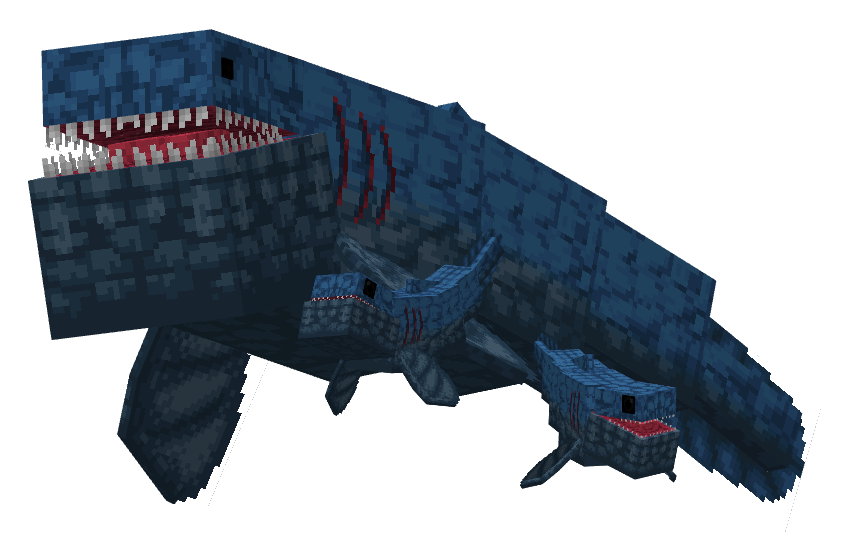
Colossoteus is a massive new Leviathan found in both Deep Oceans and regular oceans. Its terrifying size and durability make it extremely dangerous. The Colossoteus's roar can be heard from great distances, and it can destroy blocks in its path. To make matters worse, it can unleash a powerful sonar attack similar to the Warden's Sonic Boom and attacks other animals. It can be detected by using the Leviathan Sensor. If an Adult Colossoteus dies, he can drop a Sonar Organ and his skeleton.
- Config File not inculed.
- You are all allowed to use this mod in your modpacks!
- Do not port my mods without permission!
Available Versions
How to Install Thalassophobia on Your Server
Order Server
Order a Minecraft Java server with at least 3 GB RAM (4 GB recommended).
Set forge Loader
In the panel under "Egg", select the forge loader and matching Minecraft version (1.20.1).
Install Mod
Open the mod browser in the dashboard and search for "Thalassophobia". Click "Install" – done! Alternatively, upload the .jar via SFTP to the /mods folder.
Compatibility
Mod Loaders
Minecraft Versions
1.20.1, 1.19.4, 1.19.2
Server-side
✓ RequiredRecommended RAM
4 GB(min. 3 GB)Frequently Asked Questions
Thalassophobia server crashes on startup – what to do?
Most common cause: wrong forge version or insufficient RAM. Check the server log (latest.log) for "OutOfMemoryError" or "Mixin" errors. With Mado Hosting: ensure at least 3 GB RAM is allocated and the loader matches the mod version (1.20.1). You can switch loaders with one click in the panel.
Is Thalassophobia compatible with forge?
Thalassophobia officially supports forge for Minecraft 1.20.1, 1.19.4, 1.19.2. The Mado dashboard automatically detects incompatible loader combinations.
Server lagging with Thalassophobia – how to optimize performance?
Recommended RAM: 4 GB (per 8 players). Use /spark profiler to check if Thalassophobia consumes the most tick time. Common fixes: reduce server view-distance to 8-10, install "performant" or "starlight" as supplementary mods on Forge. With Mado Hosting, your server runs on NVMe SSDs with dedicated CPU cores for minimal latency.
Similar Mods
![[EMF] Entity Model Features](https://cdn.modrinth.com/data/4I1XuqiY/6e5bbd0d06b1741bfdab6c0cfab6de8fdaf0064c_96.webp)


Rent Modded Server
Install Thalassophobia with just one click on your server.