
The Block Keeps Ticking
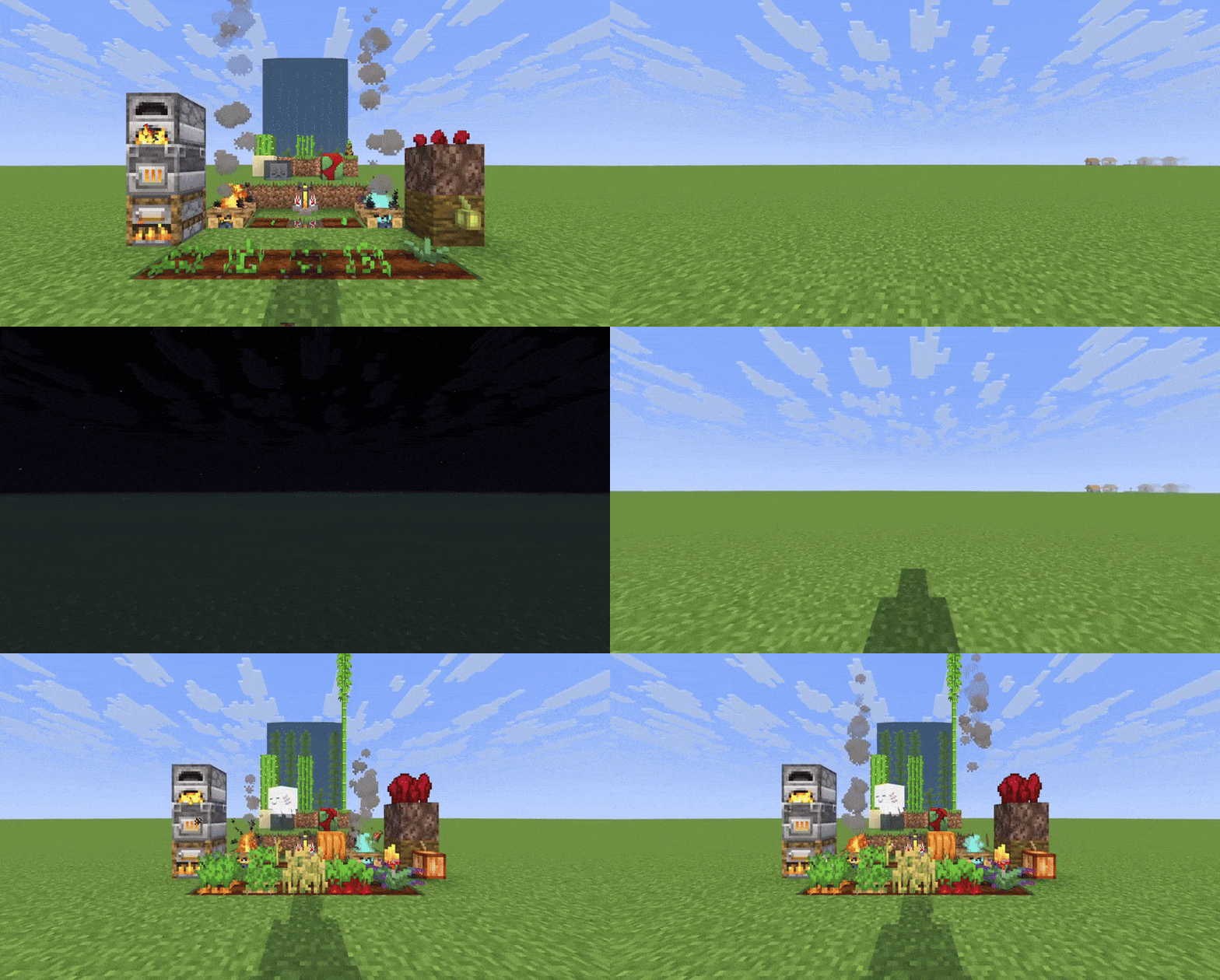
Simulates block ticking and entity growth in unloaded chunks, so your farms, furnaces, and passive mobs keep growing and working even when you're far away.
Screenshots


About this Mod
The Block Keeps Ticking

This wonderful mod icon was created by Sulmino_ on Twitter/X.
Simulate block ticking and entities in unloaded chunks
The Block Keeps Ticking is a complete rewrite of Alive World, (which is a fork of Presence Not Required) that allows blocks and entities to continue progressing in unloaded chunks, so your farms, furnaces, and passive mobs keep growing and working even when you're far away.
Features
Simulate When Away: Simulate blocks and entities in unloaded chunks when you are away from those chunks.
Block Support:
- Block Entities: Furnaces, Campfires, Brewing Stands
- Crops & Stems: Wheat, Carrots, Potatoes, Beetroots, Torchflowers, Pumpkins and Melons
- Nether Wart: Growth progression
- Cocoa Beans: Growth progression
- Trees: Sapling growth
- Growing Plants: Kelp, Bamboo, Sugar Cane, Cactus
- Dried Ghast & Sniffer Eggs: Hydration and hatching progression
- Budding Amethyst: Growth progression
- Cauldrons: Water and lava dripping
- Mud: Mud above Dripstone conversion to clay
- Sweet Berry Bushes: Growth progression
*Note: Due to the way Sniffer Eggs and Dried Ghasts are processed, some precision is lost during simulation.
Time Modes: Choose between world time (only progresses when playing) or real time (progresses even when offline).
Simulate After Sleeping: Time skips (e.g. from sleeping) will simulate loaded chunks for the duration of the time skip.
Lazy Tax setting: Configure a percentage reduction of simulated ticks to slow down simulation for your prefered balance level.
Per-Object Configuration: Enable or disable simulation for specific blocks and entities individually.
Serverside: When installed on a server, players do not need to install the mod. Can also be installed in singleplayer worlds.
Configuration
You can configure the following values with ModMenu and YetAnotherConfigLib, or by editing config\the-block-keeps-ticking.json.
Time Source: Choose between "World Time" (only progresses when playing) or "Real Time" (progresses even when offline). Real Time works well with lazy tax. (Default: World Time)
Simulate After Sleeping: When enabled, time skips (e.g. from sleeping) will simulate loaded chunks for the duration of the time skip. (Default: false)
Lazy Tax (%): Simulated ticks are reduced by this percentage. Increasing this value slows down simulation in unloaded chunks. Range: 0-99. (Default: 0)
Debug Logging: Enables detailed logging when simulation occurs, showing which blocks, block entities, and entities are being simulated. (Default: false)
Ticking Objects: Individual toggles to enable or disable simulation for each supported block type and entity. All are enabled by default.
⚠️ Warning: This mod stores Fabric chunk attachments. Removing it may cause harmless log spam about unknown attachment types. This is a Fabric limitation, not a bug in the mod.
API usage
The Block Keeps Ticking exposes a small API so other mods can register their own ticking objects to be simulated in unloaded chunks. Read more about this on Github.
Available Versions
How to Install The Block Keeps Ticking on Your Server
Order Server
Order a Minecraft Java server with at least 3 GB RAM (4 GB recommended).
Set fabric Loader
In the panel under "Egg", select the fabric loader and matching Minecraft version (26.1.2).
Install Mod
Open the mod browser in the dashboard and search for "The Block Keeps Ticking". Click "Install" – done! Alternatively, upload the .jar via SFTP to the /mods folder.
Compatibility
Mod Loaders
Minecraft Versions
26.1.2, 26.1.1, 26.1 (+6 more)
Server-side
✓ RequiredRecommended RAM
4 GB(min. 3 GB)Frequently Asked Questions
The Block Keeps Ticking server crashes on startup – what to do?
Most common cause: wrong fabric version or insufficient RAM. Check the server log (latest.log) for "OutOfMemoryError" or "Mixin" errors. With Mado Hosting: ensure at least 3 GB RAM is allocated and the loader matches the mod version (26.1.2). You can switch loaders with one click in the panel.
Is The Block Keeps Ticking compatible with fabric?
The Block Keeps Ticking officially supports fabric for Minecraft 26.1.2, 26.1.1, 26.1. The Mado dashboard automatically detects incompatible loader combinations.
Server lagging with The Block Keeps Ticking – how to optimize performance?
Recommended RAM: 4 GB (per 8 players). Use /spark profiler to check if The Block Keeps Ticking consumes the most tick time. Common fixes: reduce server view-distance to 8-10, install "performant" or "starlight" as supplementary mods on Forge. With Mado Hosting, your server runs on NVMe SSDs with dedicated CPU cores for minimal latency.
Similar Mods


Rent Modded Server
Install The Block Keeps Ticking with just one click on your server.