
The Toolkits
Add a few useful tools to modded minecraft
Screenshots
About this Mod
Link Item
Quark has a shift-T command that can link an item to chat, but it cannot be used in JEI ingredient and bookmark overlay. This mod adds a new shortcut (configurable, default shift-/) that can be used in all those mentioned screens. The text is also clickable, which will open the inventory (so the JEI) and input the search term for you. You need to set resource id search to "REQUIRE_PREFIX" in order for the search to work.
open JEI command
/the-toolkits jei <search_term>
This command is used in the implementation of the link-item function. You may find this useless.
print item nbt
This command print nbt of item to chat. You hold the item and run this command, that's it. You need to be OP to use this OP command.
/the-toolkits nbt get
print player attributes
This command prints player attributes like speed. There are two types of attributes (syncable and dirty). I don't know the difference between them, so I just print them all. This command can be useful, e.g. when you want to understand how apotheosis works, since in apotheosis many effects are implemented by injecting new attributes in the player. You need to be OP to use this command.
/the-toolkits attributes get
recipe dump
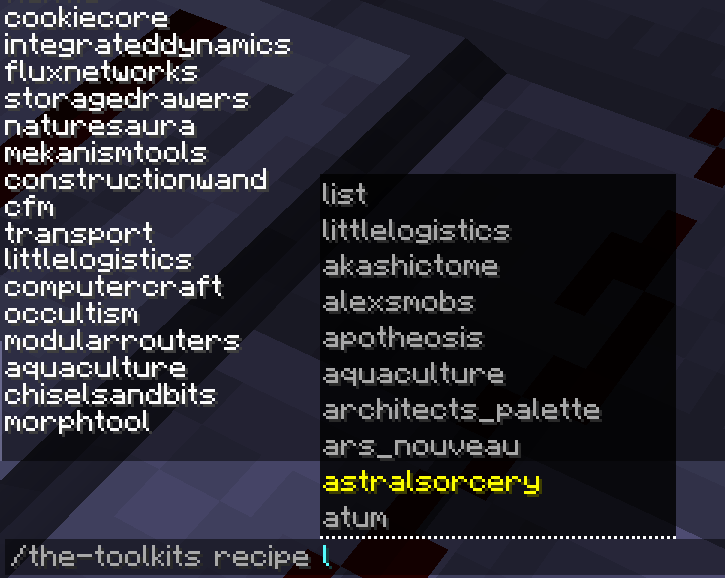
This is a newly added feature, currently only available in 1.16.5 and will be ported into higher version in the future. Recipes can be categorized by Serializer, whose name is a resource id, like "minecraft:crafting_shaped" or "create:mechanical_crafting". The first part is "namespace", the second is "path". This command takes parameters based on this concept.
List all namespaces:
/the-toolkits recipe list
List all paths under this namespace:
/the-toolkits recipe <ns> list
List all recipes id under this ns:path:
/the-toolkits recipe <ns> <path> list
Randomly print one recipe under this ns:path:
/the-toolkits recipe <ns> <path> random
Dump recipes under this category (in the form of json), watch the output to see where the result is stored:
/the-toolkits recipe <ns> <path> dump
This command may not work for all type of recipe and will/need to be improved
entity inspection command
Wonder what is lagging your world? After you use mods like spark to have an idea of what contributes the most of the lag, do you want to know the location of them? This command helps you dump every entity's location of a given entity type (you can use classname, name or registry name). This will be useful if you are the OP of a server and want to inspect where exactly is causing the lag. (recommend to be used with spark or other profiler mods)
/the-toolkits entity summary classname/name/registry_name # have a summary of all the entities count
/the-toolkits entity locations classname/name/registry_name name # dump the locations of them
Similar command exists for block_entity as well, replace entity with block_entity and let the suggestion guides you to dump locations of block entities.
Available Versions
How to Install The Toolkits on Your Server
Order Server
Order a Minecraft Java server with at least 3 GB RAM (4 GB recommended).
Set forge Loader
In the panel under "Egg", select the forge loader and matching Minecraft version (1.19.2).
Install Mod
Open the mod browser in the dashboard and search for "The Toolkits". Click "Install" – done! Alternatively, upload the .jar via SFTP to the /mods folder.
Compatibility
Mod Loaders
Minecraft Versions
1.19.2, 1.19, 1.18.2 (+1 more)
Server-side
✓ RequiredRecommended RAM
4 GB(min. 3 GB)Frequently Asked Questions
The Toolkits server crashes on startup – what to do?
Most common cause: wrong forge version or insufficient RAM. Check the server log (latest.log) for "OutOfMemoryError" or "Mixin" errors. With Mado Hosting: ensure at least 3 GB RAM is allocated and the loader matches the mod version (1.19.2). You can switch loaders with one click in the panel.
Is The Toolkits compatible with forge?
The Toolkits officially supports forge for Minecraft 1.19.2, 1.19, 1.18.2. The Mado dashboard automatically detects incompatible loader combinations.
Server lagging with The Toolkits – how to optimize performance?
Recommended RAM: 4 GB (per 8 players). Use /spark profiler to check if The Toolkits consumes the most tick time. Common fixes: reduce server view-distance to 8-10, install "performant" or "starlight" as supplementary mods on Forge. With Mado Hosting, your server runs on NVMe SSDs with dedicated CPU cores for minimal latency.
Similar Mods




![[ETF] Entity Texture Features](https://cdn.modrinth.com/data/BVzZfTc1/af683d206d50b05258d865b0d6e4aa2f2cee12f2_96.webp)
![[EMF] Entity Model Features](https://cdn.modrinth.com/data/4I1XuqiY/6e5bbd0d06b1741bfdab6c0cfab6de8fdaf0064c_96.webp)
Rent Modded Server
Install The Toolkits with just one click on your server.