
the_garden.jar
Another horror mod based on old minecraft
Screenshots
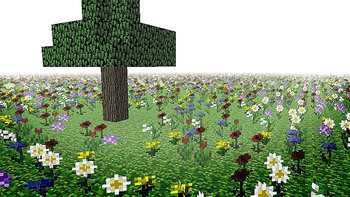
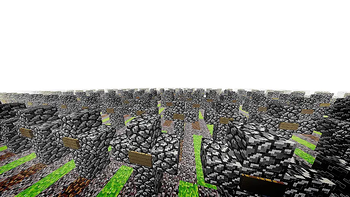
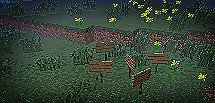
About this Mod
MOD IS CURRENTLY IN BETA RELEASE
Bugs and issues may occur
I also want to note that I'm a solo developer.
If you want to make a video about the mod, please mention that the mod is currently in beta and include the warning section below in your video as well.
If you encounter any bugs, contact me: nat.default on Discord, on X at https://x.com/natdefault, or join the Discord server.
Official Discord Server
Suggestions and ideas for the mod are always welcome.
Due to personal issues, I will not be releasing any more major updates after 1.2.2, only bug fixes.
Please read the whole description, thanks.
Hush now, and walk where petals lie,
Beneath a still and watchful sky.
Thou wert not lost when thou didst roam
The Garden found thee, brought thee home.
The Garden
The Garden is a psychological horror experience that introduces liminal spaces and unsettling encounters into Minecraft.
This is the only official CurseForge page of the mod.
The official Modrinth page is:
https://modrinth.com/mod/the_garden.jar
Features
Custom Entities
Show entities
- Stalker
- InvisibleStalker
- help_me
- saint
- N
- I
- Crawler
New Content
New ores and materials
- Silver
- Bronze
- Tin
Unique items
- Silver Cross
- Bronze Cross
- Tin Tools
Dimensions
Show dimensions
- the_garden
- stonery
- cemetery
- basement
- where
- pardon
Commands
/thegarden— Opens the menu UI for command information
WARNING
This mod contains emotional and horror-related content.
Includes:
- Sudden loud sounds and ambient noise
- Flashing lights and visual effects
- Unsettling themes and text
- Unexpected events
Audio levels for most sounds can be adjusted using Minecraft's default volume settings:
- Hostile Creatures
- Ambient/Environment
- Music
If you are sensitive to flashing lights, loud noises, or intense horror experiences, please play with caution.
Although this is one of my first full releases, the mod was built with care and a focus on creating a memorable and unsettling experience.
Feedback and suggestions are always welcome and help improve future updates.
Inspiration
Mainly inspired by:
- wonderland.jar (heavily inspired)
- Minecraft ARGs
- Dreams I had
- Wanting to scare my friends with a fun mod
Special Thanks
JetBrains for IntelliJ IDEA
JDG for The Original Work
https://www.curseforge.com/minecraft/texture-packs/the-original-workCrackers0106 for some textures
https://modrinth.com/user/Crackers0106
Available Versions
How to Install the_garden.jar on Your Server
Order Server
Order a Minecraft Java server with at least 4 GB RAM (6 GB recommended).
Set forge Loader
In the panel under "Egg", select the forge loader and matching Minecraft version (1.20.1).
Install Mod
Open the mod browser in the dashboard and search for "the_garden.jar". Click "Install" – done! Alternatively, upload the .jar via SFTP to the /mods folder.
Compatibility
Mod Loaders
Minecraft Versions
1.20.1
Server-side
✓ RequiredRecommended RAM
6 GB(min. 4 GB)Frequently Asked Questions
the_garden.jar server crashes on startup – what to do?
Most common cause: wrong forge version or insufficient RAM. Check the server log (latest.log) for "OutOfMemoryError" or "Mixin" errors. With Mado Hosting: ensure at least 4 GB RAM is allocated and the loader matches the mod version (1.20.1). You can switch loaders with one click in the panel.
Is the_garden.jar compatible with forge?
the_garden.jar officially supports forge for Minecraft 1.20.1. The Mado dashboard automatically detects incompatible loader combinations.
Server lagging with the_garden.jar – how to optimize performance?
Recommended RAM: 6 GB (per 5 players). Use /spark profiler to check if the_garden.jar consumes the most tick time. Common fixes: reduce server view-distance to 8-10, install "performant" or "starlight" as supplementary mods on Forge. With Mado Hosting, your server runs on NVMe SSDs with dedicated CPU cores for minimal latency.
Similar Mods
![[EMF] Entity Model Features](https://cdn.modrinth.com/data/4I1XuqiY/6e5bbd0d06b1741bfdab6c0cfab6de8fdaf0064c_96.webp)


Rent Modded Server
Install the_garden.jar with just one click on your server.