
TickShield
Prevents lag spikes and TPS drops by stabilizing heavy workloads without changing vanilla behavior.
Screenshots
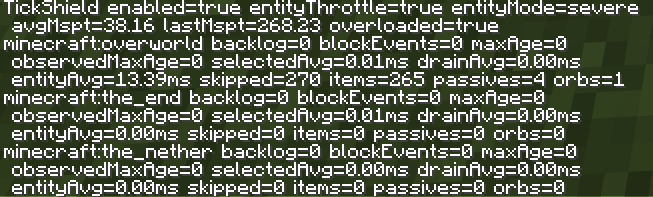
About this Mod


TickShield
TickShield is a lightweight performance mod focused on stabilizing Minecraft under heavy load.
Instead of changing game mechanics or simplifying behavior, TickShield controls how work is processed per tick to prevent sudden lag spikes and TPS drops.
What it does
TickShield monitors server tick load in real time and keeps it within a safe range.
When the game is about to overload a tick, TickShield safely delays non-critical work across multiple ticks while preserving vanilla outcomes.
This results in smoother gameplay, fewer freezes, and more consistent performance.
Key features
- Prevents lag spikes from TNT chains, mob farms, and redstone systems
- Stabilizes TPS under heavy load
- Distributes workload across ticks instead of overloading a single tick
- Preserves vanilla mechanics and behavior
- Works in singleplayer, LAN, and dedicated servers
- No configuration required
Design philosophy
TickShield does not change what happens in the game.
It only changes when work is processed to keep performance stable.
Optimize the workload, not the outcome.
Compatibility
TickShield is designed to work alongside major optimization mods such as Sodium, Lithium, and Starlight.
It does not replace them and focuses on a different layer of performance: tick stability.
Notes
- Server-side mod (also applies to singleplayer worlds)
- No gameplay changes
- No intrusive UI or settings required
Available Versions
How to Install TickShield on Your Server
Order Server
Order a Minecraft Java server with at least 3 GB RAM (4 GB recommended).
Set fabric Loader
In the panel under "Egg", select the fabric loader and matching Minecraft version (1.21.11).
Install Mod
Open the mod browser in the dashboard and search for "TickShield". Click "Install" – done! Alternatively, upload the .jar via SFTP to the /mods folder.
Compatibility
Mod Loaders
Minecraft Versions
1.21.11
Server-side
✓ RequiredRecommended RAM
4 GB(min. 3 GB)Frequently Asked Questions
TickShield server crashes on startup – what to do?
Most common cause: wrong fabric version or insufficient RAM. Check the server log (latest.log) for "OutOfMemoryError" or "Mixin" errors. With Mado Hosting: ensure at least 3 GB RAM is allocated and the loader matches the mod version (1.21.11). You can switch loaders with one click in the panel.
Is TickShield compatible with fabric?
TickShield officially supports fabric for Minecraft 1.21.11. The Mado dashboard automatically detects incompatible loader combinations.
Server lagging with TickShield – how to optimize performance?
Recommended RAM: 4 GB (per 8 players). Use /spark profiler to check if TickShield consumes the most tick time. Common fixes: reduce server view-distance to 8-10, install "performant" or "starlight" as supplementary mods on Forge. With Mado Hosting, your server runs on NVMe SSDs with dedicated CPU cores for minimal latency.
Similar Mods




Rent Modded Server
Install TickShield with just one click on your server.