
Tileman
Locks players into tiles
Screenshots

About this Mod
Introducing Tileman!
Tileman is a mod that locks every player in their own specific area. This area can only be expanded by killing mobs and monsters.
Basic Concepts
Player when joining the world spawns in a 3x3 area for a start. At this time, when the player tries to leave the area it wil get pushed back away into the area.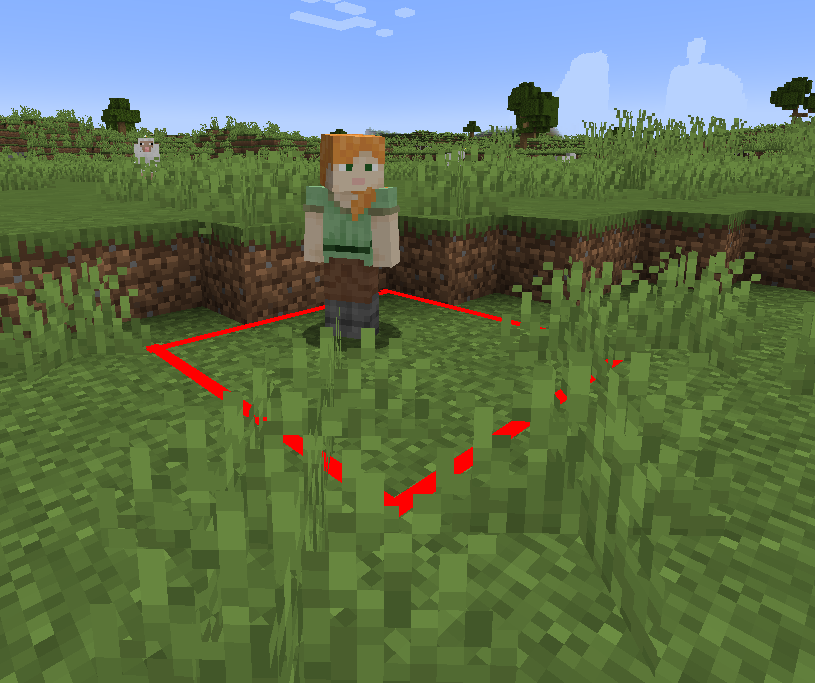
The player can start earning Available Tiles by killing mobs/monsters. After that the player can stand on a tile outside of the area to unlock it. The area will automatically expand like shown below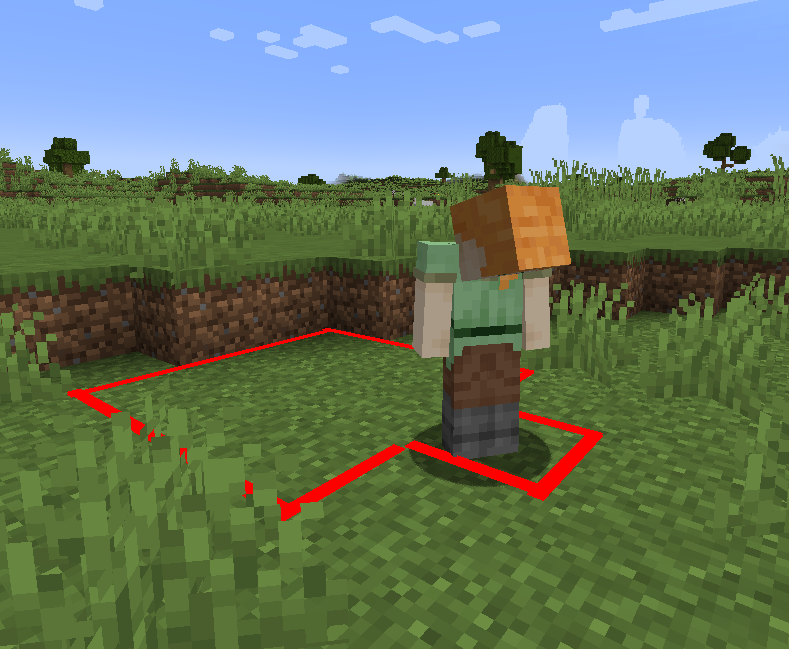
The mod also features a small side panel to keep track of how many tiles you have available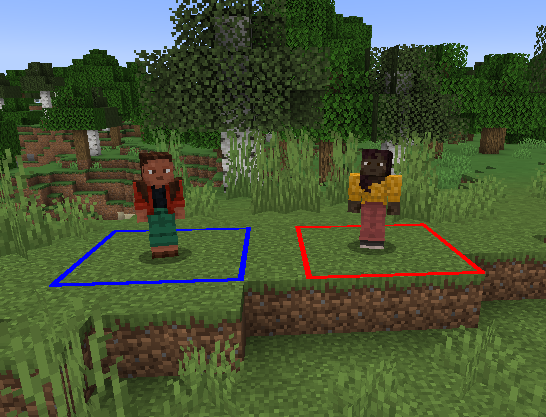
Other Players' tiles are blue, yours are red
Tileman also features a friending system which allows to connect areas and unlock tiles for a group
Have Fun!
P.S A lot of chickens were harmed in the creation of this mod
READ BEFORE PLAYING
there a some known bugs which could lead to you being stuck in the nether or end. Here's what to do to avoid this situation:
Make sure to only enter a nether portal that is on unlocked tiles (obsidian can be outside)
Make sure to only enter an end portal while having available tiles needed for the whole fight or just to get to the surface and kill endermen to get more
Detailed instructions will be posted to out discord. If you find any bugs please also join and let me know, I will fix them
https://discord.gg/hFtMfCWhgw
Available Versions
How to Install Tileman on Your Server
Order Server
Order a Minecraft Java server with at least 3 GB RAM (4 GB recommended).
Set fabric Loader
In the panel under "Egg", select the fabric loader and matching Minecraft version (1.21.4).
Install Mod
Open the mod browser in the dashboard and search for "Tileman". Click "Install" – done! Alternatively, upload the .jar via SFTP to the /mods folder.
Compatibility
Mod Loaders
Minecraft Versions
1.21.4, 1.21.1
Server-side
✓ RequiredRecommended RAM
4 GB(min. 3 GB)Frequently Asked Questions
Tileman server crashes on startup – what to do?
Most common cause: wrong fabric version or insufficient RAM. Check the server log (latest.log) for "OutOfMemoryError" or "Mixin" errors. With Mado Hosting: ensure at least 3 GB RAM is allocated and the loader matches the mod version (1.21.4). You can switch loaders with one click in the panel.
Is Tileman compatible with fabric and forge?
Tileman officially supports fabric, forge for Minecraft 1.21.4, 1.21.1. Note: Forge and Fabric mods are NOT cross-compatible – pick one loader and stick with it. The Mado dashboard automatically detects incompatible loader combinations.
Server lagging with Tileman – how to optimize performance?
Recommended RAM: 4 GB (per 8 players). Use /spark profiler to check if Tileman consumes the most tick time. Common fixes: reduce server view-distance to 8-10, install "performant" or "starlight" as supplementary mods on Forge. With Mado Hosting, your server runs on NVMe SSDs with dedicated CPU cores for minimal latency.
Similar Mods




Rent Modded Server
Install Tileman with just one click on your server.