
Timber Physics
Makes tress fall when chopped
Screenshots
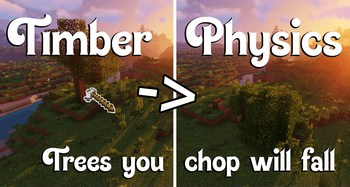
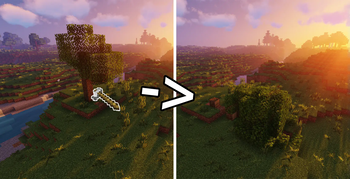
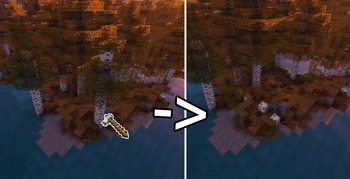
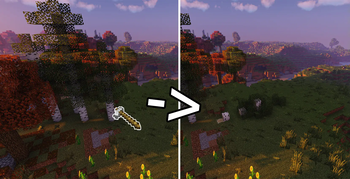
About this Mod
This pack adds Timber Physics!
If you chop a naturally spawned Tree with an Axe, it will fall over!
Compatible with Custom Trees from other Datapacks
If you want to chopp Nether Trees download this addon.
Customisation Options:
- To get into the options do /trigger physicstimber.help
- Choose whether sneaking should not trigger the Timber or if it should only trigger when sneaking. (Player specific)
- Choose the max Size a Tree can have for Timber to be triggered. (Admin only option, global)
If you are wielding an Axe with Silk Touch, Timber will not trigger.
Technical info:
This pack can be very taxing for Servers and Clients when big trees are chopped! Keep that in mind.
Max Tree size options explained:
Small: [up to 15 Logs and 100 Leaves]
all Vanilla Trees that are not large Trees
Medium: [up to 150 Logs and 400 Leaves]
all Vanilla Trees
Large: [up to 200 Logs and 800 Leaves] <- Default Option!
most Custom Trees
Absurd: [up to 600 Logs and 2500 Leaves]
basically anything that´s not really ridiculous
If a Tree is larger than the selected Max size, Timber wont trigger for it. (It will not fall over)
How a Tree is defined:
- Having 3+ Logs and at least 1 Leaf that is non persistent ([persistent=false]) connected to one of the Logs
- Each Log looks for connected Logs (also diagonal) so if there are Logs in your Tree that have a one Block distance to other Logs they are not considered to be part of the Tree!
Available Versions
How to Install Timber Physics on Your Server
Order Server
Order a Minecraft Java server with at least 3 GB RAM (4 GB recommended).
Set datapack Loader
In the panel under "Egg", select the datapack loader and matching Minecraft version (1.21.11).
Install Mod
Open the mod browser in the dashboard and search for "Timber Physics". Click "Install" – done! Alternatively, upload the .jar via SFTP to the /mods folder.
Compatibility
Mod Loaders
Minecraft Versions
1.21.11, 1.21.10, 1.21.9 (+9 more)
Server-side
✓ RequiredRecommended RAM
4 GB(min. 3 GB)Frequently Asked Questions
Timber Physics server crashes on startup – what to do?
Most common cause: wrong datapack version or insufficient RAM. Check the server log (latest.log) for "OutOfMemoryError" or "Mixin" errors. With Mado Hosting: ensure at least 3 GB RAM is allocated and the loader matches the mod version (1.21.11). You can switch loaders with one click in the panel.
Is Timber Physics compatible with datapack and fabric and forge and neoforge and quilt?
Timber Physics officially supports datapack, fabric, forge, neoforge, quilt for Minecraft 1.21.11, 1.21.10, 1.21.9. Note: Forge and Fabric mods are NOT cross-compatible – pick one loader and stick with it. The Mado dashboard automatically detects incompatible loader combinations.
Server lagging with Timber Physics – how to optimize performance?
Recommended RAM: 4 GB (per 8 players). Use /spark profiler to check if Timber Physics consumes the most tick time. Common fixes: reduce server view-distance to 8-10, install "performant" or "starlight" as supplementary mods on Forge. With Mado Hosting, your server runs on NVMe SSDs with dedicated CPU cores for minimal latency.
Similar Mods




Rent Modded Server
Install Timber Physics with just one click on your server.