
TinyFish Death Penalty
Adds a death countdown: players are frozen on death, then respawn with partial health—dying finally has a price.
Screenshots
About this Mod
Death Penalty — Make Death Matter Again
In Minecraft, enabling keepInventory protects your items but removes the consequence of death—often turning it into a free heal or a "fast travel" exploit back to base.
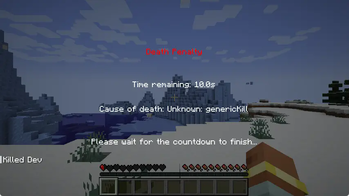
Death Penalty introduces an innovative balance mechanism: The Death Countdown.
When you die, you don't respawn immediately. Instead, you enter a mandatory "fake death" countdown. During this penalty period, you are immobilized and must wait for the timer to finish. More importantly, rebirth doesn't mean a full recovery—you respawn with a weakened body (customizable health/hunger), adding a real cost to every mistake.
This mod retains the convenience of keeping your inventory while ensuring that death still carries a meaningful price.
✨ Key Features
- ⏳ Death Countdown: Prevents players from using death as a quick teleport or instant heal.
- 👁️ Immersive Experience:
- Seamless Respawn: Skip the vanilla "You Died" screen entirely. Once the timer ends, you are instantly revived at your spawn point.
- Free Camera: Look around freely during the countdown (position remains locked) to observe your surroundings.
- HUD & Interaction Hiding: Automatically hides the vanilla HUD and blocks all interactions (inventory, blocks, items) during the penalty, leaving you to reflect on your demise.
- ❤️ Weakened State: Respawning isn't free. Configure the exact Health and Hunger you wake up with (supports fixed values like "10" or percentages like "50%").
- 💬 Fully Customizable:
- Message System: Rename damage types (e.g., "Fall" -> "Gravity Check") and define random death messages (e.g., "Hesitation is defeat"). Supports color codes and placeholders.
- Flexible Config: Adjust countdown duration, UI scaling, void death handling, and more.
Available Versions
How to Install TinyFish Death Penalty on Your Server
Order Server
Order a Minecraft Java server with at least 3 GB RAM (4 GB recommended).
Set forge Loader
In the panel under "Egg", select the forge loader and matching Minecraft version (1.20.1).
Install Mod
Open the mod browser in the dashboard and search for "TinyFish Death Penalty". Click "Install" – done! Alternatively, upload the .jar via SFTP to the /mods folder.
Compatibility
Mod Loaders
Minecraft Versions
1.20.1
Server-side
✓ RequiredRecommended RAM
4 GB(min. 3 GB)Frequently Asked Questions
TinyFish Death Penalty server crashes on startup – what to do?
Most common cause: wrong forge version or insufficient RAM. Check the server log (latest.log) for "OutOfMemoryError" or "Mixin" errors. With Mado Hosting: ensure at least 3 GB RAM is allocated and the loader matches the mod version (1.20.1). You can switch loaders with one click in the panel.
Is TinyFish Death Penalty compatible with forge?
TinyFish Death Penalty officially supports forge for Minecraft 1.20.1. The Mado dashboard automatically detects incompatible loader combinations.
Server lagging with TinyFish Death Penalty – how to optimize performance?
Recommended RAM: 4 GB (per 8 players). Use /spark profiler to check if TinyFish Death Penalty consumes the most tick time. Common fixes: reduce server view-distance to 8-10, install "performant" or "starlight" as supplementary mods on Forge. With Mado Hosting, your server runs on NVMe SSDs with dedicated CPU cores for minimal latency.
Similar Mods




Rent Modded Server
Install TinyFish Death Penalty with just one click on your server.