
Too Many Entities
Hide extra entities in order to reduce lag, especially with mob farms. The mobs still exist in the world, they are just not visible.
About this Mod
Description
This mod allows you to hide extra entities in order to reduce lag, especially with mob farms. The mobs still exist in the world, they are just not visible. In order to use the mod, you first have to configure a maximum entity limit (which can either be set per entity type, or globally). By default, this is set to 64. If the entity limit is set to 64 and it is applied globally, then the mod will prevent rendering more than 64 of one entity type at a time. You can also specify a limit for each entity type, for example a limit of 5 cows, meaning that at all times there will be no more than 5 cows rendered on screen. This is particularly useful for mob farms, where you can have up to hundreds of entities that aren't necessarily important to see, and hiding them can give a big increase in FPS depending on how many entities there were.
This mod requires Cloth Config to run, as well as Architectury API for versions of the mod past v1.0.1. For Fabric, this mod requires the Fabric API, and it is strongly recommended to install Mod Menu. This will allow you to modify the mod's configuration without having to restart the game. If Entity Culling is installed, there is an option you can toggle that will make the mod work with Entity Culling, for an extra boost in performance
If the mod isn't doing anything, make sure you have it configured properly. By default, the mod doesn't hide extra entities in order to avoid unexpected/confusion behavior. You can enable this by toggling the "Apply Max Entity Count Globally" setting, or tweaking the individual maximum entity counts in the "Entity" tab of the settings menu.
Performance
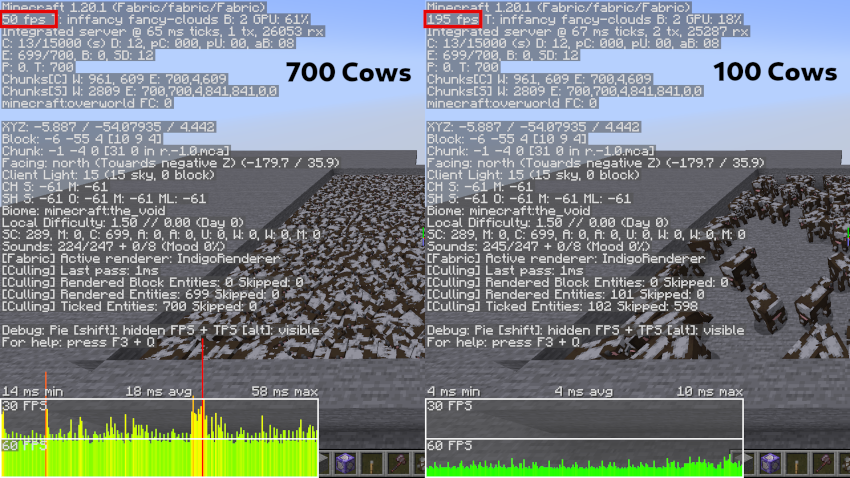
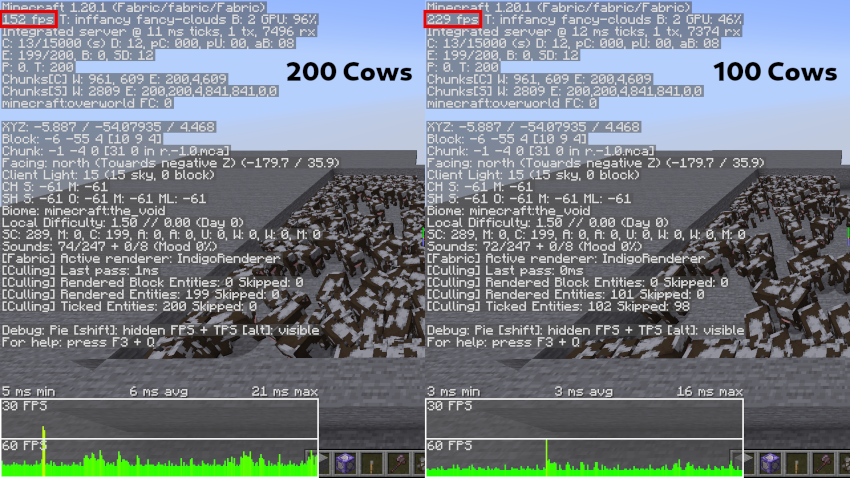
In order to test the efficiency of this mod, I summoned many cows and compared the FPS when using the mod to cap the number of cows to 100, and when the mod is disabled. On the left is when the mod is disabled, and on the right is when the number of cows is capped.
Available Versions
How to Install Too Many Entities on Your Server
Order Server
Order a Minecraft Java server with at least 3 GB RAM (4 GB recommended).
Set fabric Loader
In the panel under "Egg", select the fabric loader and matching Minecraft version (1.21.11).
Install Mod
Open the mod browser in the dashboard and search for "Too Many Entities". Click "Install" – done! Alternatively, upload the .jar via SFTP to the /mods folder.
Compatibility
Mod Loaders
Minecraft Versions
1.21.11, 1.21.10, 1.21.9 (+13 more)
Server-side
✗ UnsupportedRecommended RAM
4 GB(min. 3 GB)Frequently Asked Questions
Too Many Entities server crashes on startup – what to do?
Most common cause: wrong fabric version or insufficient RAM. Check the server log (latest.log) for "OutOfMemoryError" or "Mixin" errors. With Mado Hosting: ensure at least 3 GB RAM is allocated and the loader matches the mod version (1.21.11). You can switch loaders with one click in the panel.
Is Too Many Entities compatible with fabric and forge and neoforge?
Too Many Entities officially supports fabric, forge, neoforge for Minecraft 1.21.11, 1.21.10, 1.21.9. Note: Forge and Fabric mods are NOT cross-compatible – pick one loader and stick with it. The Mado dashboard automatically detects incompatible loader combinations.
Server lagging with Too Many Entities – how to optimize performance?
Recommended RAM: 4 GB (per 8 players). Use /spark profiler to check if Too Many Entities consumes the most tick time. Common fixes: reduce server view-distance to 8-10, install "performant" or "starlight" as supplementary mods on Forge. With Mado Hosting, your server runs on NVMe SSDs with dedicated CPU cores for minimal latency.
Similar Mods


Rent Modded Server
Install Too Many Entities with just one click on your server.