
Tooltips DLP8
A client-side mod that adds customizable tooltips to items with JSON configuration and color formatting support.
Screenshots
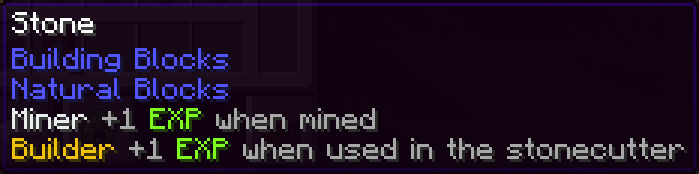
About this Mod
Tooltips DLP8
A simple client-side mod that adds customizable tooltips to Minecraft items. Uses resource packs for easy distribution and configuration!
Features
- Customizable tooltips with hex colors (#RRGGBB)
- Line break support (#n)
- Resource pack only - Distribute configurations easily
- Multiple resource pack support - Load tooltips from multiple packs
- JSONC configuration with comments
/tooltips reloadcommand to reload configuration- Predefined colors for CivLabs classes
- Automatic resource pack detection and loading
- Resource pack name display in commands
Configuration
Resource Pack Method
Create resource packs with tooltip configurations in assets/tooltips-dlp8/[your-filename].jsonc:
Important: Use different filenames (like civlabs.jsonc, my-server.jsonc, etc.) instead of tooltips.jsonc to avoid conflicts with the mod's built-in tooltips.
{
  // Example tooltips for CivLabs classes: You can add comments with // or /* */
  "minecraft:diamond_sword": "#e03e2dGuardsman's Weapon#n#resetA sharp blade forged by skilled hands",
  "minecraft:golden_apple": "#b96ad9Healer's Blessing#n#resetRestores health and grants temporary effects"
}
Multiple Resource Packs
The mod supports loading tooltips from multiple resource packs simultaneously. Tooltips from later packs will override earlier ones if they have the same item ID.
Color Codes
#RRGGBB- Hex color (e.g.,#ff0000for red)#reset- Reset to default tooltip color#n- New line
Specialization Experiment Classes Colors
#7e8c8d- Blacksmith (Gray)#f1c40f- Builder (Yellow)#2dc26b- Farmer (Green)#e03e2d- Guardsman (Red)#b96ad9- Healer (Purple)#3598db- Librarian (Blue)#ecf0f1- Miner (Light Gray)
See this resource pack for an example: SpEx Resource Pack
Commands
/tooltips reload- Reload configuration from resource packs and show loaded packs/tooltips help- Show help, current status, and loaded resource packs
The commands will display:
- Number of loaded tooltips
- Number of resource packs with tooltips
- Names of loaded resource packs
Perfect for roleplay servers, custom servers, or adding custom information to your items!
Available Versions
How to Install Tooltips DLP8 on Your Server
Order Server
Order a Minecraft Java server with at least 3 GB RAM (4 GB recommended).
Set fabric Loader
In the panel under "Egg", select the fabric loader and matching Minecraft version (1.21.8).
Install Mod
Open the mod browser in the dashboard and search for "Tooltips DLP8". Click "Install" – done! Alternatively, upload the .jar via SFTP to the /mods folder.
Compatibility
Mod Loaders
Minecraft Versions
1.21.8, 1.21.7, 1.21.6
Server-side
✗ UnsupportedRecommended RAM
4 GB(min. 3 GB)Frequently Asked Questions
Tooltips DLP8 server crashes on startup – what to do?
Most common cause: wrong fabric version or insufficient RAM. Check the server log (latest.log) for "OutOfMemoryError" or "Mixin" errors. With Mado Hosting: ensure at least 3 GB RAM is allocated and the loader matches the mod version (1.21.8). You can switch loaders with one click in the panel.
Is Tooltips DLP8 compatible with fabric?
Tooltips DLP8 officially supports fabric for Minecraft 1.21.8, 1.21.7, 1.21.6. The Mado dashboard automatically detects incompatible loader combinations.
Server lagging with Tooltips DLP8 – how to optimize performance?
Recommended RAM: 4 GB (per 8 players). Use /spark profiler to check if Tooltips DLP8 consumes the most tick time. Common fixes: reduce server view-distance to 8-10, install "performant" or "starlight" as supplementary mods on Forge. With Mado Hosting, your server runs on NVMe SSDs with dedicated CPU cores for minimal latency.
Similar Mods

![[ETF] Entity Texture Features](https://cdn.modrinth.com/data/BVzZfTc1/af683d206d50b05258d865b0d6e4aa2f2cee12f2_96.webp)
![[EMF] Entity Model Features](https://cdn.modrinth.com/data/4I1XuqiY/6e5bbd0d06b1741bfdab6c0cfab6de8fdaf0064c_96.webp)



Rent Modded Server
Install Tooltips DLP8 with just one click on your server.