
Top Down View
Play Minecraft from a top-down perspective inspired by ARPGs like Path of Exile 2 or Diablo.
Screenshots
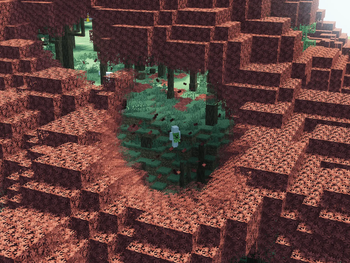


About this Mod
Top Down View lets you play Minecraft from a top-down perspective inspired by ARPGs like Path of Exile 2 or Diablo. Experience combat and exploration from a whole new angle.
Dependencies: Embeddium
Controls
- Toggle View: F4
- Rotate Camera: R (direction depends on cursor position)
- Left side ← Counter-clockwise
- Right side → Clockwise
- Bottom ↺ 180° flip
- Zoom: Left Alt + scroll wheel
- Free Camera Mode: Configure key in settings, hold to freely rotate camera, double-click to reset angles
Compatibility Notes
- Shaders: The fade feature is incompatible with most major shaders. Please disable the fade feature when using them together. (Note: Fade appears to work with MakeUp - Ultra Fast | Shaders.)
- Entity Culling: Causes entities and block entities to vanish.
- Sound Physics Remastered: Audio occlusion/reverb is calculated from the wrong position due to the detached camera.
- Epic Fight: Set
camera_mode = "ALWAYS_BACK"inconfig/epicfight-client.tomlto prevent camera conflicts. - Flerovium: Sounds become inaudible when zooming out due to its distant sound culling feature
Requirements
- Minecraft 1.20.1
- Forge 47.4.10+
- Embeddium
- Client-side only
Available Versions
How to Install Top Down View on Your Server
Order Server
Order a Minecraft Java server with at least 3 GB RAM (4 GB recommended).
Set forge Loader
In the panel under "Egg", select the forge loader and matching Minecraft version (1.20.6).
Install Mod
Open the mod browser in the dashboard and search for "Top Down View". Click "Install" – done! Alternatively, upload the .jar via SFTP to the /mods folder.
Compatibility
Mod Loaders
Minecraft Versions
1.20.6, 1.20.5, 1.20.4 (+3 more)
Server-side
✗ UnsupportedRecommended RAM
4 GB(min. 3 GB)Frequently Asked Questions
Top Down View server crashes on startup – what to do?
Most common cause: wrong forge version or insufficient RAM. Check the server log (latest.log) for "OutOfMemoryError" or "Mixin" errors. With Mado Hosting: ensure at least 3 GB RAM is allocated and the loader matches the mod version (1.20.6). You can switch loaders with one click in the panel.
Is Top Down View compatible with forge?
Top Down View officially supports forge for Minecraft 1.20.6, 1.20.5, 1.20.4. The Mado dashboard automatically detects incompatible loader combinations.
Server lagging with Top Down View – how to optimize performance?
Recommended RAM: 4 GB (per 8 players). Use /spark profiler to check if Top Down View consumes the most tick time. Common fixes: reduce server view-distance to 8-10, install "performant" or "starlight" as supplementary mods on Forge. With Mado Hosting, your server runs on NVMe SSDs with dedicated CPU cores for minimal latency.
Similar Mods




Rent Modded Server
Install Top Down View with just one click on your server.