
Torch Optimizer
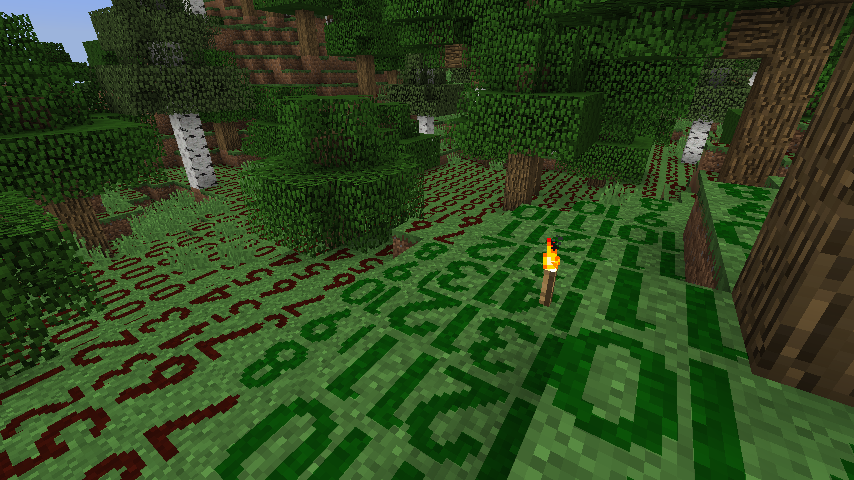
Allows you to visualize the intensity of light rendered as numbers on the top of blocks. There's a default optimal indicator for light placement set for torches. It can be adjusted for other light sources. Use the square brackets to control its position.
About this Mod


Screens
Description
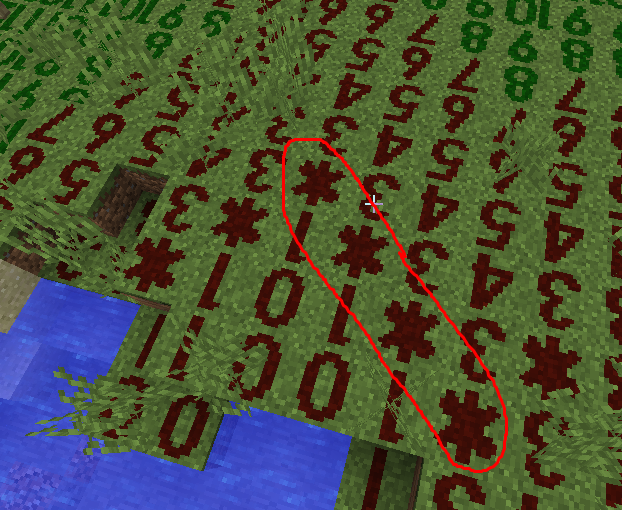
Torch Optimizer shows numbers on the ground to help you to place torches or other light sources for maximum mob spawning blockage.Instructions
The default shortcut key to turn on/off light level overlay is F7. You can change it in "Options -> Controls".
You can use Shift + F7 to toggle sky light calculation. Ctrl + F7 to toggle overlay display (1.12.2 & below)
Initial Version to 1.12.2-2.0.4
, (comma) to change the optimal torch position by plus one.
. (period) to change the optimal torch position by minus one.
[ (Left Bracket) to change the optimal torch position by plus one.
] (Right Bracket) to change the optimal torch position by minus one.
Features
If you enable optimizeEnable in the gui config you will get an asterisk placement on the ground at position number 2. However you can further change where the placement will be from 0 to 15.Licensing
A derivative work based on the mod by oldjunyi known as Light level Overlay Reloaded which is also MIT LICENSED.
Original License by 4poc at https://github.com/4poc/lloverlay/blob/master/resources/LICENSE included here for posterity.
The source code is available at: https://github.com/4poc/lloverlay
Light Level Overlay is licensed 3-clause BSD.
Copyright (c) 2012-2013, Matthias Hecker <[email protected]>
All rights reserved.
Redistribution and use in source and binary forms, with or without
modification, are permitted provided that the following conditions are met:
- Redistributions of source code must retain the above copyright
notice, this list of conditions and the following disclaimer. - Redistributions in binary form must reproduce the above copyright
notice, this list of conditions and the following disclaimer in the
documentation and/or other materials provided with the distribution. - Neither the name of the author nor the
names of the contributors may be used to endorse or promote products
derived from this software without specific prior written permission.
THIS SOFTWARE IS PROVIDED BY THE COPYRIGHT HOLDERS AND CONTRIBUTORS "AS IS" AND
ANY EXPRESS OR IMPLIED WARRANTIES, INCLUDING, BUT NOT LIMITED TO, THE IMPLIED
WARRANTIES OF MERCHANTABILITY AND FITNESS FOR A PARTICULAR PURPOSE ARE
DISCLAIMED. IN NO EVENT SHALL THE AUTHOR BE LIABLE FOR ANY
DIRECT, INDIRECT, INCIDENTAL, SPECIAL, EXEMPLARY, OR CONSEQUENTIAL DAMAGES
(INCLUDING, BUT NOT LIMITED TO, PROCUREMENT OF SUBSTITUTE GOODS OR SERVICES;
LOSS OF USE, DATA, OR PROFITS; OR BUSINESS INTERRUPTION) HOWEVER CAUSED AND
ON ANY THEORY OF LIABILITY, WHETHER IN CONTRACT, STRICT LIABILITY, OR TORT
(INCLUDING NEGLIGENCE OR OTHERWISE) ARISING IN ANY WAY OUT OF THE USE OF THIS
SOFTWARE, EVEN IF ADVISED OF THE POSSIBILITY OF SUCH DAMAGE.
Modpacks
Don't ask, just add. Link back appreciated but not required.Help a Veteran Today
I am a US Veteran. I am not disabled. However, I devote a lot of my time programming assets for your Minecraft experience. Any help you can spare is greatly appreciated at https://patreon.com/kreezxil
This project is proudly powered by FORGE, without whom it would not be possible. Help FORGE get rid of Adfocus at https://www.patreon.com/LexManos.
Available Versions
How to Install Torch Optimizer on Your Server
Order Server
Order a Minecraft Java server with at least 3 GB RAM (4 GB recommended).
Set forge Loader
In the panel under "Egg", select the forge loader and matching Minecraft version (1.17.1).
Install Mod
Open the mod browser in the dashboard and search for "Torch Optimizer". Click "Install" – done! Alternatively, upload the .jar via SFTP to the /mods folder.
Compatibility
Mod Loaders
Minecraft Versions
1.17.1, 1.16.5, 1.14.4 (+2 more)
Server-side
✗ UnsupportedRecommended RAM
4 GB(min. 3 GB)Frequently Asked Questions
Torch Optimizer server crashes on startup – what to do?
Most common cause: wrong forge version or insufficient RAM. Check the server log (latest.log) for "OutOfMemoryError" or "Mixin" errors. With Mado Hosting: ensure at least 3 GB RAM is allocated and the loader matches the mod version (1.17.1). You can switch loaders with one click in the panel.
Is Torch Optimizer compatible with forge?
Torch Optimizer officially supports forge for Minecraft 1.17.1, 1.16.5, 1.14.4. The Mado dashboard automatically detects incompatible loader combinations.
Server lagging with Torch Optimizer – how to optimize performance?
Recommended RAM: 4 GB (per 8 players). Use /spark profiler to check if Torch Optimizer consumes the most tick time. Common fixes: reduce server view-distance to 8-10, install "performant" or "starlight" as supplementary mods on Forge. With Mado Hosting, your server runs on NVMe SSDs with dedicated CPU cores for minimal latency.
Similar Mods




![[ETF] Entity Texture Features](https://cdn.modrinth.com/data/BVzZfTc1/af683d206d50b05258d865b0d6e4aa2f2cee12f2_96.webp)
![[EMF] Entity Model Features](https://cdn.modrinth.com/data/4I1XuqiY/6e5bbd0d06b1741bfdab6c0cfab6de8fdaf0064c_96.webp)
Rent Modded Server
Install Torch Optimizer with just one click on your server.