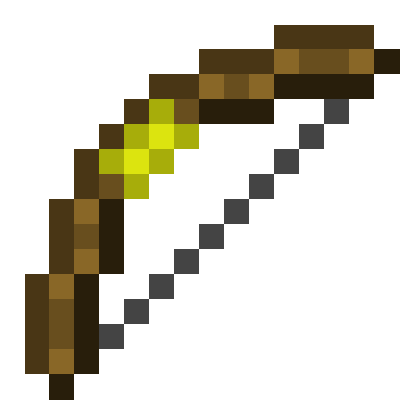
TorchBowMod
Can shoot torch!
Screenshots
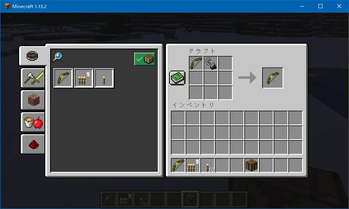
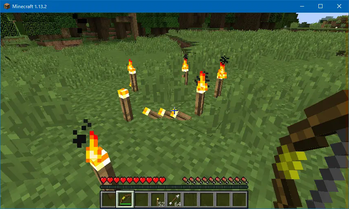
About this Mod
TorchBowMod
📢 Update Notice
- 2025/09/20
- Forge 1.21.5 support
- NeoForge, Fabric 1.21.5 ~ 1.21.7 support
- 2025/09/15
- Forge, NeoForge, Fabric 1.21.1 and 1.21.8 support
- 2025/02/23
- NeoForge 1.21.4: Added support for Ceiling Torch
- 2023/06/19
- Quilt 1.20.1 support
Note: When requesting addition of other mods compatibility or support for a new Minecraft version, please specify either Forge , NeoForge or Fabric.
📮 Contact Us
🌐 Community
🔥 What does this mod do?
This mod adds a bow that can shoot and set up torches.
🛠️ Recipes
- Torch Bow
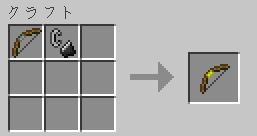
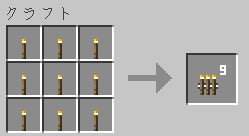
- Multi Torch
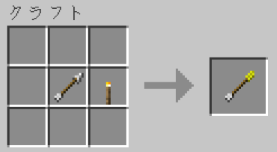
- Torch Arrow
🔧 How to repair
You can repair the TorchBow by using Flint and Steel on an anvil.
Available on Minecraft 1.14.x and higher only.
🎯 How to use
Requires Forge, NeoForge, Fabric, or Quilt.
Torch Bow
Consumes torches (or multi-torches) from your inventory and shoots them to place torches.
Multi Torch
Shoots and places nine torches at once.
Torch Arrow
Can be shot using a vanilla bow. Places torches on the ground.
Of course, it also works with the TorchBow.
🧩 Supported Mods
✅ Minecraft 1.21.1 and later
(only for TorchBowMod version 1.1.0 or higher)
TorchBowMod now automatically supports torch items whose blocks extend WallTorchBlock.
- Verified with the following mods:
- MoreTorchVariants (except Redstone Torch) — 1.21.4 [Fabric]
- Adorn (Stone Torch) — 1.21.1 [NeoForge/Fabric]
- More Beautiful Torches (except Redstone Torch) — 1.21.1 [Forge/NeoForge/Fabric]
- Colored Torches (all torches) — 1.21.4 [NeoForge]
In addition, for NeoForge builds, if Ceiling Torch is installed,
you can also place torches on the underside of blocks.
🕹️ Minecraft 1.7.10 ~ 1.16.2
Only the Forge version of TorchBowMod is compatible with these mods.
- StorageBox
- MoreInventoryMod
- Silent's Gems
- Torch Bandoiler
- Galacticraft
- Ceiling Torch
🌍 Language Support
- Japanese (日本語)
- English (英語)
- German (ドイツ語)
- Russian (ロシア語)
- Korean (韓国語)
- Chinese (繁体字)
📎 Other
- Twitter: 🍢🐟煮込みすぎたおでん🐟🍢 @noriokun4649
- Mail: noriokun.official.mail☆gmail.com (☆=@)
🎥 Video
Available Versions
How to Install TorchBowMod on Your Server
Order Server
Order a Minecraft Java server with at least 3 GB RAM (4 GB recommended).
Set fabric Loader
In the panel under "Egg", select the fabric loader and matching Minecraft version (26.1).
Install Mod
Open the mod browser in the dashboard and search for "TorchBowMod". Click "Install" – done! Alternatively, upload the .jar via SFTP to the /mods folder.
Compatibility
Mod Loaders
Minecraft Versions
26.1, 1.21.11, 1.21.8 (+12 more)
Server-side
✓ RequiredRecommended RAM
4 GB(min. 3 GB)Frequently Asked Questions
TorchBowMod server crashes on startup – what to do?
Most common cause: wrong fabric version or insufficient RAM. Check the server log (latest.log) for "OutOfMemoryError" or "Mixin" errors. With Mado Hosting: ensure at least 3 GB RAM is allocated and the loader matches the mod version (26.1). You can switch loaders with one click in the panel.
Is TorchBowMod compatible with fabric and forge and neoforge and quilt?
TorchBowMod officially supports fabric, forge, neoforge, quilt for Minecraft 26.1, 1.21.11, 1.21.8. Note: Forge and Fabric mods are NOT cross-compatible – pick one loader and stick with it. The Mado dashboard automatically detects incompatible loader combinations.
Server lagging with TorchBowMod – how to optimize performance?
Recommended RAM: 4 GB (per 8 players). Use /spark profiler to check if TorchBowMod consumes the most tick time. Common fixes: reduce server view-distance to 8-10, install "performant" or "starlight" as supplementary mods on Forge. With Mado Hosting, your server runs on NVMe SSDs with dedicated CPU cores for minimal latency.
Similar Mods




![[ETF] Entity Texture Features](https://cdn.modrinth.com/data/BVzZfTc1/af683d206d50b05258d865b0d6e4aa2f2cee12f2_96.webp)
![[EMF] Entity Model Features](https://cdn.modrinth.com/data/4I1XuqiY/6e5bbd0d06b1741bfdab6c0cfab6de8fdaf0064c_96.webp)
Rent Modded Server
Install TorchBowMod with just one click on your server.