Screenshots
About this Mod
Totem Display — Never Miss Your Safety Net!
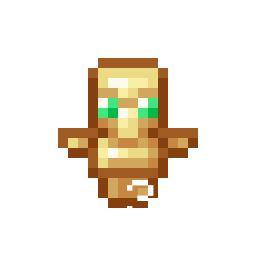
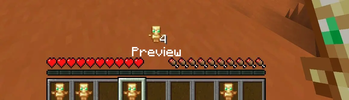
Totem Display is a lightweight, client-side cosmetic and utility mod for Fabric[cite: 1]. It adds a clean, customizable indicator to your heads-up display (HUD), showing you at a glance whether you have a Totem of Undying equipped or ready in your inventory[cite: 1].
No more opening your inventory mid-combat or panicking during intense PvP/PvE situations just to check if you are protected.
✨ Features
- Real-Time Totem Tracking: Displays a handy icon on your screen so you always know your survival status.
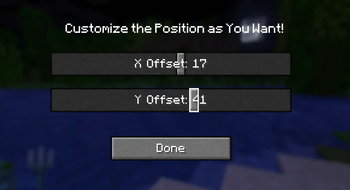
- Fully Configurable: Don't like where the icon is? The mod includes a built-in configuration screen to adjust the display to fit your personal UI preferences[cite: 1].
- Seamless Mod Menu Integration: Access the settings screen effortlessly directly from your in-game mod list[cite: 1].
- 100% Client-Side: This mod runs entirely on your client[cite: 1]. You can join any vanilla multiplayer server, Realms, or anarchy server without needing the mod installed on the server side.
🛠 Technical Specifications & Requirements
| Detail | Specification |
|---|---|
| Mod Loader | Fabric |
| Supported Game Versions | 1.21.4, 1.21.8, 1.21.11 |
| Environment | Client-side only |
| Required Mods | Fabric API |
| Optional Mods | Mod Menu (Highly recommended to access the in-game config screen)[cite: 1] |
💡 Why download Totem Display?
In Minecraft, a split second can mean the difference between keeping your hard-earned gear or losing everything. Totem Display gives you the peace of mind you need during raids, boss fights, or dangerous exploration by keeping your totem status visible at all times without cluttering your screen.
Available Versions
How to Install Totem Display on Your Server
Order Server
Order a Minecraft Java server with at least 3 GB RAM (4 GB recommended).
Set fabric Loader
In the panel under "Egg", select the fabric loader and matching Minecraft version (1.21.11).
Install Mod
Open the mod browser in the dashboard and search for "Totem Display". Click "Install" – done! Alternatively, upload the .jar via SFTP to the /mods folder.
Compatibility
Mod Loaders
Minecraft Versions
1.21.11, 1.21.8, 1.21.4
Server-side
✗ UnsupportedRecommended RAM
4 GB(min. 3 GB)Frequently Asked Questions
Totem Display server crashes on startup – what to do?
Most common cause: wrong fabric version or insufficient RAM. Check the server log (latest.log) for "OutOfMemoryError" or "Mixin" errors. With Mado Hosting: ensure at least 3 GB RAM is allocated and the loader matches the mod version (1.21.11). You can switch loaders with one click in the panel.
Is Totem Display compatible with fabric?
Totem Display officially supports fabric for Minecraft 1.21.11, 1.21.8, 1.21.4. The Mado dashboard automatically detects incompatible loader combinations.
Server lagging with Totem Display – how to optimize performance?
Recommended RAM: 4 GB (per 8 players). Use /spark profiler to check if Totem Display consumes the most tick time. Common fixes: reduce server view-distance to 8-10, install "performant" or "starlight" as supplementary mods on Forge. With Mado Hosting, your server runs on NVMe SSDs with dedicated CPU cores for minimal latency.
Similar Mods




![[ETF] Entity Texture Features](https://cdn.modrinth.com/data/BVzZfTc1/af683d206d50b05258d865b0d6e4aa2f2cee12f2_96.webp)
![[EMF] Entity Model Features](https://cdn.modrinth.com/data/4I1XuqiY/6e5bbd0d06b1741bfdab6c0cfab6de8fdaf0064c_96.webp)
Rent Modded Server
Install Totem Display with just one click on your server.