
Totem Optimizer
anti ghost (prevents ghosting by sending extra updates), Client side visually instant toteming, Fixes totem flicker.
Screenshots
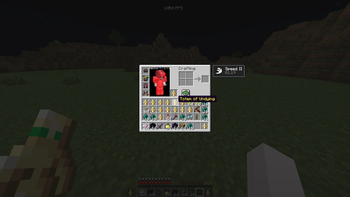

About this Mod
Totem Optimizer


Adds anti ghost by adding more inventory updates and for things to react quicker visually as well as reduced flicker client side.
When moving a totem into your mainhand or offhand, Minecraft can sometimes visually desync, flicker, or show the wrong slot state for a moment when inventory updates are being corrected.
Totem Optimizer helps reduce that by forcing extra inventory reupdates on the client, which helps prevent ghosting and keeps the shown inventory state corrected faster.
Works across 1.21 - 1.21.11 in the same jar (1.21.X)
Also supports 26.1 - 26.1.2 with the 26.1.X version.
Requires:
What it does
Totem Optimizer sends extra inventory updates so your client refreshes the shown slot state faster. (Exact way anti ghost does it, though not the same code it works pretty much the same so it should be allowed on mctiers.)
This helps when retoteming into your mainhand or offhand and the item visually flickers, ghosts, or looks delayed for a moment.
The server still controls the real inventory. This mod does not give any real advantage other than reducing ghosting, and does not change how totems actually work.
It only helps the client keep the inventory display updated faster.
There is also server opt out support, so servers can disable Totem Optimizer if they do not want players using it on their server.
This mod is client side, but if a server opts out then the optimizer will turn itself off there. just incase people want this but there should be no need to have it really.
if you want the opt out just make a ticket in the discord!
Available Versions
How to Install Totem Optimizer on Your Server
Order Server
Order a Minecraft Java server with at least 3 GB RAM (4 GB recommended).
Set fabric Loader
In the panel under "Egg", select the fabric loader and matching Minecraft version (26.1.2).
Install Mod
Open the mod browser in the dashboard and search for "Totem Optimizer". Click "Install" – done! Alternatively, upload the .jar via SFTP to the /mods folder.
Compatibility
Mod Loaders
Minecraft Versions
26.1.2, 26.1.1, 26.1 (+12 more)
Server-side
✗ UnsupportedRecommended RAM
4 GB(min. 3 GB)Frequently Asked Questions
Totem Optimizer server crashes on startup – what to do?
Most common cause: wrong fabric version or insufficient RAM. Check the server log (latest.log) for "OutOfMemoryError" or "Mixin" errors. With Mado Hosting: ensure at least 3 GB RAM is allocated and the loader matches the mod version (26.1.2). You can switch loaders with one click in the panel.
Is Totem Optimizer compatible with fabric?
Totem Optimizer officially supports fabric for Minecraft 26.1.2, 26.1.1, 26.1. The Mado dashboard automatically detects incompatible loader combinations.
Server lagging with Totem Optimizer – how to optimize performance?
Recommended RAM: 4 GB (per 8 players). Use /spark profiler to check if Totem Optimizer consumes the most tick time. Common fixes: reduce server view-distance to 8-10, install "performant" or "starlight" as supplementary mods on Forge. With Mado Hosting, your server runs on NVMe SSDs with dedicated CPU cores for minimal latency.
Similar Mods

![[ETF] Entity Texture Features](https://cdn.modrinth.com/data/BVzZfTc1/af683d206d50b05258d865b0d6e4aa2f2cee12f2_96.webp)
![[EMF] Entity Model Features](https://cdn.modrinth.com/data/4I1XuqiY/6e5bbd0d06b1741bfdab6c0cfab6de8fdaf0064c_96.webp)



Rent Modded Server
Install Totem Optimizer with just one click on your server.