
TPS HUD TickPulse
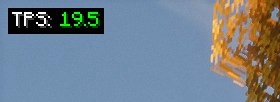
Lightweight client‑side NeoForge overlay for live TPS and MSPT. No server install and no custom packets. Safe on any server.
Screenshots

About this Mod
TPS HUD (TickPulse)
See tick health at a glance. A super-lightweight client-side overlay for TPS and MSPT on NeoForge.
No server install. No custom packets. Just local math.

Highlights
- Live TPS and MSPT overlay (top-left by default)
- Client-only: join any server without them installing this mod
- Zero network impact: no handshake channels, no custom payloads
- Stable readout via world-time sampling with a short smoothing window (client-tick fallback)
- Tidy, always-on Detail layout (labels + values)
- Tiny footprint (low CPU and memory)
Config & keybinds
- Open in-game config: Mods → TPS HUD → Config
- Tweak the HUD: anchor, padding, scale, precision, format (TPS / MSPT / BOTH), smoothing, color thresholds
- Buttons: Apply (save without closing), Preview (overlay-only view), Reset (defaults), Done/Cancel
- Keybinds (rebindable): F7 = Toggle HUD, F8 = Reload config
Why use it?
- The vanilla debug screen doesn’t show TPS or MSPT
- Players and server owners can spot lag quickly (entity spikes, heavy bases, farms)
- Works in single-player, LAN, and public servers
Compatibility
- Minecraft: 1.21.1
- Loader: NeoForge 21.1.213
- Plays nicely with performance mods (Sodium, ModernFix, etc.)
Quick Start
- Install NeoForge 1.21.1
- Drop
tpshudneoforge-<version>.jarinto yourmodsfolder - Launch the game, the overlay appears once ticks start
FAQ
Is this server-side?
No. It is client-side only.
Does it send packets or open channels?
No. It passively reads timing and estimates locally.
Why do I see TPS: -- at first?
The sampler has no data yet. Move around or wait a moment.
Why doesn’t TPS ever show above 20?
For clarity the display is capped at 20.00 (internally we still track the true rate for coloring and logic).
Why does the HUD disappear when I press F3?
Enable/disable Auto-hide on F3 in the config.
Where is “Compact” mode?
Removed for simplicity. The default Detail layout is clearer and consistent.
Can I edit the config file directly?
Use the in-game config whenever possible. Editing the JSON is optional if the game isn’t running.
Credits
- Inspired by the Fabric mod
tpshud-fabricby mooziii - NeoForge port and re-implementation by Zivalez
Available Versions
How to Install TPS HUD TickPulse on Your Server
Order Server
Order a Minecraft Java server with at least 3 GB RAM (4 GB recommended).
Set neoforge Loader
In the panel under "Egg", select the neoforge loader and matching Minecraft version (1.21.1).
Install Mod
Open the mod browser in the dashboard and search for "TPS HUD TickPulse". Click "Install" – done! Alternatively, upload the .jar via SFTP to the /mods folder.
Compatibility
Mod Loaders
Minecraft Versions
1.21.1
Server-side
✗ UnsupportedRecommended RAM
4 GB(min. 3 GB)Frequently Asked Questions
TPS HUD TickPulse server crashes on startup – what to do?
Most common cause: wrong neoforge version or insufficient RAM. Check the server log (latest.log) for "OutOfMemoryError" or "Mixin" errors. With Mado Hosting: ensure at least 3 GB RAM is allocated and the loader matches the mod version (1.21.1). You can switch loaders with one click in the panel.
Is TPS HUD TickPulse compatible with neoforge?
TPS HUD TickPulse officially supports neoforge for Minecraft 1.21.1. The Mado dashboard automatically detects incompatible loader combinations.
Server lagging with TPS HUD TickPulse – how to optimize performance?
Recommended RAM: 4 GB (per 8 players). Use /spark profiler to check if TPS HUD TickPulse consumes the most tick time. Common fixes: reduce server view-distance to 8-10, install "performant" or "starlight" as supplementary mods on Forge. With Mado Hosting, your server runs on NVMe SSDs with dedicated CPU cores for minimal latency.
Similar Mods




![[ETF] Entity Texture Features](https://cdn.modrinth.com/data/BVzZfTc1/af683d206d50b05258d865b0d6e4aa2f2cee12f2_96.webp)
![[EMF] Entity Model Features](https://cdn.modrinth.com/data/4I1XuqiY/6e5bbd0d06b1741bfdab6c0cfab6de8fdaf0064c_96.webp)
Rent Modded Server
Install TPS HUD TickPulse with just one click on your server.