TrackerOfKills
Live zombie kill statistics on a movable HUD overlay for tracking.
Screenshots
About this Mod
TrackerOfKills - Zombie Kill Tracker HUD
TrackerOfKills is a lightweight mod that tracks zombie kills with a movable HUD overlay, displaying real-time kill rates.
🌟 Core Features
📊 Real-Time Kill Statistics Display
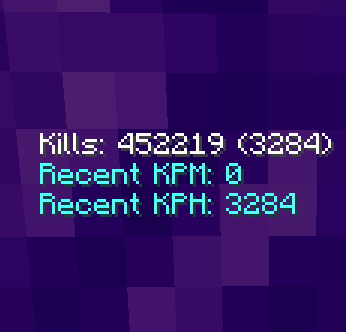
- Total Kill Counter: Shows your all-time zombie kill count from Minecraft's built-in statistics system
- Session Tracking: Displays kills accumulated since joining the current world/server session (shown in parentheses)
- KPM (Kills Per Minute): Calculates your zombie kill rate over the last 60 seconds
- KPH (Kills Per Hour): Calculates your zombie kill rate over the past 60 minutes
- Visual Feedback: The overlay highlights with a yellow border when being dragged
- Toggle Overlay Position Mode: C key opens the positioning interface
- Reset Position: J key instantly resets overlay to default location
- Persistent Configuration: All settings are automatically saved to
config/trackerofkills.json - Cross-Session Memory: Remembers your preferred overlay position between gaming sessions
- Sliding Window Analysis: Kill rates are calculated using a rolling time window for accuracy
- Specialized Targeting: Specifically tracks zombie kills
- Statistics Integration: Leverages Minecraft's native statistics system for accuracy
- Responsive Interface: Smooth dragging mechanics with real-time visual feedback
If the server you play on is using MythicMobs plugin this mod will most likely work for your use case only if the MythicMobs are actually a zombie.
I got the inspiration to make this mod from a server I play on called DungeonCraft.
If you want to check it out the ip is DungeonCraft.co.
Available Versions
How to Install TrackerOfKills on Your Server
Order Server
Order a Minecraft Java server with at least 3 GB RAM (4 GB recommended).
Set fabric Loader
In the panel under "Egg", select the fabric loader and matching Minecraft version (1.21.8).
Install Mod
Open the mod browser in the dashboard and search for "TrackerOfKills". Click "Install" – done! Alternatively, upload the .jar via SFTP to the /mods folder.
Compatibility
Mod Loaders
Minecraft Versions
1.21.8, 1.21.4
Server-side
✗ UnsupportedRecommended RAM
4 GB(min. 3 GB)Frequently Asked Questions
TrackerOfKills server crashes on startup – what to do?
Most common cause: wrong fabric version or insufficient RAM. Check the server log (latest.log) for "OutOfMemoryError" or "Mixin" errors. With Mado Hosting: ensure at least 3 GB RAM is allocated and the loader matches the mod version (1.21.8). You can switch loaders with one click in the panel.
Is TrackerOfKills compatible with fabric?
TrackerOfKills officially supports fabric for Minecraft 1.21.8, 1.21.4. The Mado dashboard automatically detects incompatible loader combinations.
Server lagging with TrackerOfKills – how to optimize performance?
Recommended RAM: 4 GB (per 8 players). Use /spark profiler to check if TrackerOfKills consumes the most tick time. Common fixes: reduce server view-distance to 8-10, install "performant" or "starlight" as supplementary mods on Forge. With Mado Hosting, your server runs on NVMe SSDs with dedicated CPU cores for minimal latency.
Similar Mods




Rent Modded Server
Install TrackerOfKills with just one click on your server.