
Translator
Provides real-time translation for Minecraft, including chat messages, scoreboards, bossbars, titles, and tooltips, helping players enjoy maps and servers in different languages.
Screenshots
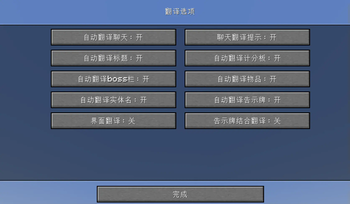
About this Mod
This mod serves as a translation tool within the game, designed to translate text found in various in-game elements without altering world data. It supports translating text in the chat window, scoreboard, bossbar, title, tooltip, and more.
Key Features
- Non-Intrusive Translation: Ensures that all functionalities do not modify the game world data.
- Hotkeys:
- Press U to open translation options.
- Press O to initiate screen recognition.
In-Game Commands
/transconfig: Configuration command for the translator, with subcommands:translator <Translator> [argument]: Choose between translation services. Some services may require initial configuration, with varying arguments based on the service chosen.language <from> <to>: Set the source and target languages for translation.clearcache: Clear the translation cache.
/translate <text>: Command to translate provided text./translate-re <text>: Reverse translation command, translating from the target language back to the source language.
Supported Translation Services
The mod comes equipped with integration for Baidu Translate and Youdao Translate. Users must obtain their own API keys from the respective platforms to use these services.
Available Versions
How to Install Translator on Your Server
Order Server
Order a Minecraft Java server with at least 3 GB RAM (4 GB recommended).
Set fabric Loader
In the panel under "Egg", select the fabric loader and matching Minecraft version (1.21.3).
Install Mod
Open the mod browser in the dashboard and search for "Translator". Click "Install" – done! Alternatively, upload the .jar via SFTP to the /mods folder.
Compatibility
Mod Loaders
Minecraft Versions
1.21.3, 1.21, 1.20.4 (+1 more)
Server-side
✗ UnsupportedRecommended RAM
4 GB(min. 3 GB)Frequently Asked Questions
Translator server crashes on startup – what to do?
Most common cause: wrong fabric version or insufficient RAM. Check the server log (latest.log) for "OutOfMemoryError" or "Mixin" errors. With Mado Hosting: ensure at least 3 GB RAM is allocated and the loader matches the mod version (1.21.3). You can switch loaders with one click in the panel.
Is Translator compatible with fabric?
Translator officially supports fabric for Minecraft 1.21.3, 1.21, 1.20.4. The Mado dashboard automatically detects incompatible loader combinations.
Server lagging with Translator – how to optimize performance?
Recommended RAM: 4 GB (per 8 players). Use /spark profiler to check if Translator consumes the most tick time. Common fixes: reduce server view-distance to 8-10, install "performant" or "starlight" as supplementary mods on Forge. With Mado Hosting, your server runs on NVMe SSDs with dedicated CPU cores for minimal latency.
Similar Mods




![[ETF] Entity Texture Features](https://cdn.modrinth.com/data/BVzZfTc1/af683d206d50b05258d865b0d6e4aa2f2cee12f2_96.webp)
![[EMF] Entity Model Features](https://cdn.modrinth.com/data/4I1XuqiY/6e5bbd0d06b1741bfdab6c0cfab6de8fdaf0064c_96.webp)
Rent Modded Server
Install Translator with just one click on your server.