Translator (NeoForge)
NeoForge 1.21.1 in-game translator — client-side chat & world text. 中文: GitHub README_zh-CN.md
Screenshots
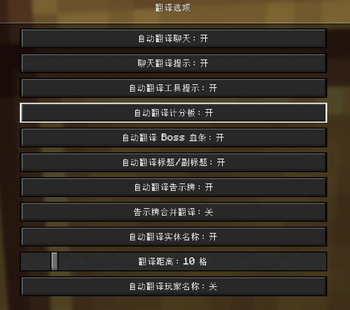
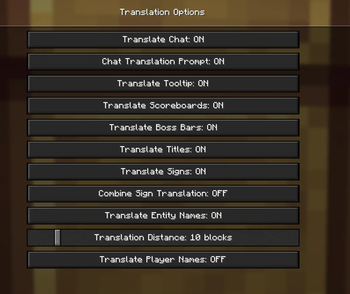
About this Mod
This mod serves as a translation tool within the game, designed to translate text found in various in-game elements without altering world data. It supports chat, scoreboards, boss bars, titles, tooltips, signs, TextDisplay floating text, books, and more.
Maintained by Gstar (GitHub) — NeoForge 1.21.1, developed with AI-assisted tooling (Cursor). Independent project; see CREDITS.md for design references.
Platform
| Loader | Minecraft | Notes |
|---|---|---|
| NeoForge | 1.21.1 | Requires Cloth Config (NeoForge 15.0.127+) |
Key features
- Non-intrusive translation — client-side only; does not modify the world.
- Hotkeys
- U — open translation options
- O — screen OCR (when the active translator supports images)
- In-game commands
/transconfig— configure translators, languages, cache, and API keys/translate <text>— translate text (result is copyable)/translate-re <text>— reverse translation
- Auto-translate — chat, tooltips, titles, scoreboard, boss bar, signs, entity names / TextDisplay, and more (toggle per feature in options)
Supported translation services
Configure your own API keys in-game (Cloth Config or commands):
- Baidu Translate
- Youdao Translate
- Tencent Cloud Machine Translation
- Bing Translate
- OpenAI-compatible LLM endpoints
Quick start
- Install NeoForge 21.1.216+, Cloth Config API (NeoForge 15.0.127+), and this mod.
- Configure Tencent Cloud (example):
/transconfig tencent <SecretId> <SecretKey> - Set languages:
/transconfig language "Auto" "Chinese (Simplified)" - Press U and enable the auto-translate options you need.
Full command reference: docs/INSTALL.md
Chinese documentation
Simplified Chinese guides are on GitHub (this Modrinth page is English-only):
Available Versions
How to Install Translator (NeoForge) on Your Server
Order Server
Order a Minecraft Java server with at least 3 GB RAM (4 GB recommended).
Set neoforge Loader
In the panel under "Egg", select the neoforge loader and matching Minecraft version (1.21.1).
Install Mod
Open the mod browser in the dashboard and search for "Translator (NeoForge)". Click "Install" – done! Alternatively, upload the .jar via SFTP to the /mods folder.
Compatibility
Mod Loaders
Minecraft Versions
1.21.1
Server-side
✗ UnsupportedRecommended RAM
4 GB(min. 3 GB)Frequently Asked Questions
Translator (NeoForge) server crashes on startup – what to do?
Most common cause: wrong neoforge version or insufficient RAM. Check the server log (latest.log) for "OutOfMemoryError" or "Mixin" errors. With Mado Hosting: ensure at least 3 GB RAM is allocated and the loader matches the mod version (1.21.1). You can switch loaders with one click in the panel.
Is Translator (NeoForge) compatible with neoforge?
Translator (NeoForge) officially supports neoforge for Minecraft 1.21.1. The Mado dashboard automatically detects incompatible loader combinations.
Server lagging with Translator (NeoForge) – how to optimize performance?
Recommended RAM: 4 GB (per 8 players). Use /spark profiler to check if Translator (NeoForge) consumes the most tick time. Common fixes: reduce server view-distance to 8-10, install "performant" or "starlight" as supplementary mods on Forge. With Mado Hosting, your server runs on NVMe SSDs with dedicated CPU cores for minimal latency.
Similar Mods




![[ETF] Entity Texture Features](https://cdn.modrinth.com/data/BVzZfTc1/af683d206d50b05258d865b0d6e4aa2f2cee12f2_96.webp)
![[EMF] Entity Model Features](https://cdn.modrinth.com/data/4I1XuqiY/6e5bbd0d06b1741bfdab6c0cfab6de8fdaf0064c_96.webp)
Rent Modded Server
Install Translator (NeoForge) with just one click on your server.