
Transplant SMP
Lifesteal SMP, but you can steal more than just hearts.
About this Mod
Transplant SMP (Fabric)
If Lifesteal SMP met Origins SMP
Requirements:
- Fabric Loader (>= 0.14.9)
- Fabric API (>= 0.62.0)
- Installation on both client and server, and both client and server must have the same version of the mod.
- Friends
Mod compatibility:
Not too bad (comes with AppleSkin compat), report any incompatibilities in the Issues tab and I'll look into it.
Usage:
The mod comes with a handful of QOL features (mainly Arm Transplant) and a crafting recipe for an Organ Item.
QOL Features:
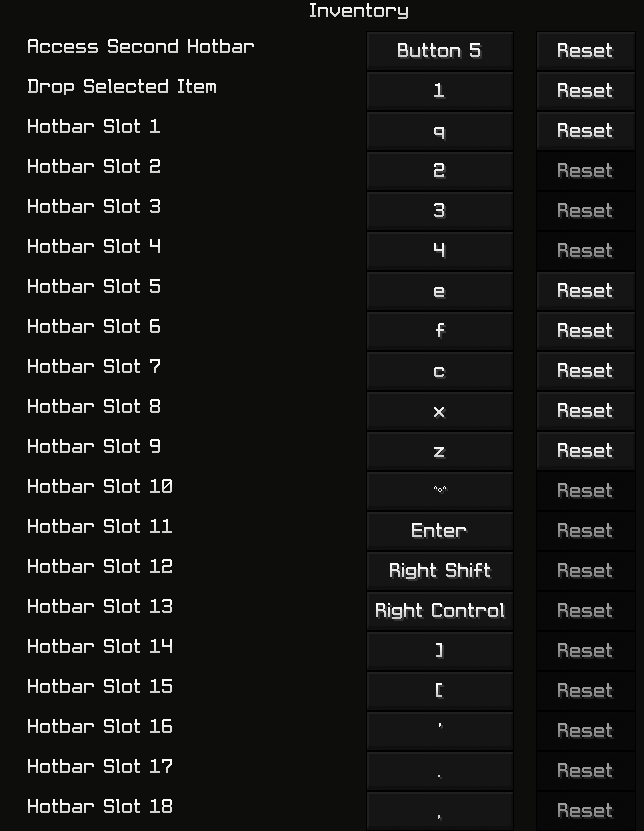
A few extra keybinds have been added as a QOL for Arm Transplant users. Hotbar slots 10 through 18 are for ease of access to any gained slots via a single-key hotkey. However, one can also use the "Access Second Hotbar" key and the hotkey for a 1 through 9 slot to access the corresponding 10 through 18 slot (1 -> 10, 2 -> 11, etc.)
Crafting:
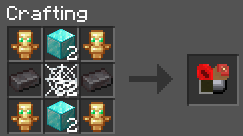
Requires:
4 Totems of Undying
4 Diamond Blocks
2 Netherite Ingots
32 Cobwebs
Transplants:
- Heart Transplant
- Arm Transplant
- Skin Transplant
- Stomach Transplant
Descriptions:
Heart Transplant:
Hearts.

Vanilla defaults: 10 Hearts max.
Transplant: Up to 20 Hearts.

You get more/less hearts. This is normal LifeSteal.
Arm Transplant:
Hotbar slots.

Vanilla defaults: 9 Hotbar slots.
Transplant: Up to 18 Hotbar slots.

If you have MORE slots, they will be added to the hotbar.
If you have LESS slots, they will be removed in the same order they were added.

If gamerule `armBalancing` is `true`, then you will also receive a small increase/decrease
(dep. on more/less slots respectively) in attack speed (not mining speed!) based on the number of slots you have.
Skin Transplant:
Armor bars.

Vanilla defaults: 10 bars max, one set of armor.
Transplant: Up to 20 bars.

You are able to equip 2 sets of armor at once.
(Enchantments from the second set have no effect).

If you have MORE than 10 bars, the extra armor bars will come into effect.
If you have LESS than 10 bars, then you will only feel the effect of that amount of armor bars.
(i.e. If you have full diamond and no 2nd set, and you have 9 bars of armor, the 10th armor bar from full diamond will have no effect.)
Stomach Transplant:
Hunger bars.

Vanilla defaults: 10 bars max, 20 saturation max, healing above 9 bars.
Transplant: Up to 20 bars, and up to 40 saturation max (scaling with bars), see below for healing.

If you have MORE than 10 bars, you will heal as long as you have above 9 (vanilla) bars.
If you have LESS than 10 bars, the minimum bars to heal with are scaled down accordingly.
Gamerules:
armBalancing(default:false) : If true, Arm Transplant users get an increase in attack speed (not mining speed). A decrease will occur if the player has lost slots.armBalanceAmount(default:0.1) : ifarmBalancingis true, this is the amount of attack speed increase/decrease PER gained/lost slot.noNetheriteSkinSecondary(default:false) : If true, Netherite armor will not be able to be used as a secondary set of armor for Skin Transplant users.
Why is it called Transplant SMP?
https://www.youtube.com/playlist?list=PL5biciXbHO_xIDkh_xhxcY0TBVdb-MJ9G
Available Versions
How to Install Transplant SMP on Your Server
Order Server
Order a Minecraft Java server with at least 3 GB RAM (4 GB recommended).
Set fabric Loader
In the panel under "Egg", select the fabric loader and matching Minecraft version (1.19.2).
Install Mod
Open the mod browser in the dashboard and search for "Transplant SMP". Click "Install" – done! Alternatively, upload the .jar via SFTP to the /mods folder.
Compatibility
Mod Loaders
Minecraft Versions
1.19.2
Server-side
✓ RequiredRecommended RAM
4 GB(min. 3 GB)Frequently Asked Questions
Transplant SMP server crashes on startup – what to do?
Most common cause: wrong fabric version or insufficient RAM. Check the server log (latest.log) for "OutOfMemoryError" or "Mixin" errors. With Mado Hosting: ensure at least 3 GB RAM is allocated and the loader matches the mod version (1.19.2). You can switch loaders with one click in the panel.
Is Transplant SMP compatible with fabric?
Transplant SMP officially supports fabric for Minecraft 1.19.2. The Mado dashboard automatically detects incompatible loader combinations.
Server lagging with Transplant SMP – how to optimize performance?
Recommended RAM: 4 GB (per 8 players). Use /spark profiler to check if Transplant SMP consumes the most tick time. Common fixes: reduce server view-distance to 8-10, install "performant" or "starlight" as supplementary mods on Forge. With Mado Hosting, your server runs on NVMe SSDs with dedicated CPU cores for minimal latency.
Similar Mods




Rent Modded Server
Install Transplant SMP with just one click on your server.