
Trims - Color Splash!
Expands the available materials used while trimming armor!
Screenshots
![All 39 trim colors [1.21.9+]](https://cdn.modrinth.com/data/H7TelaeD/images/19868786d2255a3bc182149767881b84105a16eb_350.webp)

![Trimmed copper armor [1.21.9+]](https://cdn.modrinth.com/data/H7TelaeD/images/5af9e6e2d477d91ebe091197a099f764b91a294d_350.webp)
![All 39 trim colors [1.20.x]](https://cdn.modrinth.com/data/H7TelaeD/images/0581ac5f754549da1b66221771535ea35f4859cc_350.webp)
![Rose Gold Alloy Recipe [1.21+]](https://cdn.modrinth.com/data/H7TelaeD/images/47b3305b3b396c489b89feddeeb18ca811c943f6.jpeg)
About this Mod
Trims - Color Splash!
Adds 29 trim materials that you can apply to your armor in the smithing table!
Heavily inspired by More Trim Colors by Skottify!

Please join the Discord if you have questions!
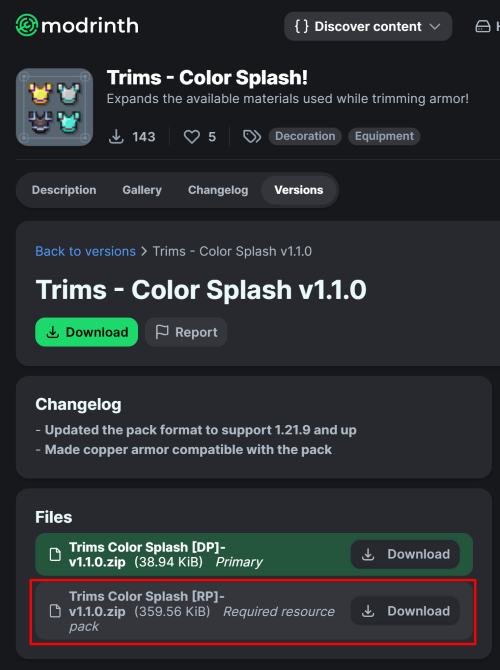
(When using the datapack version, please make sure you install the required resource pack as it is needed for it to function correctly!)
All new trim materials
1.21.4 and up
 Armadillo Scute
 Blaze Rod
 Blue Ice
 Breeze Rod
 Crying Obsidian
 Dragon Breath
 Dripstone Block
 Echo Shard
 End Crystal
 Ender Pearl
 Ghast Tear
 Glass (Removes trims)
 Glowstone Dust
 Heart Of The Sea
 Leather
 Magma Cream
 Nautilus Shell
 Nether Star
 Nether Wart
 Netherite Scrap
 Obsidian
 Phantom Membrane
 Prismarine Shard
 Prismarine Crystals
 Rabbit Hide
 Rose Gold
 Shulker Shell
 Slime Ball
 Turtle Scute
Older versions
- Armadillo Scute ->
 Brick (< 1.20.5)
 - Rose Gold ->
 Honey Block (< 1.21)
  Resin Brick ->
  Magma Block (< 1.21.4)
- Breeze Rod ->
 Pearlescent Froglight (< 1.21)
Rose Gold Recipe
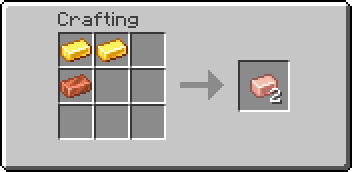
(Shapeless)
This data pack is compatible with:
Compatible Mods
-
Elytra Trims (KikuGie)
 - ( No item texture )
-
Alex's Caves (AlexModGuy)

-
Ancient Aether (Builderdog841)

-
Frostiful (TheDeathlyCow)

-
Geode+ (Team Chorus)

-
More Armor Trims (masik16u)

-
More Sniffer Flowers (Nikdo53)

-
TaTe's Extra Trims (AverageTaTeMan)

-
Too Many Trims (Herobrine011840)

-
Trims Expanded (Omniv)

FAQ:
Q: Why does the smithing table recipe have a red 'X' over it when I try to trim my armor?
A: First, drop the trim material on the ground, pick it up again, and try crafting. If the issue persists, restart your server. If neither of these steps resolves the problem, please report the issue in the Discord Server or on the github page.
Q: Why can't I place the materials in the smithing table?
A: If the issue continues after trying the fixes above, double-check that you have installed the datapack correctly. If you are certain the datapack is installed right, please report the issue in the Discord Server or on the github page.
Q: Why are none of the recipes working?
A: You might need to restart your world, server, or realm. The recipes should function correctly after the restart.
Q: I am seeing a missing texture when I try to use this. How can I fix it?
A: When using the datapack version, you must download and install the required resource pack.
Q: Where can I find and download the resource pack?
A: The main download button on Modrinth only provides the datapack, not the resource pack. You need to go to the "Versions" tab to find and download the resource pack file. (see img at the top of the page)
Special thanks to Lynx for help with generating files!
Available Versions
How to Install Trims - Color Splash! on Your Server
Order Server
Order a Minecraft Java server with at least 3 GB RAM (4 GB recommended).
Set datapack Loader
In the panel under "Egg", select the datapack loader and matching Minecraft version (26.1).
Install Mod
Open the mod browser in the dashboard and search for "Trims - Color Splash!". Click "Install" – done! Alternatively, upload the .jar via SFTP to the /mods folder.
Compatibility
Mod Loaders
Minecraft Versions
26.1, 1.21.11, 1.21.10 (+69 more)
Server-side
✓ RequiredRecommended RAM
4 GB(min. 3 GB)Frequently Asked Questions
Trims - Color Splash! server crashes on startup – what to do?
Most common cause: wrong datapack version or insufficient RAM. Check the server log (latest.log) for "OutOfMemoryError" or "Mixin" errors. With Mado Hosting: ensure at least 3 GB RAM is allocated and the loader matches the mod version (26.1). You can switch loaders with one click in the panel.
Is Trims - Color Splash! compatible with datapack and fabric and forge and neoforge and quilt?
Trims - Color Splash! officially supports datapack, fabric, forge, neoforge, quilt for Minecraft 26.1, 1.21.11, 1.21.10. Note: Forge and Fabric mods are NOT cross-compatible – pick one loader and stick with it. The Mado dashboard automatically detects incompatible loader combinations.
Server lagging with Trims - Color Splash! – how to optimize performance?
Recommended RAM: 4 GB (per 8 players). Use /spark profiler to check if Trims - Color Splash! consumes the most tick time. Common fixes: reduce server view-distance to 8-10, install "performant" or "starlight" as supplementary mods on Forge. With Mado Hosting, your server runs on NVMe SSDs with dedicated CPU cores for minimal latency.
Similar Mods

![[ETF] Entity Texture Features](https://cdn.modrinth.com/data/BVzZfTc1/af683d206d50b05258d865b0d6e4aa2f2cee12f2_96.webp)
![[EMF] Entity Model Features](https://cdn.modrinth.com/data/4I1XuqiY/6e5bbd0d06b1741bfdab6c0cfab6de8fdaf0064c_96.webp)



Rent Modded Server
Install Trims - Color Splash! with just one click on your server.