
TR PVP TierTagger
Tier tagger for Turkish PvP Tier List
About this Mod
🏷️ İstek sürümler için discord: ekky25
ᴇɴ English (Show / Hide)
TrTierListTagger is a GUI-based Minecraft mod that allows you to easily view players’ Tier (rank) tags.
You can see player tiers next to their names without dealing with complex commands.
This mod was developed specifically for the Turkish PvP Tier List Discord community, and it displays the tiers used on that server.
Discord: https://discord.gg/trtierlist
👨💻 Developers
⌨️ Commands
/trtiertagger→ Opens the TrTierTagger menu/trtiertagger <player>→ Opens a menu to view the specified player’s tiers
✨ Features
- 🖥️ Modern and user-friendly GUI
- 🏷️ Tier Tag system for players
- 🔍 Search players by name
- 👁️ View other players’ tier information
- ⚡ Fast and clean user experience
🧭 Tier Tagger GUI
You can customize and manage TierTagger settings through this menu.

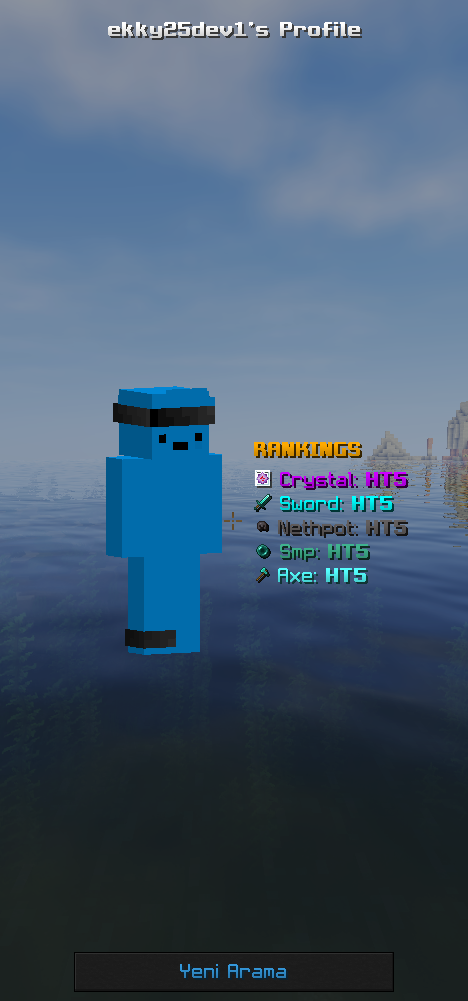
🏷️ Tier Tags
Different tier tags visually represent player skill levels in a clear and organized way.

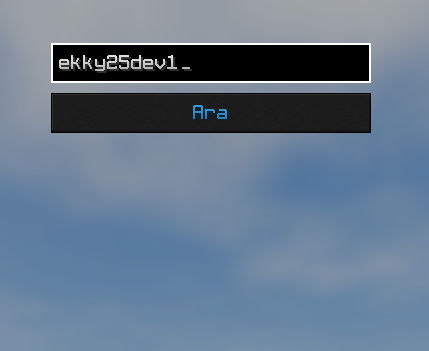
🔎 Search Screen
Search by player name to quickly access detailed tier information.
🇹🇷 Türkçe (Aç / Kapat)
TrTierListTagger, oyuncuların Tier (seviye) etiketlerini görebilmeniz için geliştirilmiş GUI tabanlı bir Minecraft modudur.
Komut karmaşası olmadan, oyuncuların tierlerini adlarının yanında görebilirsiniz.
Bu eklenti Türk PvP Tier List discord sunucusu için yapılmıştır ve bu sunucudaki tierler gözükmektedir
👨💻 Geliştiriciler
⌨️ Komutlar
/trtiertagger→ TrTierTagger menüsünü açar/trtiertagger <oyuncu>→ Belirtilen oyuncunun tierlerini görüntülemek için menüyü açar
✨ Özellikler
- 🖥️ Modern ve kullanıcı dostu GUI
- 🏷️ Oyuncular için Tier Tag sistemi
- 🔍 Oyuncu adına göre arama
- 👁️ Başka oyuncuların tierlerini görüntüleme
- ⚡ Hızlı ve sade kullanım
🧭 Tier Tagger GUI
TierTagger ayarlarını değiştirebilirsiniz.
🏷️ Taglar
Farklı tier etiketleri sayesinde oyuncuların seviyeleri görsel olarak net bir şekilde ayırt edilir.
🔎 Arama Ekranı
Oyuncu adına göre arama yaparak seçilen oyuncunun tier bilgilerine hızlıca ulaşabilirsiniz.
Available Versions
How to Install TR PVP TierTagger on Your Server
Order Server
Order a Minecraft Java server with at least 3 GB RAM (4 GB recommended).
Set fabric Loader
In the panel under "Egg", select the fabric loader and matching Minecraft version (26.1.2).
Install Mod
Open the mod browser in the dashboard and search for "TR PVP TierTagger". Click "Install" – done! Alternatively, upload the .jar via SFTP to the /mods folder.
Compatibility
Mod Loaders
Minecraft Versions
26.1.2, 26.1.1, 26.1 (+9 more)
Server-side
✗ UnsupportedRecommended RAM
4 GB(min. 3 GB)Frequently Asked Questions
TR PVP TierTagger server crashes on startup – what to do?
Most common cause: wrong fabric version or insufficient RAM. Check the server log (latest.log) for "OutOfMemoryError" or "Mixin" errors. With Mado Hosting: ensure at least 3 GB RAM is allocated and the loader matches the mod version (26.1.2). You can switch loaders with one click in the panel.
Is TR PVP TierTagger compatible with fabric?
TR PVP TierTagger officially supports fabric for Minecraft 26.1.2, 26.1.1, 26.1. The Mado dashboard automatically detects incompatible loader combinations.
Server lagging with TR PVP TierTagger – how to optimize performance?
Recommended RAM: 4 GB (per 8 players). Use /spark profiler to check if TR PVP TierTagger consumes the most tick time. Common fixes: reduce server view-distance to 8-10, install "performant" or "starlight" as supplementary mods on Forge. With Mado Hosting, your server runs on NVMe SSDs with dedicated CPU cores for minimal latency.
Similar Mods




Rent Modded Server
Install TR PVP TierTagger with just one click on your server.