
True Adaptive Music
Experience dynamic music that adapts to what happens in Minecraft!
Screenshots


About this Mod
Special thanks to Adstrum for creating the logo!
Supported non-English languages:
- Russian (Special thanks to ToyotaCorolled)
Demonstration Courtesy of Icebergen538!
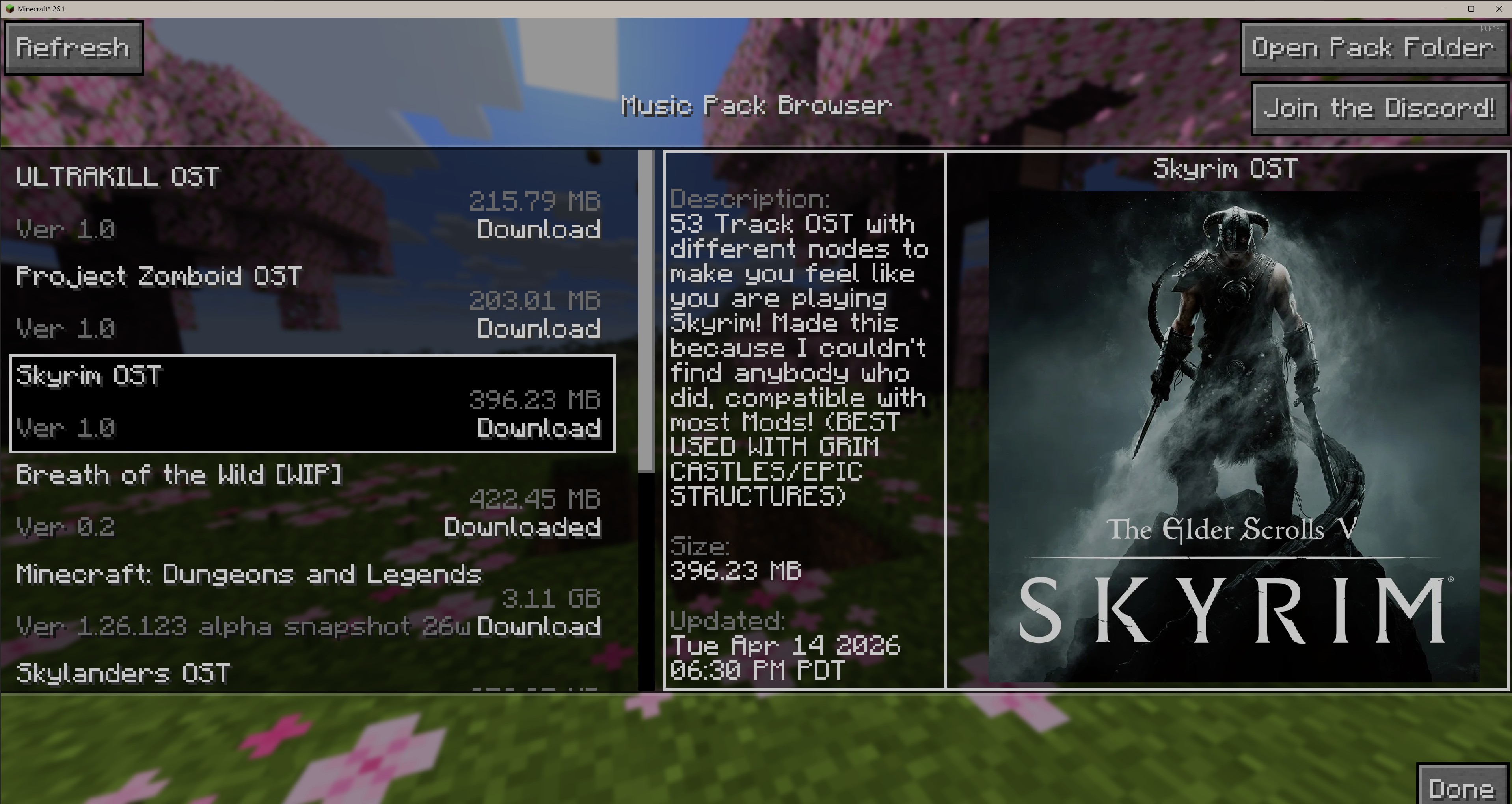
Download Community-Made Packs In-Game!
What is True Adaptive Music
True Adaptive Music introduces Music Packs. Like Resource Packs, Music Packs allow users to create a new environment for players to experience when they are playing Minecraft. Music Packs include special logic that allows them to control what music plays when.
For example:
Imagine wandering around, and some calm music is playing. Then suddenly a mob approaches you, and combat music seamlessly kicks in! You defeat the mob and the music returns back to normal. You then find a village and as you approach the music fades into another track.
What's so great about MusicPacks is that they are infinitely customizable. Want specific music to play in a biome? Check. How about specific combat music for every biome? Check! Epic boss fight music with the Ender Dragon? Well, no you can't do that sadly...
Just kidding, check!
Another great thing is that True Adaptive Music is made to be compatible with other mods, for example mods that add bosses or biomes or structures or dimensions or whatever!
Oh and one more thing, you can play ANY MUSIC you want. When making a music pack you can choose to add music from vanilla minecraft, as well as any other music added by any mods you have loaded, as well as any old audio files you happen across.
To access music packs all you have to do is go to the sound options menu and scroll to the very bottom. Once you click the True Adaptive Music button, you can open your pack folder to throw in any packs you have, select or edit any existing packs in your folder, or create a pack of your own all within the Minecraft client!
So anyway, go give it a try! This is my first ever minecraft mod and took a lot of learning so please comment with any bugs or feature requests. Also share any music packs you make in the discord above!
You can also follow development and submit formal bug/feature requests here!
https://github.com/LilTOJustice/TrueAdaptiveMusic
Available Versions
How to Install True Adaptive Music on Your Server
Order Server
Order a Minecraft Java server with at least 3 GB RAM (4 GB recommended).
Set fabric Loader
In the panel under "Egg", select the fabric loader and matching Minecraft version (26.1.2).
Install Mod
Open the mod browser in the dashboard and search for "True Adaptive Music". Click "Install" – done! Alternatively, upload the .jar via SFTP to the /mods folder.
Compatibility
Mod Loaders
Minecraft Versions
26.1.2, 26.1.1, 26.1 (+20 more)
Server-side
~ OptionalRecommended RAM
4 GB(min. 3 GB)Frequently Asked Questions
True Adaptive Music server crashes on startup – what to do?
Most common cause: wrong fabric version or insufficient RAM. Check the server log (latest.log) for "OutOfMemoryError" or "Mixin" errors. With Mado Hosting: ensure at least 3 GB RAM is allocated and the loader matches the mod version (26.1.2). You can switch loaders with one click in the panel.
Is True Adaptive Music compatible with fabric and forge?
True Adaptive Music officially supports fabric, forge for Minecraft 26.1.2, 26.1.1, 26.1. Note: Forge and Fabric mods are NOT cross-compatible – pick one loader and stick with it. The Mado dashboard automatically detects incompatible loader combinations.
Server lagging with True Adaptive Music – how to optimize performance?
Recommended RAM: 4 GB (per 8 players). Use /spark profiler to check if True Adaptive Music consumes the most tick time. Common fixes: reduce server view-distance to 8-10, install "performant" or "starlight" as supplementary mods on Forge. With Mado Hosting, your server runs on NVMe SSDs with dedicated CPU cores for minimal latency.
Similar Mods




![[ETF] Entity Texture Features](https://cdn.modrinth.com/data/BVzZfTc1/af683d206d50b05258d865b0d6e4aa2f2cee12f2_96.webp)
![[EMF] Entity Model Features](https://cdn.modrinth.com/data/4I1XuqiY/6e5bbd0d06b1741bfdab6c0cfab6de8fdaf0064c_96.webp)
Rent Modded Server
Install True Adaptive Music with just one click on your server.