
tse
TSE is a mod for Hypixel Skyblock that plays custom Sounds after a set amount of seconds in specific areas of the game once you right click an specific item it also add a Final Destination Helper So you Remember To Sneak There is also a Chattriggers part
Screenshots
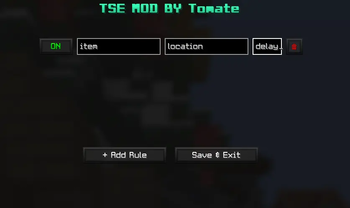
About this Mod
TSE (Tomate's Sound Effects)
TSE is a highly versatile utility mod designed to provide customizable auditory cues based on in-game items, locations, and chat events. Originally developed as a personal reminder for Hyperion cooldowns, it has evolved into a robust and feature-rich tool for tracking ability timings, boss mechanics, and much more.
Key Features
Dynamic Sound Cues: Triggers a sound effect after a user-defined delay to ensure you never miss a rotation or ability window. A built-in Timer displays exactly when the sound will fire, and a Screen Title is shown at the moment of triggering for clear visual feedback.
Flexible Matching System: The advanced detection engine allows for partial name matching; inputting a single keyword from an item's name is sufficient to trigger the rule. Optionally enable Exact Match Only for precise control.
Context-Aware Filters:
Global Execution: Leave the "Location" field blank to trigger sounds across all areas.
Universal Item Tracking: Leave the "Item" name blank to receive alerts for any item used within a specified location.
Only Toggle on Sneak: Restrict rule activation to only fire while sneaking.
Server/System Message Filter: Choose to detect only server or system messages when using chat-based triggers.
Chat Trigger Support: Use /tse chattriggers to trigger sounds automatically after detecting a specified chat message, with support for exact match mode and server/system message filtering.
Final Destination Helper: Dedicated assistance for Final Destination mechanics to keep you prepared during critical moments.
Extensive Sound Customization:
Choose from an expanded library of default sounds or import your own via Custom Sound Support.
Switch between sounds on the fly, preview them before committing, and manage your audio files directly with the Open Sounds Folder and Reload Sounds buttons.
Fine-tune audio levels with a Volume Slider ranging from 0–200%.
Intuitive Configuration: Manage all your active rules through a clean, in-game interface. Access the configuration menu instantly using the command /tse.
Keybind Support for quick access without typing a command.
Categories to keep your rules organized.
Pin Rules to keep your most important rules always at the top.
Search Bar to instantly find any rule, plus a dedicated Sound Search Bar to quickly locate the right audio.
Scroll Support for managing large numbers of rules without clutter.
Undo Button that saves your last 20 deletions, so accidental removals are never permanent.
Close Warning to prevent accidentally discarding unsaved changes.
Info Text throughout the UI to guide you at every step.
Compatibility: Fully supported on Minecraft 1.21.11
Whether you are optimizing your Hypixel SkyBlock clears or managing complex ability rotations, TSE provides the precise, customizable audio feedback necessary for high-level gameplay.
Note: To ensure your changes are applied, remember to click Save & Exit after modifying your rules in the GUI.
Available Versions
How to Install tse on Your Server
Order Server
Order a Minecraft Java server with at least 3 GB RAM (4 GB recommended).
Set fabric Loader
In the panel under "Egg", select the fabric loader and matching Minecraft version (1.21.11).
Install Mod
Open the mod browser in the dashboard and search for "tse". Click "Install" – done! Alternatively, upload the .jar via SFTP to the /mods folder.
Compatibility
Mod Loaders
Minecraft Versions
1.21.11
Server-side
✗ UnsupportedRecommended RAM
4 GB(min. 3 GB)Frequently Asked Questions
tse server crashes on startup – what to do?
Most common cause: wrong fabric version or insufficient RAM. Check the server log (latest.log) for "OutOfMemoryError" or "Mixin" errors. With Mado Hosting: ensure at least 3 GB RAM is allocated and the loader matches the mod version (1.21.11). You can switch loaders with one click in the panel.
Is tse compatible with fabric?
tse officially supports fabric for Minecraft 1.21.11. The Mado dashboard automatically detects incompatible loader combinations.
Server lagging with tse – how to optimize performance?
Recommended RAM: 4 GB (per 8 players). Use /spark profiler to check if tse consumes the most tick time. Common fixes: reduce server view-distance to 8-10, install "performant" or "starlight" as supplementary mods on Forge. With Mado Hosting, your server runs on NVMe SSDs with dedicated CPU cores for minimal latency.
Similar Mods




Rent Modded Server
Install tse with just one click on your server.