
TSOTİ
Takes a clean, professional screenshot of your inventory.
Screenshots
About this Mod
📸 Take Screenshot Of The Inventory (TSOTI)
An inventory capture utility designed for sharing clean layout screenshots.
Developed by Markesr
🔍 What is TSOTI?
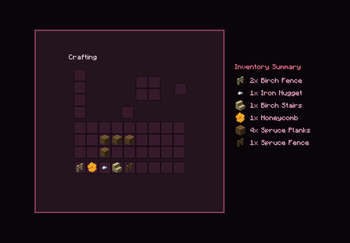
Take Screenshot Of The Inventory (TSOTI) is a utility mod that allows you to take cropped screenshots of your in-game inventory. Instead of manually cropping full-screen screenshots, TSOTI isolates the inventory interface and exports it as a framed image. It is designed for showcasing gear, sharing loadouts, or keeping track of storage content.
⚡ Key Functionality & Performance
- GUI Capture: Hooks into the game's GUI rendering to capture the inventory frame directly when the hotkey is pressed.
- Automated Cropping: Trims outer screen space to focus precisely on the inventory slots.
- Inventory Summary Option: Generates a categorized text list of your items alongside the image file to show item counts clearly.
🛠️ Available Features
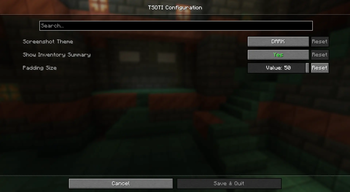
- GUI Color Themes: Customize the background style of your exported screenshots. Available options include: Dark, Midnight Blue, Cherry Blossom, Gold, Matrix, Light, or Transparent (for external editing).
- Adjustable Padding: Modify the inner and outer padding borders of the screenshot via the config menu to change the crop size.
- Language Support: Utilizes Minecraft's native
I18nengine to support English, Turkish, German, Spanish, French, Portuguese (BR), and Polish. - Configuration Menu: Change themes, padding size, and toggle the text summary on the fly using the in-game config screen.
📥 Dependencies
To use this mod, please ensure you have the following installed:
- Fabric API
- Cloth Config API
- ModMenu (Required to access the in-game settings menu)
Available Versions
How to Install TSOTİ on Your Server
Order Server
Order a Minecraft Java server with at least 3 GB RAM (4 GB recommended).
Set fabric Loader
In the panel under "Egg", select the fabric loader and matching Minecraft version (1.21.11).
Install Mod
Open the mod browser in the dashboard and search for "TSOTİ". Click "Install" – done! Alternatively, upload the .jar via SFTP to the /mods folder.
Compatibility
Mod Loaders
Minecraft Versions
1.21.11, 1.21.10, 1.21.9 (+9 more)
Server-side
✗ UnsupportedRecommended RAM
4 GB(min. 3 GB)Frequently Asked Questions
TSOTİ server crashes on startup – what to do?
Most common cause: wrong fabric version or insufficient RAM. Check the server log (latest.log) for "OutOfMemoryError" or "Mixin" errors. With Mado Hosting: ensure at least 3 GB RAM is allocated and the loader matches the mod version (1.21.11). You can switch loaders with one click in the panel.
Is TSOTİ compatible with fabric?
TSOTİ officially supports fabric for Minecraft 1.21.11, 1.21.10, 1.21.9. The Mado dashboard automatically detects incompatible loader combinations.
Server lagging with TSOTİ – how to optimize performance?
Recommended RAM: 4 GB (per 8 players). Use /spark profiler to check if TSOTİ consumes the most tick time. Common fixes: reduce server view-distance to 8-10, install "performant" or "starlight" as supplementary mods on Forge. With Mado Hosting, your server runs on NVMe SSDs with dedicated CPU cores for minimal latency.
Similar Mods




Rent Modded Server
Install TSOTİ with just one click on your server.