
Tubarcev's Anomalies For Tubakerta
Mod adds a couple of anomalies and Radiation zones and Psi effects from Stalker
Screenshots
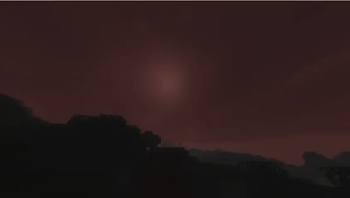
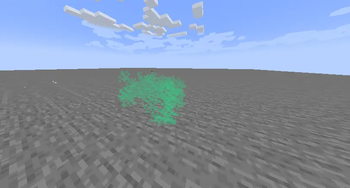
About this Mod
⚠️ IMPORTANT: This project is currently in early Alpha development. Many features are still being worked on, mechanics are subject to changeю.
Overview This mod brings the harsh, unforgiving environment of the S.T.A.L.K.E.R. universe into Minecraft. It introduces anomaly, immersive visual effects.
Current Features (Early Build) Even in this early stage, the core technical foundation and several mechanics are implemented:
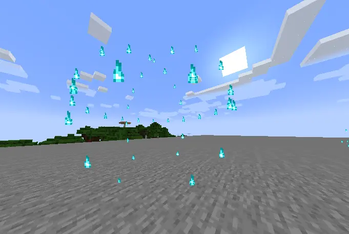
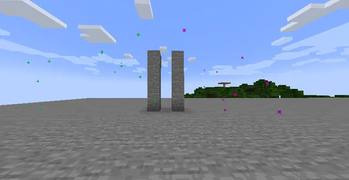
Anomalies: Encounter classic anomalies in the world, currently including Burner (Жарка), Electra (Электра), and Gas (Газировка).
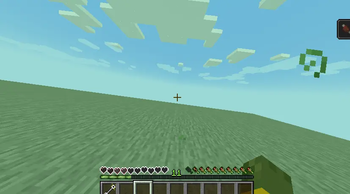
Radiation & Psi-Emissions. Entering irradiated or Psi-zones applies custom visual screen effects to the player and affects gameplay.
Management Tools: Includes a specialized remote control panel item for interacting with or managing the mod's systems.
Custom Client Rendering: The mod features a modular structure with a dedicated client-side system specifically built for rendering anomaly particles, precise damage zones, and immersive screen distortions.
In future:
Protective gear (gas masks, scientific suits) to counter radiation and Psi-emissions.
Integration of and bolts for safe navigation.
Shader Compatibility (Ejection Mechanics)
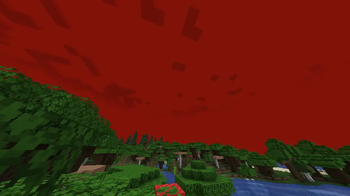
Atmospheric Emission mechanics were implemented with smooth transitions of sky and fog colors. In a vanilla game (without shaders), everything works automatically.
If you play with shaders (Sodium + Iris):
The shaders completely overlap the vanilla rendering of the sky. To make the Ejection look cinematic and the sky turn red, you need to add a special interceptor code to your shaderpack. So far, only Sildur's Vibrant Shaders:
How to adapt the shader:
- Open the shaderpacks folder in the game directory.
- Open the archive of your shader ('Sildurs Vibrant Shaders v1.56.zip`: https://www.curseforge.com/minecraft/shaders/sildurs-vibrant-shaders) just like a regular folder.
- Follow the path
shaders/and find the file `final.fsh'. - Open it in any convenient text editor (Notepad++ is recommended).
- Replace the code inside with this one: https://gist.github.com/Light-Tubar/db551516c33e92899e3b6f710d897a55
- Save the changes to the
final' file.fshand confirm the archive update. - In the game, press the
Rkey to reset the shaders.
Available Versions
How to Install Tubarcev's Anomalies For Tubakerta on Your Server
Order Server
Order a Minecraft Java server with at least 3 GB RAM (4 GB recommended).
Set fabric Loader
In the panel under "Egg", select the fabric loader and matching Minecraft version (1.21.11).
Install Mod
Open the mod browser in the dashboard and search for "Tubarcev's Anomalies For Tubakerta". Click "Install" – done! Alternatively, upload the .jar via SFTP to the /mods folder.
Compatibility
Mod Loaders
Minecraft Versions
1.21.11, 1.21.10, 1.21.1
Server-side
✓ RequiredRecommended RAM
4 GB(min. 3 GB)Frequently Asked Questions
Tubarcev's Anomalies For Tubakerta server crashes on startup – what to do?
Most common cause: wrong fabric version or insufficient RAM. Check the server log (latest.log) for "OutOfMemoryError" or "Mixin" errors. With Mado Hosting: ensure at least 3 GB RAM is allocated and the loader matches the mod version (1.21.11). You can switch loaders with one click in the panel.
Is Tubarcev's Anomalies For Tubakerta compatible with fabric?
Tubarcev's Anomalies For Tubakerta officially supports fabric for Minecraft 1.21.11, 1.21.10, 1.21.1. The Mado dashboard automatically detects incompatible loader combinations.
Server lagging with Tubarcev's Anomalies For Tubakerta – how to optimize performance?
Recommended RAM: 4 GB (per 8 players). Use /spark profiler to check if Tubarcev's Anomalies For Tubakerta consumes the most tick time. Common fixes: reduce server view-distance to 8-10, install "performant" or "starlight" as supplementary mods on Forge. With Mado Hosting, your server runs on NVMe SSDs with dedicated CPU cores for minimal latency.
Similar Mods




Rent Modded Server
Install Tubarcev's Anomalies For Tubakerta with just one click on your server.