
twdclient
Advanced customizable HUD client for Minecraft 1.20.1 (Fabric) — monitor FPS, ping, coordinates, armor, CPS, and more!
Screenshots
About this Mod
🧭 TWD Client
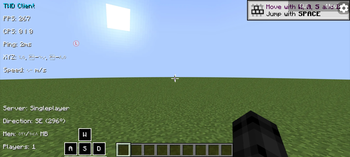
TWD Client is an advanced Fabric mod for Minecraft 1.20.1 that adds a fully customizable HUD packed with useful information and tools for players who want a clean, performance-oriented interface.
✨ Features
📊 Performance Info
FPS Counter – Display your frame rate in real-time
Ping & TPS – Track connection delay and server ticks
Memory Usage – Monitor system resource usage
🧍 Player Info
Coordinates (XYZ) – Always know your exact position
Speed & Combo – Measure your movement speed and hit streaks
Armor & Potions – View durability and active effects
Reach & CPS – Track hit distance and clicks per second
⚙️ Controls & Tools
Keystrokes – Show pressed keys (W, A, S, D, Space)
Crosshair Customizer – Personalize your aim reticle
Compass & Real Time – Display direction and local time
🌐 Server Info
Server IP & Player Count – Keep track of where you’re connected
🖱️ Usage
Install Fabric Loader 0.15.11+ and Fabric API 0.92.2+
Place the .jar file in your mods folder
Launch Minecraft
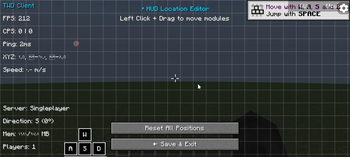
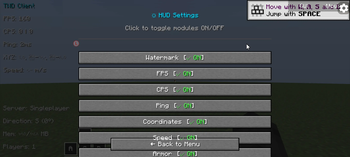
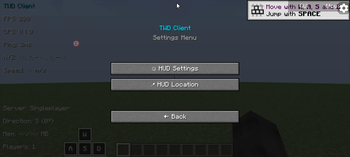
Press Right Shift to open the HUD customization menu
Drag and drop modules, right-click to toggle them, and personalize your layout however you like!
🧩 Requirements
Java 17+
Minecraft 1.20.1
Fabric Loader & API
📄 License
This project is licensed under the MIT License — feel free to use, modify, and share it.
❤️ Credits
demon
the discord for help
https://discord.gg/twd1
Available Versions
How to Install twdclient on Your Server
Order Server
Order a Minecraft Java server with at least 3 GB RAM (4 GB recommended).
Set fabric Loader
In the panel under "Egg", select the fabric loader and matching Minecraft version (1.20.1).
Install Mod
Open the mod browser in the dashboard and search for "twdclient". Click "Install" – done! Alternatively, upload the .jar via SFTP to the /mods folder.
Compatibility
Mod Loaders
Minecraft Versions
1.20.1
Server-side
✗ UnsupportedRecommended RAM
4 GB(min. 3 GB)Frequently Asked Questions
twdclient server crashes on startup – what to do?
Most common cause: wrong fabric version or insufficient RAM. Check the server log (latest.log) for "OutOfMemoryError" or "Mixin" errors. With Mado Hosting: ensure at least 3 GB RAM is allocated and the loader matches the mod version (1.20.1). You can switch loaders with one click in the panel.
Is twdclient compatible with fabric?
twdclient officially supports fabric for Minecraft 1.20.1. The Mado dashboard automatically detects incompatible loader combinations.
Server lagging with twdclient – how to optimize performance?
Recommended RAM: 4 GB (per 8 players). Use /spark profiler to check if twdclient consumes the most tick time. Common fixes: reduce server view-distance to 8-10, install "performant" or "starlight" as supplementary mods on Forge. With Mado Hosting, your server runs on NVMe SSDs with dedicated CPU cores for minimal latency.
Similar Mods




![[ETF] Entity Texture Features](https://cdn.modrinth.com/data/BVzZfTc1/af683d206d50b05258d865b0d6e4aa2f2cee12f2_96.webp)
![[EMF] Entity Model Features](https://cdn.modrinth.com/data/4I1XuqiY/6e5bbd0d06b1741bfdab6c0cfab6de8fdaf0064c_96.webp)
Rent Modded Server
Install twdclient with just one click on your server.