
TwinSession
TwinSession allows multiple connections from the same Minecraft account to a single server or world. Seamlessly manage multiple in-game tasks with different clients, all using one account, without disconnections or additional purchases.
Screenshots
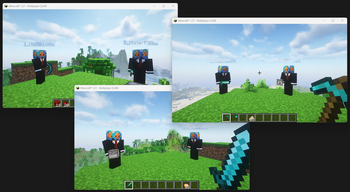
About this Mod
Goal
The Fabric TwinSession mod enables players to connect to a Minecraft server multiple times using the same account.
This functionality is particularly useful for those who want the advantages of multiple sessions,
such as managing different in-game tasks simultaneously, without needing to purchase additional Minecraft accounts.
When a player connects to the server with the same account for the second time, the mod automatically modifies the player’s username by
adding a numerical prefix followed by an underscore (e.g., "1_PlayerName").
Each additional session increments this number (e.g., "2_PlayerName", "3_PlayerName", etc.).
How to Use
Important note: You can either install this mod as server mod or as a client mod. When installed as a server mod, clients are not required to install this mod as well.
Multiplayer Servers
When installed on a server environment
- First Session: Join the server as usual with your Minecraft account.
- Second Session: Open another Minecraft client and join the same server with the same account. The mod will automatically modify your username (e.g., "1_PlayerName") to allow the connection.
- Additional Sessions: Repeat the process to join the server with more clients using the same account. Each additional session will receive a sequentially numbered username (e.g., "2_PlayerName", "3_PlayerName").
Singleplayer (LAN)
When installed on a client environment
- Set Up: Start your Minecraft world and select "Open to LAN" from the pause menu.
- Connecting: Follow the same process as in Multiplayer to connect with multiple clients using the same account.
This mod is ideal for players who wish to multitask effectively, such as managing in-game farms or automation, without the need for a separate Minecraft account.
Config
Configuration can be found under /config/twinsession.properties and contains the following settings:
| Property | Description | Type | Default value |
|---|---|---|---|
| maxPlayers | Max amount of re-joins per client. | int | 8 |
| autoWhitelist | Automatically whitelist if whitelist is enabled. | boolean | true |
| autoOp | Automatically op if original client is also op. | boolean | true |
| spawnNearPlayer | Spawn near the player, if false new players will join at world spawn. | boolean | true |
| spawnNearPlayerRadius | If spawnNearPlayer is enabled, this will set the radius on how close the player should spawn. | int | 10 |
| copyTexture | Copy the texture of the original player. | boolean | true |
| prefixWithNumber | Adds a $_ prefix to the username (Highly recommended to keep on true) |
boolean | true |
Reporting Issues
If you encounter any bugs or have suggestions for improvements, please create an issue on our GitHub repository. To create an issue:
- Go to the Issues tab of this repository.
- Click on "New Issue".
- Choose between "Bug report" or "Feature request" template.
- Fill out the template with as much detail as possible.
- Submit the issue.
Available Versions
How to Install TwinSession on Your Server
Order Server
Order a Minecraft Java server with at least 3 GB RAM (4 GB recommended).
Set fabric Loader
In the panel under "Egg", select the fabric loader and matching Minecraft version (26.1.2).
Install Mod
Open the mod browser in the dashboard and search for "TwinSession". Click "Install" – done! Alternatively, upload the .jar via SFTP to the /mods folder.
Compatibility
Mod Loaders
Minecraft Versions
26.1.2, 26.1.1, 26.1 (+19 more)
Server-side
✓ RequiredRecommended RAM
4 GB(min. 3 GB)Frequently Asked Questions
TwinSession server crashes on startup – what to do?
Most common cause: wrong fabric version or insufficient RAM. Check the server log (latest.log) for "OutOfMemoryError" or "Mixin" errors. With Mado Hosting: ensure at least 3 GB RAM is allocated and the loader matches the mod version (26.1.2). You can switch loaders with one click in the panel.
Is TwinSession compatible with fabric?
TwinSession officially supports fabric for Minecraft 26.1.2, 26.1.1, 26.1. The Mado dashboard automatically detects incompatible loader combinations.
Server lagging with TwinSession – how to optimize performance?
Recommended RAM: 4 GB (per 8 players). Use /spark profiler to check if TwinSession consumes the most tick time. Common fixes: reduce server view-distance to 8-10, install "performant" or "starlight" as supplementary mods on Forge. With Mado Hosting, your server runs on NVMe SSDs with dedicated CPU cores for minimal latency.
Similar Mods




![[ETF] Entity Texture Features](https://cdn.modrinth.com/data/BVzZfTc1/af683d206d50b05258d865b0d6e4aa2f2cee12f2_96.webp)
![[EMF] Entity Model Features](https://cdn.modrinth.com/data/4I1XuqiY/6e5bbd0d06b1741bfdab6c0cfab6de8fdaf0064c_96.webp)
Rent Modded Server
Install TwinSession with just one click on your server.