
About this Mod
txt2book
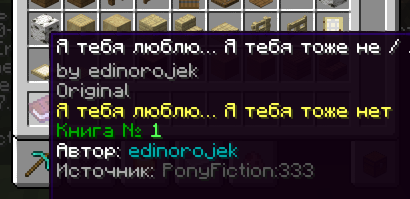
This mod allows you to import books or articles from supported websites and convert them into in-game Minecraft books.
Supported Websites:
- Telegraph (good)
- Ponyfiction (good)
- Ficbook (good with small texts)
- .docx documents (WIP)
You can set up a proxy in the config.
How to Use
To import a book, use the following command:
/txt2book <source> <workId> [signed]
Example:
/txt2book ponyfiction 333
This will import the story from ponyfiction.org/story/333 and give you a Minecraft book.
You can also specify whether the book should be signed (minecraft:written_book) or unsigned (minecraft:writable_book). By default, the book will be signed.
Examples:
/txt2book ponyfiction 333 true– Creates a signed book./txt2book ponyfiction 333 false– Creates an unsigned, writable book.
Finding workId:
- Ficbook:
ficbook.net/readfic/**10936980**→ Work ID is"10936980" - Ponyfiction:
ponyfiction.org/story/**220**→ Work ID is"220" - Telegraph:
telegra.ph/**Pikabu-Puls-August-2024-09-16**→ Work ID is"Pikabu-Puls-August-2024-09-16"
Admin Commands
/txt2book reload– Reloads the configuration./txt2book resetCache– Clears the book cache, allowing faster access to recently imported books.
Permissions
By default, all commands are restricted to server operators. You can adjust access using the permission system.
ru.pyxiion.txt2book– Permission to use the main command.ru.pyxiion.txt2book.ficbook– Permission to import books from Ficbook.ru.pyxiion.txt2book.ponyfictionru.pyxiion.txt2book.telegraphru.pyxiion.txt2book.docxru.pyxiion.txt2book.reload– Permission to reload the mod configuration.ru.pyxiion.txt2book.resetCache– Permission to reset the book cache.
Configuration
File: config/txt2book.toml
Parameters:
config_version— do not modify this value.lang— mod language. You can set "ru" or "en", or add your own language.maximum_file_size— maximum size for imported files.[characters],[characters.category],[characters.width]— system parameters.[langs.X]— messages for language X.
Language Support
The mod supports both English and Russian. You can select or add languages in the configuration file (txt2book.toml).
Some limitations
The mod does not support all possible letters. It filters them out if the mod doesn't know their size.
About docx importing
The first title in a document is considered the title of the book. All subsequent titles are chapter titles.
Plans
- Improve .docx importing
- Improve Ficbook importing
Let me know if you found a bug or have a suggestion, such as adding a new source.

Available Versions
How to Install txt2book on Your Server
Order Server
Order a Minecraft Java server with at least 3 GB RAM (4 GB recommended).
Set fabric Loader
In the panel under "Egg", select the fabric loader and matching Minecraft version (1.21.11).
Install Mod
Open the mod browser in the dashboard and search for "txt2book". Click "Install" – done! Alternatively, upload the .jar via SFTP to the /mods folder.
Compatibility
Mod Loaders
Minecraft Versions
1.21.11, 1.21.10, 1.21.9 (+9 more)
Server-side
✓ RequiredRecommended RAM
4 GB(min. 3 GB)Frequently Asked Questions
txt2book server crashes on startup – what to do?
Most common cause: wrong fabric version or insufficient RAM. Check the server log (latest.log) for "OutOfMemoryError" or "Mixin" errors. With Mado Hosting: ensure at least 3 GB RAM is allocated and the loader matches the mod version (1.21.11). You can switch loaders with one click in the panel.
Is txt2book compatible with fabric?
txt2book officially supports fabric for Minecraft 1.21.11, 1.21.10, 1.21.9. The Mado dashboard automatically detects incompatible loader combinations.
Server lagging with txt2book – how to optimize performance?
Recommended RAM: 4 GB (per 8 players). Use /spark profiler to check if txt2book consumes the most tick time. Common fixes: reduce server view-distance to 8-10, install "performant" or "starlight" as supplementary mods on Forge. With Mado Hosting, your server runs on NVMe SSDs with dedicated CPU cores for minimal latency.
Similar Mods




![[ETF] Entity Texture Features](https://cdn.modrinth.com/data/BVzZfTc1/af683d206d50b05258d865b0d6e4aa2f2cee12f2_96.webp)
![[EMF] Entity Model Features](https://cdn.modrinth.com/data/4I1XuqiY/6e5bbd0d06b1741bfdab6c0cfab6de8fdaf0064c_96.webp)
Rent Modded Server
Install txt2book with just one click on your server.