
Tyr's Fluid Void Stuff
A simple mod that changes how the edge of fluids renders in the void. Also can control how far said fluids fall.
Screenshots
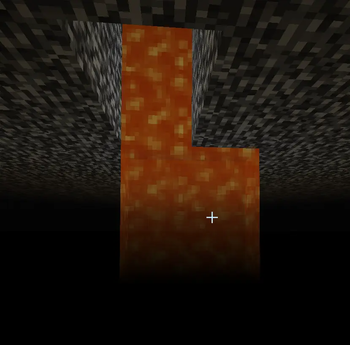

About this Mod
Tyr's Fluid Void Stuff
This mod is all about two things:
- Fade out fluids that do not end on a block so that they look pretty in void environments (Clientside, does not require mod on server)
- Limit how far a liquid can fall from its source block to prevent huge waterfalls (Serverside, does not require mod on client)
The client renderer is ported from FluidVoidFading (Neoforge 1.21.8) by DaFuqs under the GNU General Public License.
What it does
On the client, the bottom of any fluid column fades out smoothly rather than ending with a hard edge. Works on water, lava, and modded fluids. Sodium is supported.
On the server, you can set a maximum vertical drop for fluid columns. Once a column hits the limit, it stops spreading downward and leaves air below. The limit is measured as straight vertical distance from the source, so it works the same whether the fluid falls straight down or zig-zags down i.e. a staircase. Individual fluids can be exempted from this via a blacklist.
Neither side requires the other. See below.
The mod is optional on both ends of a connection (Server or Client)
| Setup | What happens |
|---|---|
| Client + Server | Full functionality with the fade renderer on the client and the column cap on the server. |
| Client only | Fade renderer works for columns that end in air naturally (e.g. in the void). No other functionality. |
| Server only | Vertical fluid limits only. Players without the mod just see normal fluid rendering, the liquid still stops, it just won't show the fade-out thingamabob. |
Config
Config file: config/tyrsfluidvoidstuff-server.toml.
| Option | Default | What it does |
|---|---|---|
maxFluidColumnLength |
0 |
Max vertical drop in blocks from the source. 0 = disabled. |
fluidColumnLengthBlacklist |
(empty) | Fluid IDs to skip the cap for, e.g. minecraft:water. |
If you have the mod on the client, the config is also reachable from the Mods screen in-game.
Credits
Available Versions
How to Install Tyr's Fluid Void Stuff on Your Server
Order Server
Order a Minecraft Java server with at least 4 GB RAM (6 GB recommended).
Set neoforge Loader
In the panel under "Egg", select the neoforge loader and matching Minecraft version (1.21.1).
Install Mod
Open the mod browser in the dashboard and search for "Tyr's Fluid Void Stuff". Click "Install" – done! Alternatively, upload the .jar via SFTP to the /mods folder.
Compatibility
Mod Loaders
Minecraft Versions
1.21.1
Server-side
~ OptionalRecommended RAM
6 GB(min. 4 GB)Frequently Asked Questions
Tyr's Fluid Void Stuff server crashes on startup – what to do?
Most common cause: wrong neoforge version or insufficient RAM. Check the server log (latest.log) for "OutOfMemoryError" or "Mixin" errors. With Mado Hosting: ensure at least 4 GB RAM is allocated and the loader matches the mod version (1.21.1). You can switch loaders with one click in the panel.
Is Tyr's Fluid Void Stuff compatible with neoforge?
Tyr's Fluid Void Stuff officially supports neoforge for Minecraft 1.21.1. The Mado dashboard automatically detects incompatible loader combinations.
Server lagging with Tyr's Fluid Void Stuff – how to optimize performance?
Recommended RAM: 6 GB (per 5 players). Use /spark profiler to check if Tyr's Fluid Void Stuff consumes the most tick time. Common fixes: reduce server view-distance to 8-10, install "performant" or "starlight" as supplementary mods on Forge. With Mado Hosting, your server runs on NVMe SSDs with dedicated CPU cores for minimal latency.
Similar Mods




Rent Modded Server
Install Tyr's Fluid Void Stuff with just one click on your server.