
Ultimate Minecarts
Complete overhaul of Minecarts. Attach them with chain and use the Furnace Minecart for faster travel!
Screenshots
About this Mod
This Mod completely overhauls Minecarts, especially the Furnace Minecart.
🚂 FEATURES
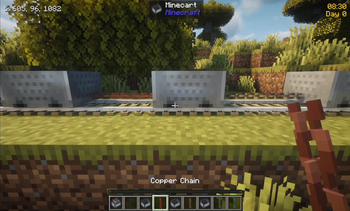
🔗 Linking mechanic
- Use Iron or Copper Chains to attach minecarts together
- Unlike other mods, you can use all chain variants, and copper chains loosen with oxidation.
- Sneak & right-click each cart to link them. The order doesn't matter in most interaction.
- Furnace minecarts will always lead the train so they cannot be attached in the middle or the back
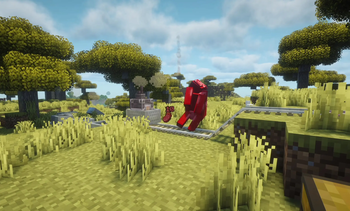
♨️ Minecart with Blast Furnace
- Replaces the vanilla item Minecart with Furnace
- New model, and GUI bar to show its amount of fuel
- The Furnace Minecart goes twice as fast as the other carts. Powered rails still apply to it
- Use any sort of fuel to power it. Use a water bucket to turn it off instantly
- Particle and Sound effects to each interaction enhance the experience :)
- Vanilla name and recipe are obviously correctly updated
💥 Collision
- Minecarts at high speed deal knockback and damage. Drive through annoying mobs!
- They scale with the amount of carts attached. A 7-cart train will kill most enemies.
- Armour, enchantment and potions reduce collision damage
- Can be toggled off in the config
⚙️ CONFIGURATION
Fully server-side:
- Toggle Linking mechanic.
- Toggle Collision Damage.
- Choose Furnace Burning Time (default: 72000).
- Choose Furnace Minecart Max Speed (default: 32 blocks per second).
- Choose other Minecarts Max speed (default: 16 blocks per second).
✨🌐 FULL LANGUAGE SUPPORT
This mod is now translated into all 142 Minecraft languages.
- Furnace Minecart will show the correct name in your language
- "Death by Minecart" message has been translated
Available Versions
How to Install Ultimate Minecarts on Your Server
Order Server
Order a Minecraft Java server with at least 3 GB RAM (4 GB recommended).
Set fabric Loader
In the panel under "Egg", select the fabric loader and matching Minecraft version (26.1.2).
Install Mod
Open the mod browser in the dashboard and search for "Ultimate Minecarts". Click "Install" – done! Alternatively, upload the .jar via SFTP to the /mods folder.
Compatibility
Mod Loaders
Minecraft Versions
26.1.2, 26.1.1, 26.1
Server-side
✓ RequiredRecommended RAM
4 GB(min. 3 GB)Frequently Asked Questions
Ultimate Minecarts server crashes on startup – what to do?
Most common cause: wrong fabric version or insufficient RAM. Check the server log (latest.log) for "OutOfMemoryError" or "Mixin" errors. With Mado Hosting: ensure at least 3 GB RAM is allocated and the loader matches the mod version (26.1.2). You can switch loaders with one click in the panel.
Is Ultimate Minecarts compatible with fabric?
Ultimate Minecarts officially supports fabric for Minecraft 26.1.2, 26.1.1, 26.1. The Mado dashboard automatically detects incompatible loader combinations.
Server lagging with Ultimate Minecarts – how to optimize performance?
Recommended RAM: 4 GB (per 8 players). Use /spark profiler to check if Ultimate Minecarts consumes the most tick time. Common fixes: reduce server view-distance to 8-10, install "performant" or "starlight" as supplementary mods on Forge. With Mado Hosting, your server runs on NVMe SSDs with dedicated CPU cores for minimal latency.
Similar Mods




Rent Modded Server
Install Ultimate Minecarts with just one click on your server.