
UltimateHotbars
UltimateHotbars lets you break free of the vanilla 9-saved hotbar limit by giving you virtually endless hotbars organized into custom pages that are created on demand!
Screenshots
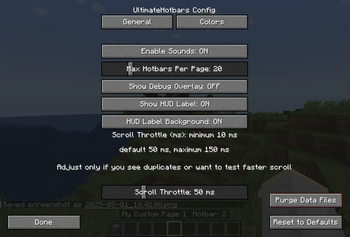
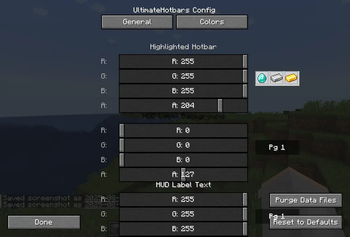
About this Mod
UltimateHotbars
UltimateHotbars is a Minecraft Forge mod (1.20.1 / Forge) that gives you virtually unlimited custom hotbars and pages. Easily switch between them in-game or in any inventory screen, save and restore layouts, and keep your tools, gear and resources organized!
NO longer necessary because V2 now creates a new hotbars.dat file in the world folder and is no longer global.This is the new Version 2 of the mod. Version 1 will no longer be worked on or updated so please switch to the V2 branch/version.
In the config menu hit the Purge Data Files button if your comming from V1.x.x as the hot bar data files are not compatable and it will be all messed up.
(Sorry you will have to start fresh with your Hot bars.)
V2.1.x
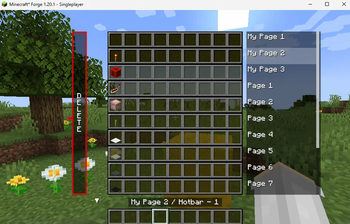
Adds new overlay of hot bars to inventory/container screens.
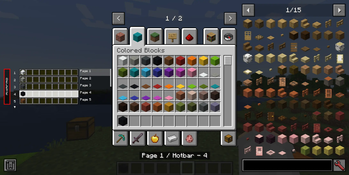
has drag and drop support from the creative inventory or JEI.
🌟 Features
- Virtual Hotbars & Pages
Create up to 100 hotbars per page (configurable), and as many pages as you like. - Peek hotbars popup
Hold ALT (by default can be changed) to popup a list of hotbars from the
current page. You can click a slot to change to it, page list to switch pages and drag
and drop support. - Hot bars overlay
Inventory, chest, anvil ect... you will be able to interact with you hot bars in that screen. - Seamless Switching
Switch hotbars or pages via keybinds inside the GUI and containers. - Persistent Storage
Your layouts are automatically saved and loaded between sessions. - Quick Clear
Instantly clear the current hotbar with a single key. - Configurable Sounds & HUD
Optional click sounds, on-screen page labels, debug overlay, and color themes.
🎮 Default Keybindings
| Action | Key(s) |
|---|---|
| Open/Close Hotbar GUI | h |
| Next Hotbar | = |
| Previous Hotbar | - |
Next Page (Ctrl + =) |
Ctrl + = |
Previous Page (Ctrl + -) |
Ctrl + - |
| Clear Current Hotbar | Delete |
| Popup for hotbars | Alt |
Tip: You can rebind all of these in the Controls menu.
⚙️ Configuration Options
Accessible via the in-game Config button in the Hotbar GUI, or by editing config/ultimatehotbar-client.toml.
| Option | Default | Description |
|---|---|---|
| enableSounds | true |
Play a click/drum sound when switching hotbars or pages. |
| maxHotbarsPerPage | 20 |
How many hotbars each page can hold (1–100). |
| showDebugOverlay | false |
Draws extra debug info (for troubleshooting). |
| showHudLabel | true |
Display “Pg 1/3” style labels on your HUD. |
| showHudLabelBackground | true |
Enable a background behind the HUD label text. |
| highlightColor | [1,1,0,0.8] |
RGBA color for the selected hotbar highlight in the GUI. |
| hudLabelBackgroundColor | [0,0,0,0.5] |
RGBA color for the HUD label background. |
| hudLabelTextColor | [1,1,1,1] |
RGBA color for the HUD label text. |
| hoverBorderColor | [1,1,1,1] |
RGBA color for the slot-hover border in the GUI. |
| scrollThrottleMs | 50 |
delay (10–150 ms) between scroll/key-hold repeats to avoid duplicates. |
- Scroll Throttle
Adjustable delay to prevent duplicate/overwrite when scrolling quickly. you can lower the delay if you really want to but it might mess up your hotbars.
If you are getting hot bars copying over eachother then raise this number but default should be ok for most systems this was put in just incase your scrolling faster then your systems I/O.
💡 Usage
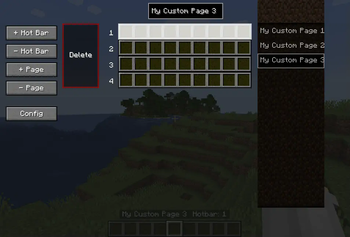
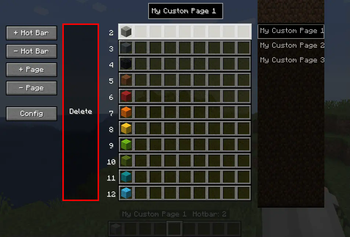
- Open the Hotbar GUI with your configured key (default
h). - Add / Remove Pages or Hotbars via the buttons on the left.
- Drag & Drop items in the GUI to rearrange.
- Mouse Scroll or use (default -,=) or ⬆️/⬇️ keys to switch hotbars.
- Mouse Scroll over page list or Ctrl + -/= to flip pages.
- Delete key clears the current hotbar instantly.
- Close GUI with
Esckey. - Popup hotbars press
ALTto quickly see your hotbars and interact with them.
License
This project is licensed under the MIT License—see LICENSE for details.
Available Versions
How to Install UltimateHotbars on Your Server
Order Server
Order a Minecraft Java server with at least 3 GB RAM (4 GB recommended).
Set forge Loader
In the panel under "Egg", select the forge loader and matching Minecraft version (1.20.1).
Install Mod
Open the mod browser in the dashboard and search for "UltimateHotbars". Click "Install" – done! Alternatively, upload the .jar via SFTP to the /mods folder.
Compatibility
Mod Loaders
Minecraft Versions
1.20.1
Server-side
~ OptionalRecommended RAM
4 GB(min. 3 GB)Frequently Asked Questions
UltimateHotbars server crashes on startup – what to do?
Most common cause: wrong forge version or insufficient RAM. Check the server log (latest.log) for "OutOfMemoryError" or "Mixin" errors. With Mado Hosting: ensure at least 3 GB RAM is allocated and the loader matches the mod version (1.20.1). You can switch loaders with one click in the panel.
Is UltimateHotbars compatible with forge?
UltimateHotbars officially supports forge for Minecraft 1.20.1. The Mado dashboard automatically detects incompatible loader combinations.
Server lagging with UltimateHotbars – how to optimize performance?
Recommended RAM: 4 GB (per 8 players). Use /spark profiler to check if UltimateHotbars consumes the most tick time. Common fixes: reduce server view-distance to 8-10, install "performant" or "starlight" as supplementary mods on Forge. With Mado Hosting, your server runs on NVMe SSDs with dedicated CPU cores for minimal latency.
Similar Mods




Rent Modded Server
Install UltimateHotbars with just one click on your server.