
Ultimate Hud
Have essential information on your HUD
Screenshots
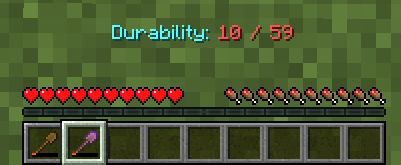
About this Mod
Ultimate Hud
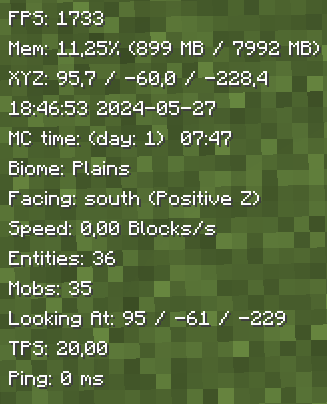
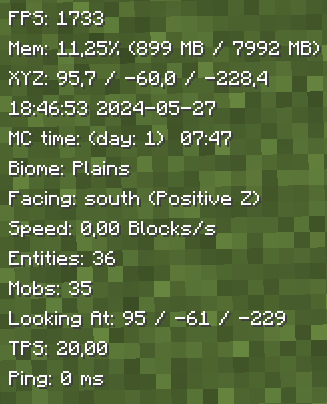
UltimateHud is a mod that displays essential information for each user in the HUD. Everything is configurable from the ultimatehud.json file inside your ./minecraft/config folder. In it, you will find a file similar to this:
Now, you can also change the options with the "Mod Menu" mod.
{
  "showFPS": true, // Displays the Frames Per Second (FPS) on the screen.
  "showRAM": true, // Displays the amount of RAM (memory) being used.
  "showCoordinates": true, // Shows the player's current coordinates in the game world.
  "showRealTime": true, // Displays the real-world current time.
  "showRealDate": true, // Displays the real-world current date.
  "showMinecraftTime": true, // Shows the in-game time.
  "showBiome": true, // Displays the current biome the player is in.
  "showFacing": true, // Shows the direction the player is facing.
  "showSpeed": true, // Displays the player's current speed.
  "showEntities": true, // Shows the number of entities around the player.
  "showMobs": true, // Displays the number of mobs around the player.
  "showLookingAt": true, // Shows information about the block or entity the player is currently looking at.
  "showTps": true, // Displays the server's Ticks Per Second (TPS).
  "showPing": true, // Shows the player's ping to the server.
  "textShadow": true, // Adds a shadow effect to the text for better readability.
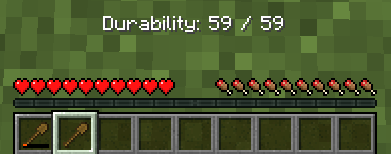
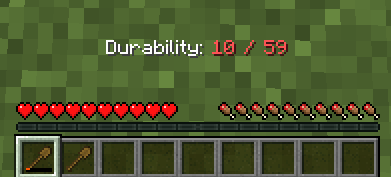
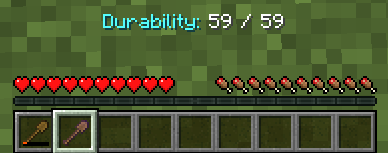
  "showItemDurability": true, // Displays the durability of the item the player is currently holding.
  "hudPosition": "LEFT" // Positions the HUD (Heads-Up Display) on the left side of the screen.
}
Fabric Loader 0.15.11 or newer is needed.
All options are toggled by setting them to true (enabled) or false (disabled), except for the last option, which sets the HUD to the left (left) or to the right (right).
TO-DO:
Add integration with Mod Menu to modify the options from within the game.(Done)Update to 1.20.5/1.20.6.(Done)Add Mob Counter.(Done)Add Entity Counter.(Done)Add TPS.(Done)Add Tool Durability.(Done)- Add underline behind the HUD information.
- Add color change functionality.
- Add the ability to change the name and format in which the information appears.
- Add the option to individually move the parameters to the right or left.
- Add MSPT
Translated into the following languages:
- English
- Spanish
- French
- Japanese
- Portuguese
- Chinese
Available Versions
How to Install Ultimate Hud on Your Server
Order Server
Order a Minecraft Java server with at least 3 GB RAM (4 GB recommended).
Set fabric Loader
In the panel under "Egg", select the fabric loader and matching Minecraft version (1.21.1).
Install Mod
Open the mod browser in the dashboard and search for "Ultimate Hud". Click "Install" – done! Alternatively, upload the .jar via SFTP to the /mods folder.
Compatibility
Mod Loaders
Minecraft Versions
1.21.1, 1.21, 1.20.6 (+2 more)
Server-side
✗ UnsupportedRecommended RAM
4 GB(min. 3 GB)Frequently Asked Questions
Ultimate Hud server crashes on startup – what to do?
Most common cause: wrong fabric version or insufficient RAM. Check the server log (latest.log) for "OutOfMemoryError" or "Mixin" errors. With Mado Hosting: ensure at least 3 GB RAM is allocated and the loader matches the mod version (1.21.1). You can switch loaders with one click in the panel.
Is Ultimate Hud compatible with fabric?
Ultimate Hud officially supports fabric for Minecraft 1.21.1, 1.21, 1.20.6. The Mado dashboard automatically detects incompatible loader combinations.
Server lagging with Ultimate Hud – how to optimize performance?
Recommended RAM: 4 GB (per 8 players). Use /spark profiler to check if Ultimate Hud consumes the most tick time. Common fixes: reduce server view-distance to 8-10, install "performant" or "starlight" as supplementary mods on Forge. With Mado Hosting, your server runs on NVMe SSDs with dedicated CPU cores for minimal latency.
Similar Mods




Rent Modded Server
Install Ultimate Hud with just one click on your server.