
Ultimine Rewind
Rewind/undo functionality for FTB Ultimine. Restore mined blocks with Ctrl+Z. Supports partial restoration and creative mode.
Screenshots
About this Mod
Ultimine Rewind
Add undo/rewind functionality to FTB Ultimine. Made a mistake while vein mining? Press Ctrl+Z to restore your blocks!
Features
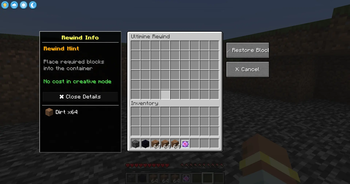
- 🔄 Undo Mining - Press Ctrl+Z to open the restoration interface
- 📦 Material System - Provide blocks to restore what you mined
- ✨ Creative Mode - No materials needed in creative mode
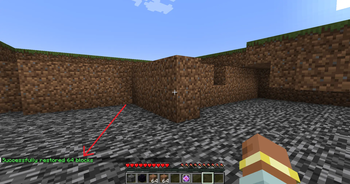
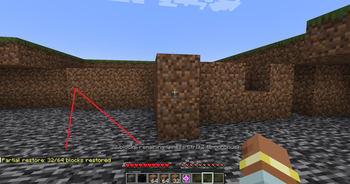
- 🔁 Partial Restore - Restore as many blocks as your materials allow, continue with Ctrl+Z
- 🌍 Multiplayer Safe - Works on servers with anti-dupe protection
- 🎨 Vanilla Style UI - Uses native chest interface
How to Use
- Mine blocks with FTB Ultimine
- Press Ctrl+Z to open the restoration menu
- Place materials into the container (same blocks you mined)
- Click "Restore Blocks" to undo your mining
Partial Restoration
Not enough materials? No problem!
- The mod will restore as many blocks as possible
- Remaining blocks stay in the record
- Press Ctrl+Z again with more materials to continue
Requirements
- Minecraft 1.20.1
- Forge 47.0+
- FTB Ultimine (Required)
Notes
- Block entities (chests, furnaces) are restored empty to prevent item duplication
- Records expire after 10 minutes
- Only the last mining operation can be undone
- Works in both singleplayer and multiplayer
License
GNU LGPL 3.0
Available Versions
How to Install Ultimine Rewind on Your Server
Order Server
Order a Minecraft Java server with at least 3 GB RAM (4 GB recommended).
Set forge Loader
In the panel under "Egg", select the forge loader and matching Minecraft version (1.21.1).
Install Mod
Open the mod browser in the dashboard and search for "Ultimine Rewind". Click "Install" – done! Alternatively, upload the .jar via SFTP to the /mods folder.
Compatibility
Mod Loaders
Minecraft Versions
1.21.1, 1.20.1
Server-side
✓ RequiredRecommended RAM
4 GB(min. 3 GB)Frequently Asked Questions
Ultimine Rewind server crashes on startup – what to do?
Most common cause: wrong forge version or insufficient RAM. Check the server log (latest.log) for "OutOfMemoryError" or "Mixin" errors. With Mado Hosting: ensure at least 3 GB RAM is allocated and the loader matches the mod version (1.21.1). You can switch loaders with one click in the panel.
Is Ultimine Rewind compatible with forge and neoforge?
Ultimine Rewind officially supports forge, neoforge for Minecraft 1.21.1, 1.20.1. The Mado dashboard automatically detects incompatible loader combinations.
Server lagging with Ultimine Rewind – how to optimize performance?
Recommended RAM: 4 GB (per 8 players). Use /spark profiler to check if Ultimine Rewind consumes the most tick time. Common fixes: reduce server view-distance to 8-10, install "performant" or "starlight" as supplementary mods on Forge. With Mado Hosting, your server runs on NVMe SSDs with dedicated CPU cores for minimal latency.
Similar Mods




Rent Modded Server
Install Ultimine Rewind with just one click on your server.