
UniversalQuestTracker
This mod allows you to track the progress of FTB quests across multiple modpacks. Works with other quest systems too.
Screenshots
About this Mod
This mod allows you to track your FTB Quest progress and more across multiple modpacks!
Universal Quest Tracker works by writing each modpack’s quest progress into one shared folder on your computer. Once multiple modpacks are pointed at the same folder, the in-game menu can show your progress from all of them in one place.
Setup:
Create a folder anywhere on your computer. You can name it whatever you want, but something like UniversalQuestTrackerData is recommended.
Copy the folder path. On Windows, Shift + Right Click the folder, then choose “Copy as path”.
Load up the modpack.
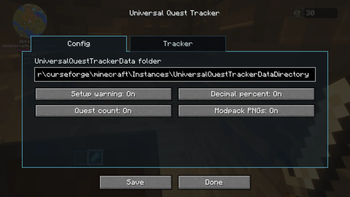
In game, press U by default to open the Universal Quest Tracker menu. Alternatively you can directly edit the universalquesttracker-common.toml just keep in mind to change the "" in the path to "/" then reload up the modpack.
Paste that folder path into the UniversalQuestTrackerData folder box.
Press Save.
Repeat this for every modpack you want to track, using the same folder path each time.
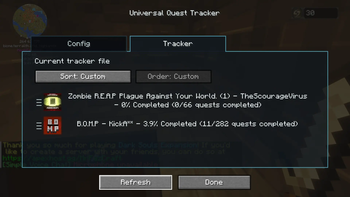
Once set up, the mod will automatically save quest progress while you play. The tracker menu can show each modpack, world name, and completion percentage. You can also refresh the tracker manually from the menu.
Features:
- Tracks FTB Quests progress across multiple modpacks
- Shared local data folder that works between supported Minecraft versions
- In-game config menu, opened with U by default
- Optional decimal percentages
- Optional completed quest count
- Optional modpack PNG display
- Custom sorting/order for tracked entries
- Generates a readable progress text file alongside its data file
- Important:
This mod is designed for FTB Quests, Better Questing and The Vault Mod (Standalone). All compatable quest mods can also be seen in the "relations" tab of the mod listed as optionally dependent. If no questing system is installed in a modpack, Universal Quest Tracker will note that instead of showing quest progress. The mod will still add the pack to the list, it'll just read null for progress.
This mod is fan-made and is not made by or affiliated with the Feed The Beast team.
Modpack Permission:
You may include Universal Quest Tracker in modpacks, including public modpacks, as long as the mod file is not modified and credit is given. Please link back to this CurseForge page when possible. Do not reupload this mod as a standalone download without permission.
Future plans:
- Port to more versions of the game based on comments I recieve on this mod.
- Add playtime display.
- Add button to hide 100% completed modpacks.
- Add button to hide modpacks without a quest system.
- Incorporate Advancement system... maybe with a toggle.
- Add more customization of what info is displayed.
- Add delete button to tracked modpacks.
- Add whatever you guys suggest in the comments :)
Available Versions
How to Install UniversalQuestTracker on Your Server
Order Server
Order a Minecraft Java server with at least 3 GB RAM (4 GB recommended).
Set forge Loader
In the panel under "Egg", select the forge loader and matching Minecraft version (1.21.1).
Install Mod
Open the mod browser in the dashboard and search for "UniversalQuestTracker". Click "Install" – done! Alternatively, upload the .jar via SFTP to the /mods folder.
Compatibility
Mod Loaders
Minecraft Versions
1.21.1, 1.20.6, 1.20.5 (+7 more)
Server-side
✓ RequiredRecommended RAM
4 GB(min. 3 GB)Frequently Asked Questions
UniversalQuestTracker server crashes on startup – what to do?
Most common cause: wrong forge version or insufficient RAM. Check the server log (latest.log) for "OutOfMemoryError" or "Mixin" errors. With Mado Hosting: ensure at least 3 GB RAM is allocated and the loader matches the mod version (1.21.1). You can switch loaders with one click in the panel.
Is UniversalQuestTracker compatible with forge and neoforge?
UniversalQuestTracker officially supports forge, neoforge for Minecraft 1.21.1, 1.20.6, 1.20.5. The Mado dashboard automatically detects incompatible loader combinations.
Server lagging with UniversalQuestTracker – how to optimize performance?
Recommended RAM: 4 GB (per 8 players). Use /spark profiler to check if UniversalQuestTracker consumes the most tick time. Common fixes: reduce server view-distance to 8-10, install "performant" or "starlight" as supplementary mods on Forge. With Mado Hosting, your server runs on NVMe SSDs with dedicated CPU cores for minimal latency.
Similar Mods




![[ETF] Entity Texture Features](https://cdn.modrinth.com/data/BVzZfTc1/af683d206d50b05258d865b0d6e4aa2f2cee12f2_96.webp)
![[EMF] Entity Model Features](https://cdn.modrinth.com/data/4I1XuqiY/6e5bbd0d06b1741bfdab6c0cfab6de8fdaf0064c_96.webp)
Rent Modded Server
Install UniversalQuestTracker with just one click on your server.