
Unlucky TNT
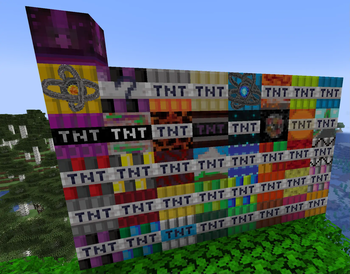
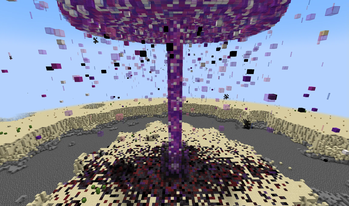
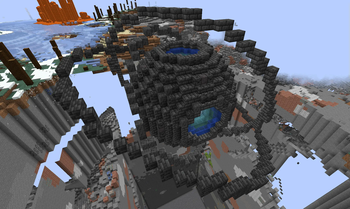
A mod which adds over 40 new TNTs all with their own unique effects.
Screenshots
About this Mod
Unlucky TNT is a TNT mod which adds over 40 new TNTs, multiple dynamites and a few extra gadgets to the game. It is dependent on Lucky TNT Lib.
Special thanks:
- Thanks goes to Lukas0094 for retexturing the logo of the mod page!
- Thanks goes to SlimingHD and Fleshcrafter for providing Lucky TNT Lib!
Non-self-explanatory things:
As some tnts and other features might not be self explanatory, this section will go over the non-self-explanatory ones and explain what they do.
- Aimable TNT: looks for an obsidian block in a 7x7x7 cube around the tnt. Then the TNT will shoot itself away from the obsidian block using normal tnt.
- Biological TNT: Spreads quicker and quicker and becomes more. ! This TNT is extremely dangerous and should never be used at high randomTickSpeed values.
- TNT bazooka: Hold this item in the main hand, a tnt in the offhand, and then press right click. It will ignite the tnt and throw it. Compatible with all Lucky TNT Lib dependent mods (Including Lucky TNT Mod).
- Timeable TNT: 1 second after fusing, it needs a redstone input to confirm exploding
Available Versions
How to Install Unlucky TNT on Your Server
Order Server
Order a Minecraft Java server with at least 3 GB RAM (4 GB recommended).
Set forge Loader
In the panel under "Egg", select the forge loader and matching Minecraft version (1.20.1).
Install Mod
Open the mod browser in the dashboard and search for "Unlucky TNT". Click "Install" – done! Alternatively, upload the .jar via SFTP to the /mods folder.
Compatibility
Mod Loaders
Minecraft Versions
1.20.1, 1.19.4, 1.19.3
Server-side
✓ RequiredRecommended RAM
4 GB(min. 3 GB)Frequently Asked Questions
Unlucky TNT server crashes on startup – what to do?
Most common cause: wrong forge version or insufficient RAM. Check the server log (latest.log) for "OutOfMemoryError" or "Mixin" errors. With Mado Hosting: ensure at least 3 GB RAM is allocated and the loader matches the mod version (1.20.1). You can switch loaders with one click in the panel.
Is Unlucky TNT compatible with forge?
Unlucky TNT officially supports forge for Minecraft 1.20.1, 1.19.4, 1.19.3. The Mado dashboard automatically detects incompatible loader combinations.
Server lagging with Unlucky TNT – how to optimize performance?
Recommended RAM: 4 GB (per 8 players). Use /spark profiler to check if Unlucky TNT consumes the most tick time. Common fixes: reduce server view-distance to 8-10, install "performant" or "starlight" as supplementary mods on Forge. With Mado Hosting, your server runs on NVMe SSDs with dedicated CPU cores for minimal latency.
Similar Mods




Rent Modded Server
Install Unlucky TNT with just one click on your server.