
URLium
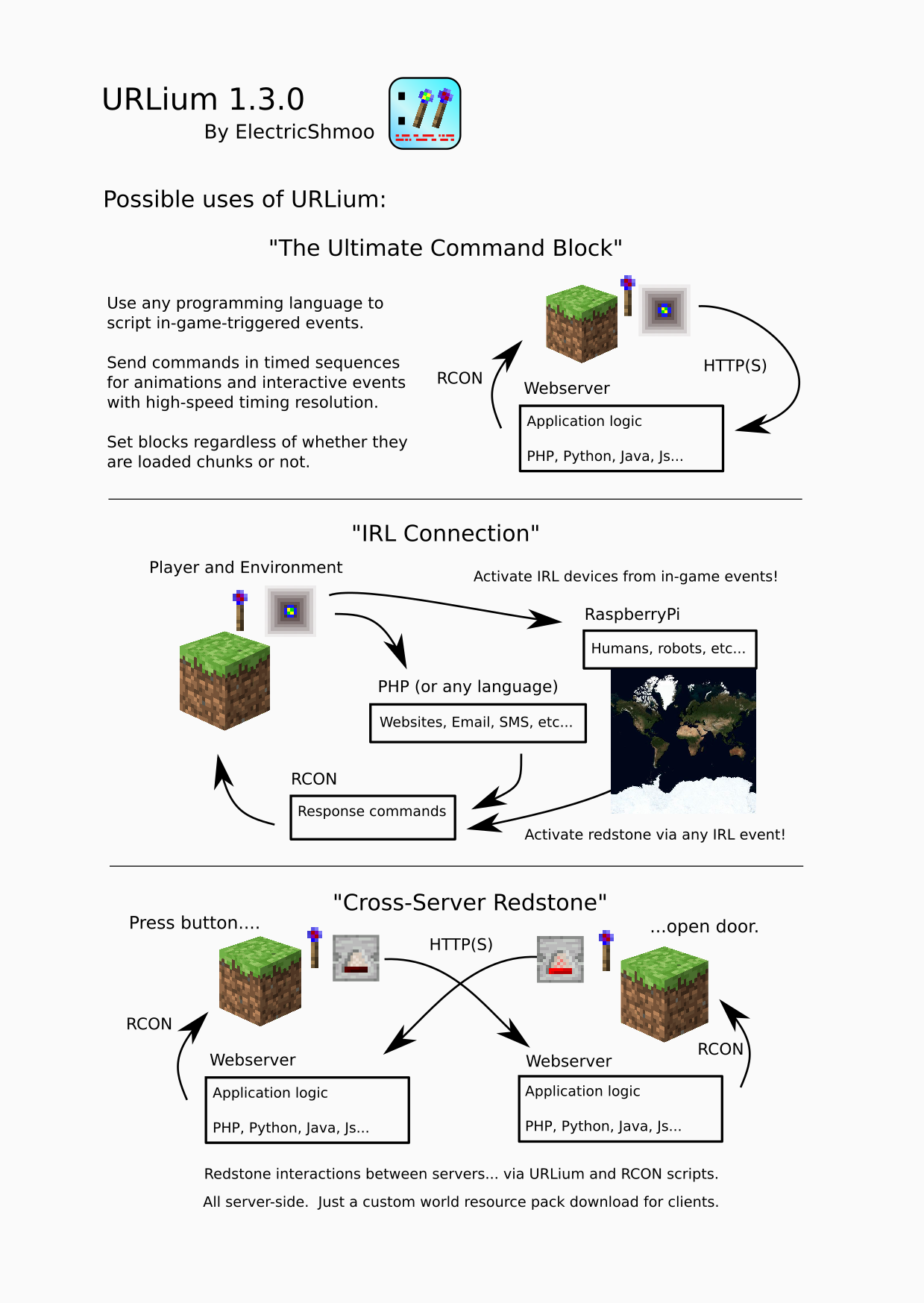
Transmit redstone and block state data over HTTP(S) to a webserver with this Polymer Library server-side mod. Get data from the Post Wand on any block, or Config Wand to turn Containers, Lecterns, Detectors, Signs, and more - into HTTP-reporting blocks!
About this Mod
https://www.youtube.com/watch?v=CDO_zV6LyeI
URLium is a Polymer Library server-side mod that transmits redstone, entity, command, and blockstate data over HTTP(S) to a configurable URL.
URLium only transmits outbound requests and logs the HTTP response data to the server log. URLium does not allow incoming commands or controls. Any in-bound control of the server is performed by existing native RCON connections, not any feature of URLium.
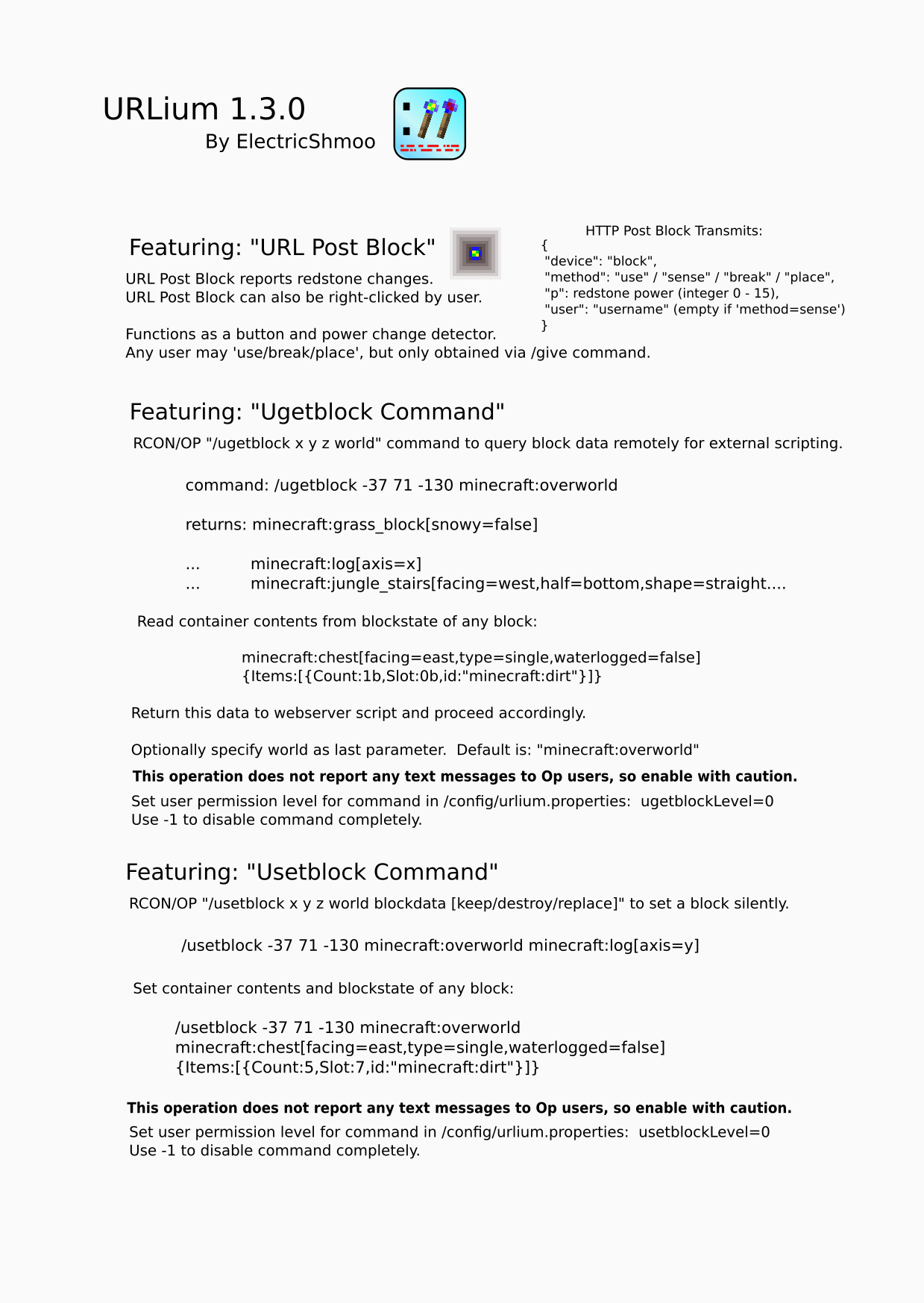
URLium Block
- reports redstone power level changes
- can also be right-clicked by user
- transmits 'place', 'break', 'use', and 'sense' events
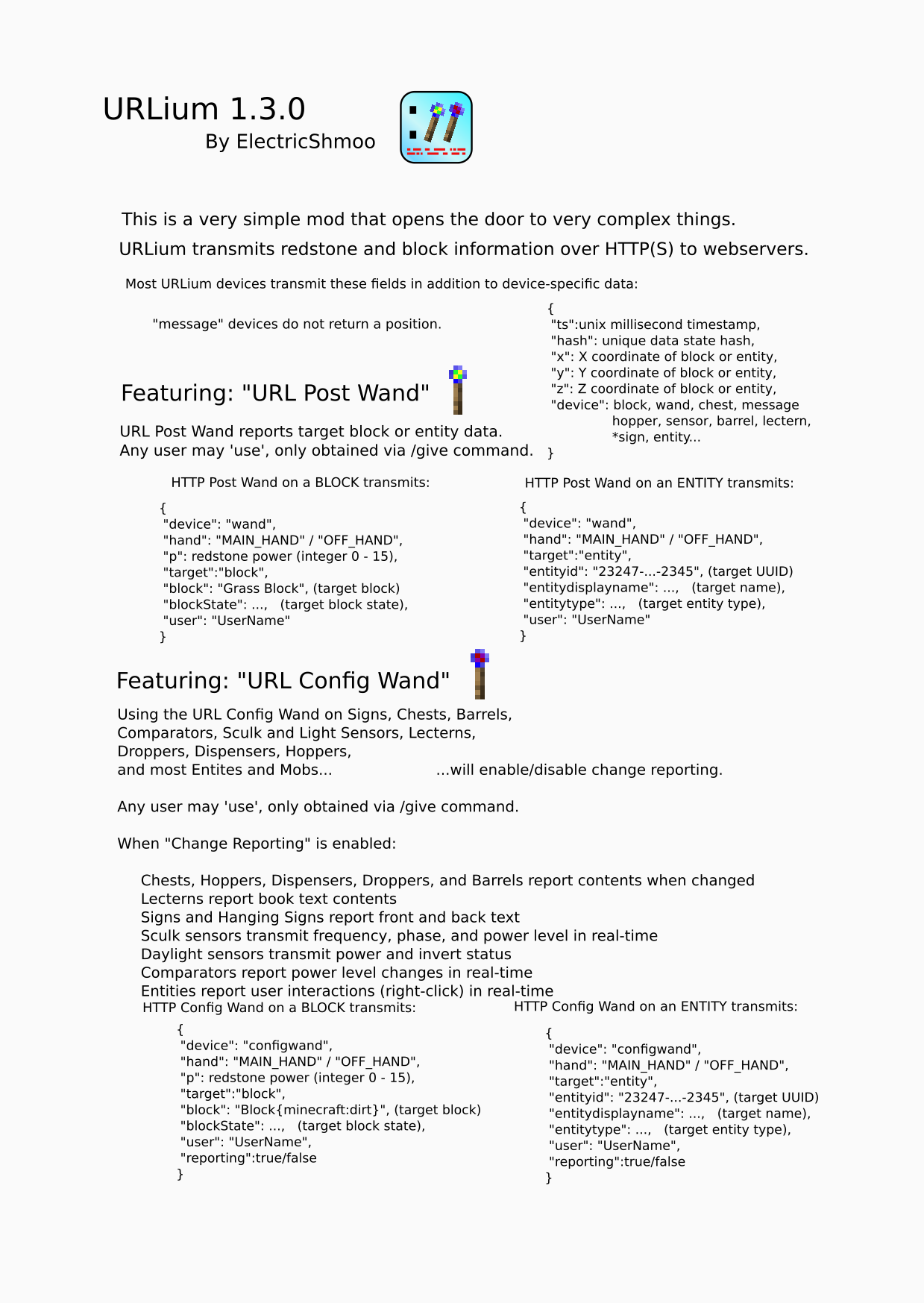
URL Post Wand
- use as tool to report target block or entity data
URL Config Wand
- use on Signs, Chests, Barrels, Comparators, Light Sensors, Sculk Sensors, Hoppers, Droppers, Dispensers, Lecterns, and Mobs will enable/disable change reporting
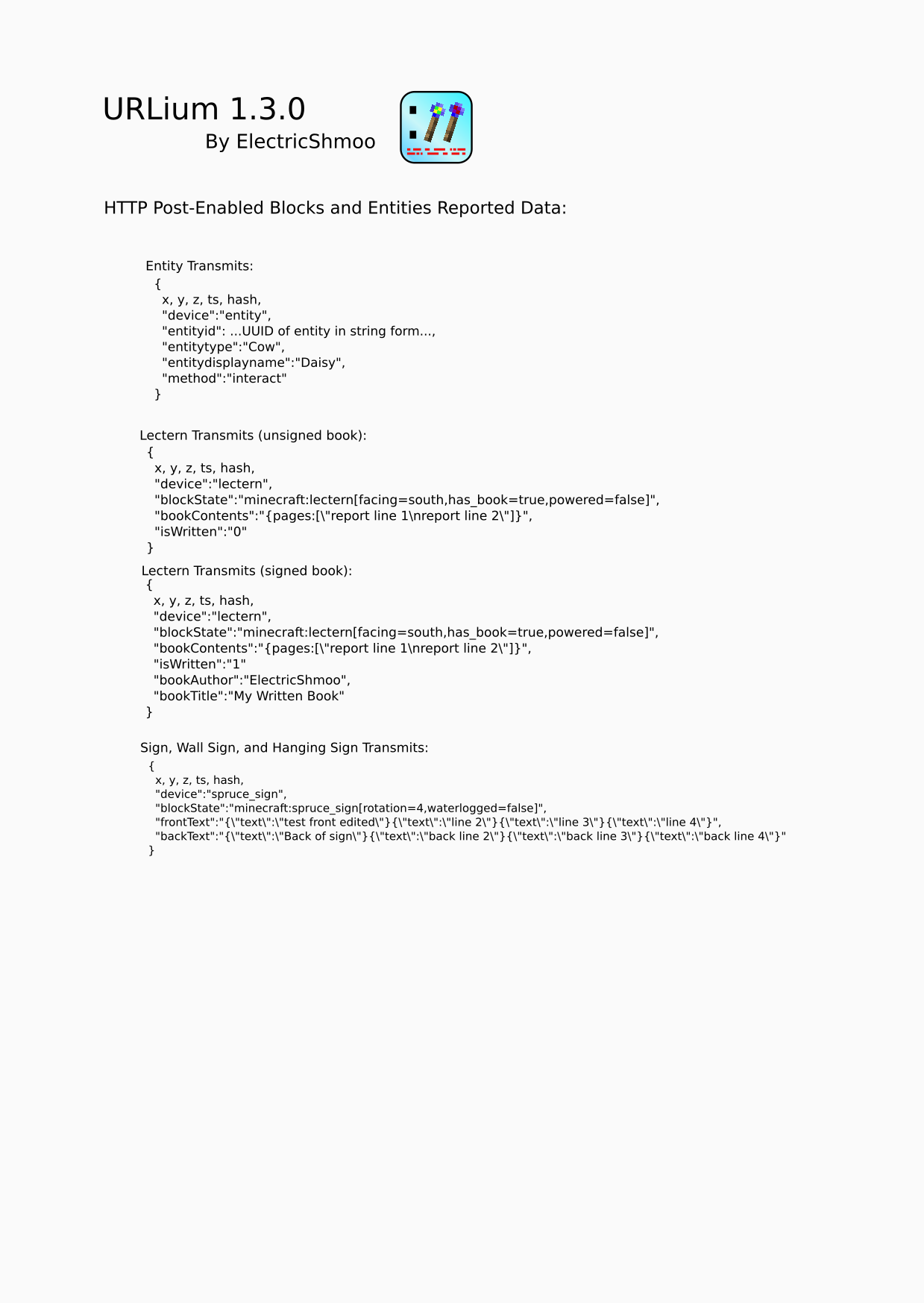
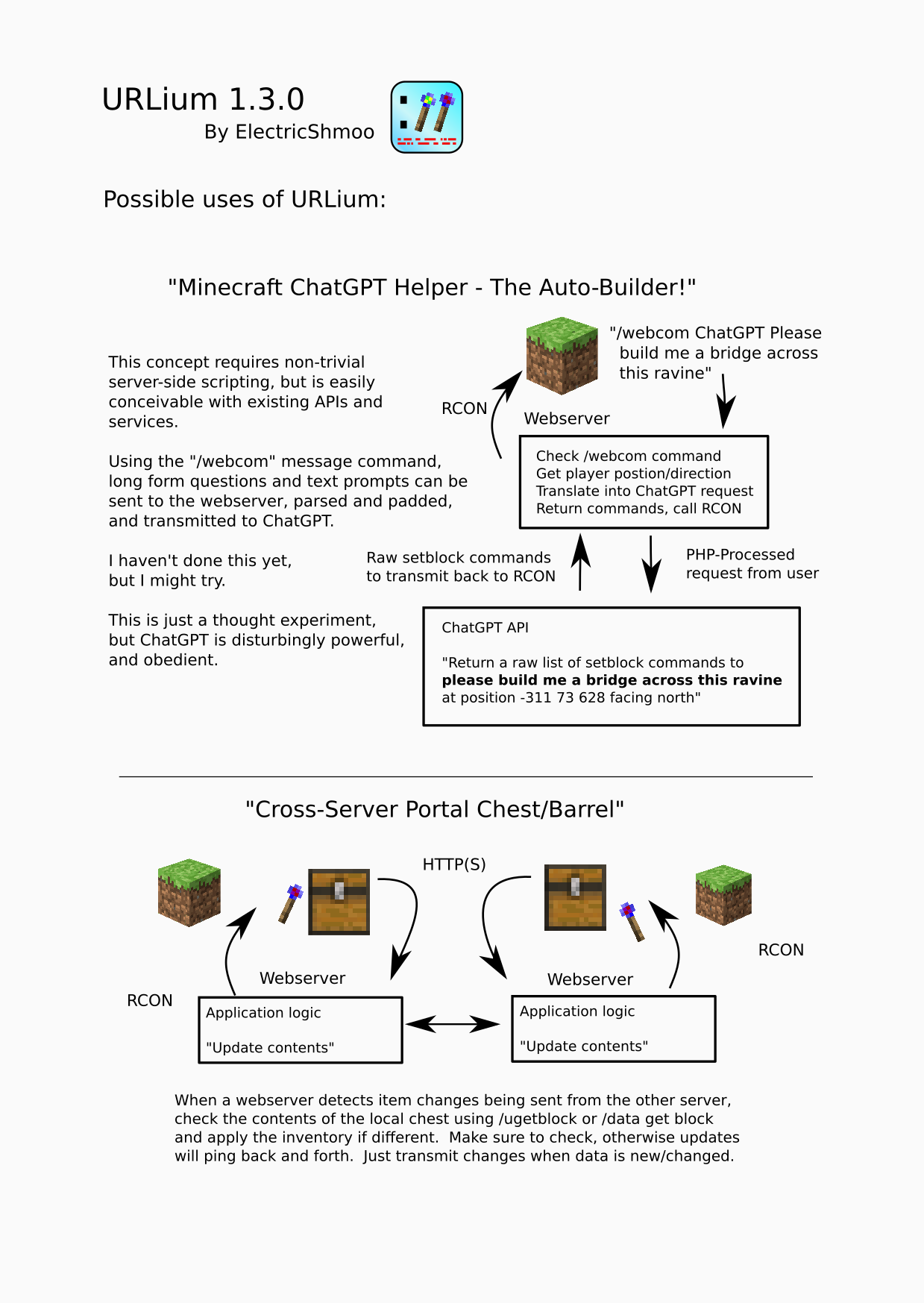
- chest contents sent when changed or block update occurs (not always real-time)
- sign front and back text content sent when changed
- comparator power level sent when changed
- sculk sensor power, phase, and frequency sent when changed
- light sensor power level sent when changed
- when a writable book or written book is placed on lectern, contents will be sent
- mobs and entities with change reporting send an "interact" event when right-clicked by any user
Ugetblock Command
Usetblock Command
- RCON-accessible command to query and set block data for remote webserver RCON response
- allows external server to perform lightweight query and get raw ('F3+i' debug query) block data
- forces block loading / generation if unloaded
- specify dimension (unlike regualr /setblock)
- silent execution
- webserver application/game logic can be written in ANY web language that can respond via RCON
- PHP, Python, Java, JS, Go, C#... anything!
"/webcom" Commands
- Users may send message to webserver with "/webcom ...message text..."
- Set command name ("webcom") in config file to any unused command name
- Up to 3 custom commands!
Respond to the Minecraft server via RCON to complete the circuit of input/output.
Possible uses:
- server-to-server redstone circuitry
- compare written book text for a quiz show competition
- get interactive I/O from the web:
- audience voting survival competition
- public HTML browser-viewable scoreboards
- update your player's status on a website from text on a hanging sign
- treasure-hunt
- with a reporting-enabled chest to see who collects items first
- with a Post Wand to see who can click the blocks first
- water real-life plants from in-game events triggering a RaspberryPi plant-watering system
- Anything That Can Be Done Via HTTP
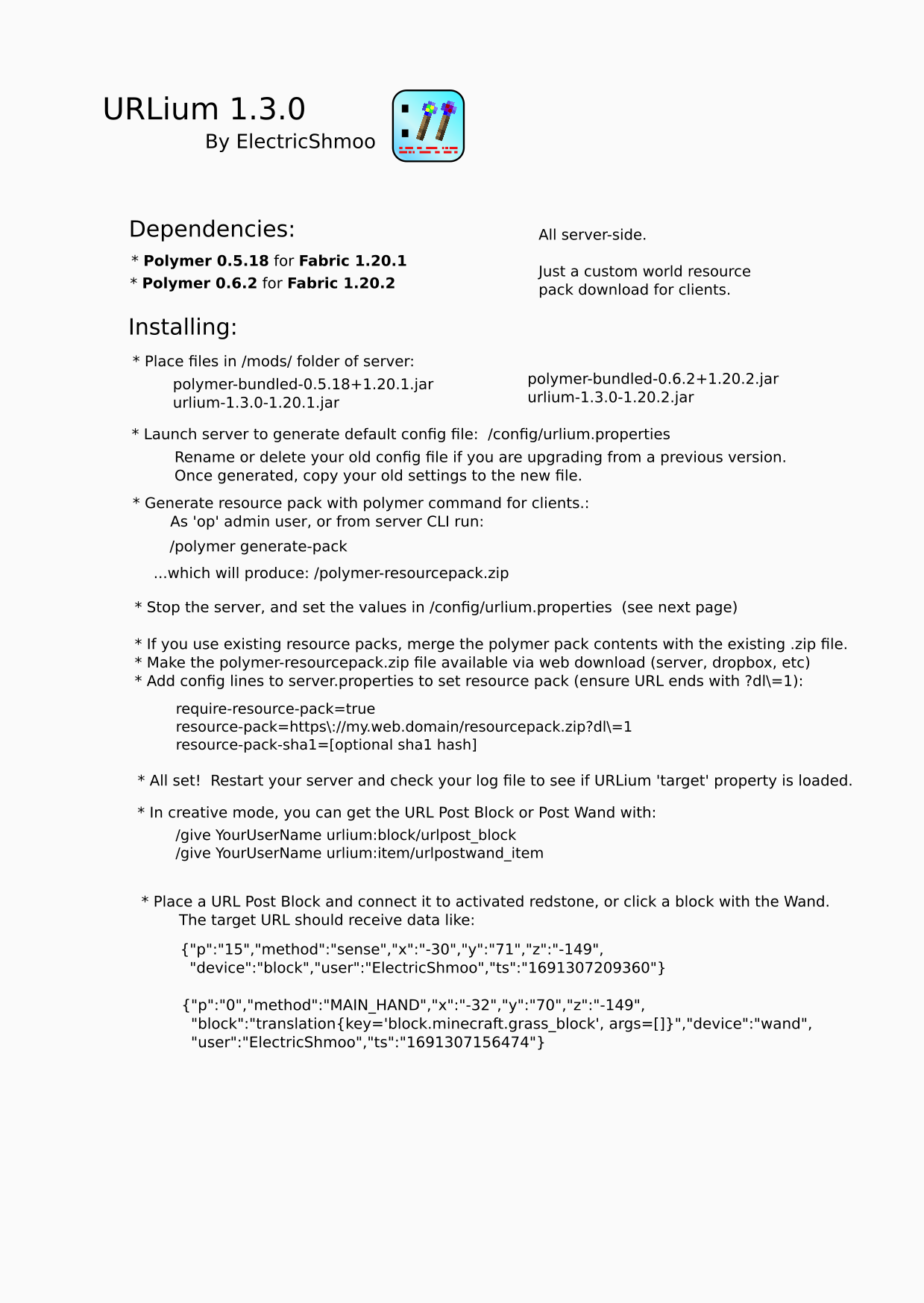
Dependencies:
- Polymer 0.5.18 for Fabric 1.20.1
- Polymer 0.6.2 for Fabric 1.20.2
- Be sure to run '/polymer generate-pack' to produce the client-side resource pack and update the SHA1 key in server settings or URLium items will not be visible.
Config:
- set URL in /config/urlium.properties:
- target=https://my.web.server/full/path/
- agent=optional_user_agent_name
- messageCommand=webcom
- securityToken=secret_token
(token is included in Authentication: Bearer header)
Sample PHP Webserver Response Script:
https://github.com/JacobMunoz/urlium_1_20_1_public/blob/master/doc/php/index.php
Sample Golang Script:
https://github.com/JacobMunoz/urlium_1_20_1_public/blob/master/doc/golang/urlium.go
Sample Python Script:
https://github.com/JacobMunoz/urlium_1_20_1_public/blob/master/doc/python/urlium.py
See the docs for more:




Available Versions
How to Install URLium on Your Server
Order Server
Order a Minecraft Java server with at least 3 GB RAM (4 GB recommended).
Set fabric Loader
In the panel under "Egg", select the fabric loader and matching Minecraft version (1.20.2).
Install Mod
Open the mod browser in the dashboard and search for "URLium". Click "Install" – done! Alternatively, upload the .jar via SFTP to the /mods folder.
Compatibility
Mod Loaders
Minecraft Versions
1.20.2, 1.20.1
Server-side
✓ RequiredRecommended RAM
4 GB(min. 3 GB)Frequently Asked Questions
URLium server crashes on startup – what to do?
Most common cause: wrong fabric version or insufficient RAM. Check the server log (latest.log) for "OutOfMemoryError" or "Mixin" errors. With Mado Hosting: ensure at least 3 GB RAM is allocated and the loader matches the mod version (1.20.2). You can switch loaders with one click in the panel.
Is URLium compatible with fabric?
URLium officially supports fabric for Minecraft 1.20.2, 1.20.1. The Mado dashboard automatically detects incompatible loader combinations.
Server lagging with URLium – how to optimize performance?
Recommended RAM: 4 GB (per 8 players). Use /spark profiler to check if URLium consumes the most tick time. Common fixes: reduce server view-distance to 8-10, install "performant" or "starlight" as supplementary mods on Forge. With Mado Hosting, your server runs on NVMe SSDs with dedicated CPU cores for minimal latency.
Similar Mods




Rent Modded Server
Install URLium with just one click on your server.