
Useful Commands
This mod adds 20 useful commands that any user can execute on your server.
About this Mod
This mod needs to be installed on the server to function. However, you can install it onto the client, so it will function in a single-player world, but not on public servers.
This is a mod that adds 20 useful commands that players on your server could execute at the permission level 0, so any player could execute them without cheats/OP.
Part of the commands in a screenshot:
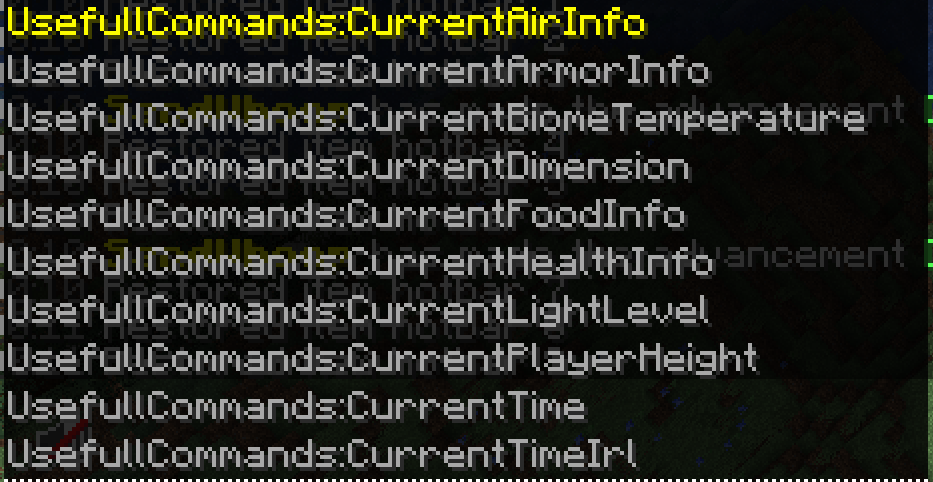
Here is the list of commands this mod includes (I misspelled useful [the first part of the command], as usefull for some reason, XD):
- /UsefullCommands:CurrentAirInfo - Shows how many ticks of oxygen you have left.
- /UsefullCommands:CurrentArmorInfo - Shows how many points of armor you have equipped.
- /UsefullCommands:CurrentBiomeTemperature - Shows the temperature of the biome you're in.
- /UsefullCommands:CurrentDimension - Shows the current dimension you are in (The Overworld, The Nether, or The End).
- /UsefullCommands:CurrentFoodInfo - Shows how many points of Food, and Saturation you have.
- /UsefullCommands:CurrentHealthInfo - Shows current H.P, and absorption H.P.
- /UsefullCommands:CurrentLightLevel - Shows current light level of where you are standing.
- /UsefullCommands:CurrentPlayerHeight - Shows how tall you are.
- /UsefullCommands:CurrentTimeIrl - Shows the current date (mm-dd-yyyy format).
- /UsefullCommands:CurrentWalkSpeed - Shows the walk speed of the player.
- /UsefullCommands:Events:Raid? - Shows if there is a raid at your region, or not.
- /UsefullCommands:ExperienceInfo - Shows how many experience levels you have, and how many experence points are needed to reach the next level.
- /UsefullCommands:ServerPlayerCount - Shows how many players are connected to the server/world.
- /UsefullCommands:ShowCurrentCoordnates - Shows current X, Y, and Z coordnates.
- /UsefullCommands:ShowCurrentItemsInHands - Shows current item (and count) in your main-hand, and off-hand.
- /UsefullCommands:ShowCurrentXYZVelocities - Shows current X, Y, and Z velocity (how fast you are moving).
- /UsefullCommands:ShowPlayerDisplayName - Shows current display name (username) of the player.
- /UsefullCommands:TicksLeftOnFire - Shows how many ticks you will be on fire for.
- /UsefullCommands:TicksYouHaveBeenFrozenFor - Shows how many ticks you have been frozen for.
- /UsefullCommands:CurrentTime - Shows the current time of day (there is a vanilla command that displays the time, but this one is for non-oped players, so they can access it too).
All outputs from these commands are printed in chat.
Side Features
Player respawn message (shown in Minecraft's action-bar), E.G "SandWhoop Just Respawned!". This also has a sound on respawn: minecraft:entity.evoker.prepare_wololo.
Player death message (also shown in action-bar) E.G: "SandWhoop Died. You were holding <count + item> in your main-hand, and <count + item> in your off-hand".
Entity death sound (plays the sound: "minecraft:entity.player.death"), when any entity in the world/server dies.
Donation
If you want, you can support me by donating with the link on this page.
Available Versions
How to Install Useful Commands on Your Server
Order Server
Order a Minecraft Java server with at least 3 GB RAM (4 GB recommended).
Set fabric Loader
In the panel under "Egg", select the fabric loader and matching Minecraft version (1.19.3).
Install Mod
Open the mod browser in the dashboard and search for "Useful Commands". Click "Install" – done! Alternatively, upload the .jar via SFTP to the /mods folder.
Compatibility
Mod Loaders
Minecraft Versions
1.19.3, 1.19.2
Server-side
✓ RequiredRecommended RAM
4 GB(min. 3 GB)Frequently Asked Questions
Useful Commands server crashes on startup – what to do?
Most common cause: wrong fabric version or insufficient RAM. Check the server log (latest.log) for "OutOfMemoryError" or "Mixin" errors. With Mado Hosting: ensure at least 3 GB RAM is allocated and the loader matches the mod version (1.19.3). You can switch loaders with one click in the panel.
Is Useful Commands compatible with fabric?
Useful Commands officially supports fabric for Minecraft 1.19.3, 1.19.2. The Mado dashboard automatically detects incompatible loader combinations.
Server lagging with Useful Commands – how to optimize performance?
Recommended RAM: 4 GB (per 8 players). Use /spark profiler to check if Useful Commands consumes the most tick time. Common fixes: reduce server view-distance to 8-10, install "performant" or "starlight" as supplementary mods on Forge. With Mado Hosting, your server runs on NVMe SSDs with dedicated CPU cores for minimal latency.
Similar Mods




![[ETF] Entity Texture Features](https://cdn.modrinth.com/data/BVzZfTc1/af683d206d50b05258d865b0d6e4aa2f2cee12f2_96.webp)

Rent Modded Server
Install Useful Commands with just one click on your server.