
Utility Golems
A Minecraft automation mod that adds buildable utility golems to handle farming, item transport, resource gathering, and other tasks using simple, vanilla-style mechanics.
Screenshots


About this Mod
Utility Golems
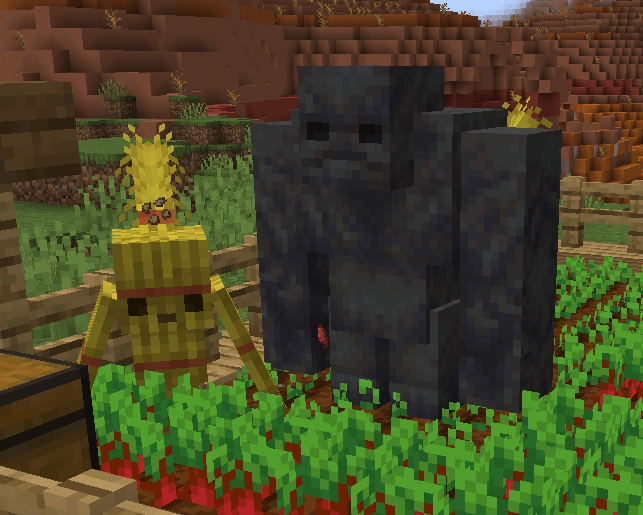
Utility Golems is a vanilla-friendly automation mod for Minecraft Forge 1.20.1 that introduces functional, buildable golems designed to handle everyday tasks.
Instead of relying on complex machines or multiblock systems, this mod focuses on simple, immersive automation. Golems are constructed directly in the world using familiar materials and behave as natural extensions of Minecraft’s mechanics.
Build your own helpers to manage farming, resource gathering, and more - no machines required!
Features
- Buildable utility golems (no natural spawning)
- Farming automation using entity-based behaviour
- Uses nearby containers for storage and resources
- No GUIs, cables, or power systems
- Designed to fit naturally into survival gameplay
Hay Golem
The Hay Golem maintains crop growth and keeps farmland productive.
Hay Golem Details
Behaviour
- Plants crops on available farmland
- Uses bonemeal to accelerate growth
- Pulls seeds and bonemeal from nearby containers
- Attacks skeletons and collects bones
- Avoids cows and sheep
- Immune to arrow damage
Healing
- Bonemeal
How to Build
- Place 2 Hay Bale blocks vertically
- Place a Carved Pumpkin on top
The golem will form immediately once the structure is complete.
Mud Golem
The Mud Golem handles harvesting and storage, completing the farming cycle.
Mud Golem Details
Behaviour
- Harvests fully grown crops
- Deposits items into nearby containers
- Monitors crops and reacts to interference
- Attacks entities that break crops
- Otherwise neutral
- Moves slowly but consistently
Healing
- Mud
How to Build
- Place two Mud Blocks vertically with one block either side of the top one for arms
- Place a Carved Pumpkin on top
The golem will activate and begin working nearby farmland.
Gameplay Integration
Utility Golems is designed to integrate cleanly into survival gameplay:
- No configuration menus
- No artificial systems
- Behaviour is driven by the environment
Golems rely on:
- Nearby containers
- Available resources
- Player placement and setup
This encourages simple but effective farm design without replacing core gameplay.
Development Notes
- This is an early release
- Currently implemented:
- Hay Golem
- Mud Golem
Additional utility golems are planned
Installation
- Install Minecraft Forge for 1.20.1
- Install Geckolib (latest) for Forge 1.20.1
- Place the mod file and dependencies in your
modsfolder - Launch the game
Feedback
Feedback, suggestions, and bug reports are welcome and will help guide future updates.
License
All rights reserved unless stated otherwise.
Available Versions
How to Install Utility Golems on Your Server
Order Server
Order a Minecraft Java server with at least 3 GB RAM (4 GB recommended).
Set forge Loader
In the panel under "Egg", select the forge loader and matching Minecraft version (1.20.6).
Install Mod
Open the mod browser in the dashboard and search for "Utility Golems". Click "Install" – done! Alternatively, upload the .jar via SFTP to the /mods folder.
Compatibility
Mod Loaders
Minecraft Versions
1.20.6, 1.20.5, 1.20.4 (+3 more)
Server-side
✓ RequiredRecommended RAM
4 GB(min. 3 GB)Frequently Asked Questions
Utility Golems server crashes on startup – what to do?
Most common cause: wrong forge version or insufficient RAM. Check the server log (latest.log) for "OutOfMemoryError" or "Mixin" errors. With Mado Hosting: ensure at least 3 GB RAM is allocated and the loader matches the mod version (1.20.6). You can switch loaders with one click in the panel.
Is Utility Golems compatible with forge and neoforge?
Utility Golems officially supports forge, neoforge for Minecraft 1.20.6, 1.20.5, 1.20.4. The Mado dashboard automatically detects incompatible loader combinations.
Server lagging with Utility Golems – how to optimize performance?
Recommended RAM: 4 GB (per 8 players). Use /spark profiler to check if Utility Golems consumes the most tick time. Common fixes: reduce server view-distance to 8-10, install "performant" or "starlight" as supplementary mods on Forge. With Mado Hosting, your server runs on NVMe SSDs with dedicated CPU cores for minimal latency.
Similar Mods




Rent Modded Server
Install Utility Golems with just one click on your server.