
Villager Brain Configuration
A highly optimized server-sided mod that allows full configuration of villager pathfinding malus
About this Mod
Villager Brain Config
A lightweight, highly optimized mod that makes villager pathfinding behavior fully configurable
Features
Per-block malus control
Customize how villagers treat different blocks in pathfinding. Blocks are configurable to any malus, block and item tags supportedProfession-based malus
Configure different path preferences per villager profession.Global block penalty caching
Pathfinding results are cached for maximum efficiency across multiple villagersNative modded support
The config file supports any modded blocks or professions
Example Use Cases
- Prevent villagers from walking into trap blocks like campfires or magma
- Make water paths viable for fishermen only
- Design custom village layouts with optimized navigation paths
- Prevent villagers from wandering off paths
- Add personality to each profession type
Pathfinding Visualizations
Planned features
- Per-villager-type rules (eg. plains villagers, taiga villagers)
Performance
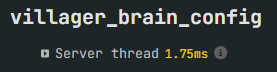
Villager Brain Config is designed to be almost invisible in impact or even faster than vanilla
Test case
- 250 villagers
- Each pathing to a unique workstation in a grid
- Compared vanilla to modded using Spark profiler
Results
Vanilla Logic

Modded Logic

Mod total
Configuration
All settings are in a villager-brain-config.json file in the config folder.
{
  "walk_on_block_penalties": {
    "minecraft:grass_block": 4.0,
    "minecraft:dirt_path": 0.0,
    "default": 5.0
  },
  "walk_through_block_penalties": {
    "minecraft:lava": -1.0,
    "minecraft:tall_grass": 20,
    "default": 0.0
  },
  "actions_penalties": {
    "jump": 10.0
  },
  "professions": {
    "minecraft:farmer": {
      "walk_on_block_penalties": {
        "minecraft:farmland": 0.0,
        "minecraft:grass_block": 2.0
      }
    },
    "minecraft:fisherman": {
      "walk_on_block_penalties": {
        "minecraft:water": 0.0
      },
      "walk_through_block_penalties": {
        "minecraft:water": 0.0
      }
    }
  },
  "avoids": [
    {
      "block": "minecraft:lava",
      "radius": 3,
      "penalty": -1.0
    }
  ]
}
Available Versions
How to Install Villager Brain Configuration on Your Server
Order Server
Order a Minecraft Java server with at least 3 GB RAM (4 GB recommended).
Set fabric Loader
In the panel under "Egg", select the fabric loader and matching Minecraft version (1.21.8).
Install Mod
Open the mod browser in the dashboard and search for "Villager Brain Configuration". Click "Install" – done! Alternatively, upload the .jar via SFTP to the /mods folder.
Compatibility
Mod Loaders
Minecraft Versions
1.21.8, 1.21.7, 1.21.6 (+5 more)
Server-side
✓ RequiredRecommended RAM
4 GB(min. 3 GB)Frequently Asked Questions
Villager Brain Configuration server crashes on startup – what to do?
Most common cause: wrong fabric version or insufficient RAM. Check the server log (latest.log) for "OutOfMemoryError" or "Mixin" errors. With Mado Hosting: ensure at least 3 GB RAM is allocated and the loader matches the mod version (1.21.8). You can switch loaders with one click in the panel.
Is Villager Brain Configuration compatible with fabric and neoforge?
Villager Brain Configuration officially supports fabric, neoforge for Minecraft 1.21.8, 1.21.7, 1.21.6. The Mado dashboard automatically detects incompatible loader combinations.
Server lagging with Villager Brain Configuration – how to optimize performance?
Recommended RAM: 4 GB (per 8 players). Use /spark profiler to check if Villager Brain Configuration consumes the most tick time. Common fixes: reduce server view-distance to 8-10, install "performant" or "starlight" as supplementary mods on Forge. With Mado Hosting, your server runs on NVMe SSDs with dedicated CPU cores for minimal latency.
Similar Mods




Rent Modded Server
Install Villager Brain Configuration with just one click on your server.