
Vehicle Upgrade
Bring tons of quality-of-life improvements to your rides. Enjoy more reliable, and more capable mounts.
Screenshots

About this Mod









Vehicle Upgrade supercharges every mount and vehicle across the game, adding tons of quality-of-life improvements for every ride. Saddled mounts no longer wander off, boats handle better on land, and you can open your player inventory even while riding. Small but powerful touches like translucent mounts when you look down and fixed passenger collisions that prevent you from getting stuck in blocks make traveling and working with vehicles feel seamless.
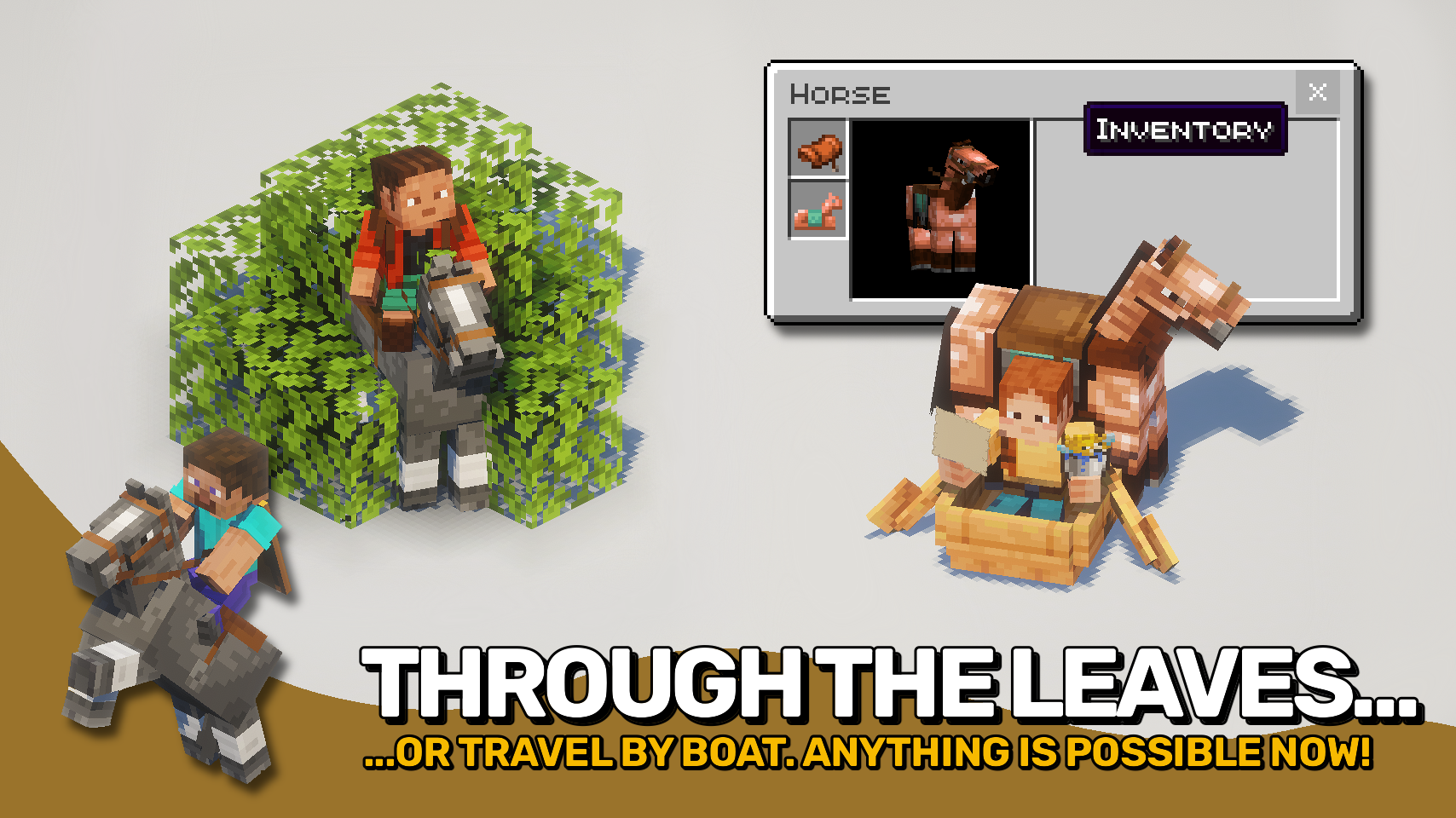
Let mounts swim through water, move through leaves, and keep full mining speed while riding. The mod brings polish, flexibility, and a big dose of fun, making every journey smoother and faster. And of course, everything is fully configurable to match your play style.

- 💦 Mounts Swim: Stay mounted while crossing water. Even fully submerged, you control when to dismount.
- 🌿 Ride Through Leaves: Mounts move through leaves instead of getting stuck.
- ⚖️ No Wandering: Saddled mounts stay where you leave them and do not wander off.
- 🪞 Translucent Mount View: Look down and your mount fades so you can see what is below.
- 🎒 Inventory Switching: Open vehicle or player inventory while riding with a key, double tap, or screen button.
- ⛏️ Full Mining Speed: Riding no longer slows your block breaking.
- 🚀 Sprint While Riding: Sprint on mounts for a quick speed boost.
- 🐴 Smarter Horses: Step up just a bit higher, increased from 1.0 to 1.1 blocks.
- 🛶 Held Items While Rowing: Show items such as maps while you row a boat.
- 🧱 Boat Step Height: Boats slide up low blocks to cross short obstacles like carpet or paths.
- 🪶 Shrink Large Passengers: Big riders automatically scale down to fit better in boats.
- 👥 Correct Vehicle Collisions: Passengers are no longer ignored when colliding with blocks. No more suffocating in ceilings!
- 🧭 Interaction Range Bonus: Reach further from your mount while riding. Perfect for fighting and building.
- ⛳ Dismount Control: Sneak and right-click with an empty hand to remove riders from vehicles.
- ⚙️ Fully Configurable: Every feature has simple settings so you can tune the experience to your taste.


⏩ INSTALLATION REQUIRED ON CLIENT & REQUIRED ON SERVER
⏩ REQUIRES PUZZLES LIB TO BE INSTALLED (FABRIC & NEOFORGE)
⏩ REQUIRES FABRIC API TO BE INSTALLED (FABRIC)
⏩ REQUIRES FORGE CONFIG API PORT TO BE INSTALLED (FABRIC)

If available for a mod, configuration is possible directly from in-game using the mod menu (requires Mod Menu by Prospector to be installed on Fabric). Please note that on older Minecraft versions installing Forge Config Screens is also a requirement.
For manual configuration using an external text editor all files are found at .minecraft/config, named as MOD_ID-client.toml, MOD_ID-common.toml, or MOD_ID-server.toml, depending on the type of config. Not all types might exist for a mod, if any at all.

🌟 Big shoutout to LobsterJonn for Jumpy Boats, which sparked the fun boat jumping mechanic in this mod.
🌟 Thanks to Cammie for VehicleFix, the inspiration behind properly implemented vehicle passenger collisions.
🌟 Hats off to legosteenjaap for HorseInBoat, which gave the idea to finally let horses ride in boats.
🌟 Thanks to TeaJ4y for Horse Stats Vanilla, inspiring the optional mount attribute display in your inventory.
🌟 Special thanks to CassieNya for Horse Buff, which sparked creative features like translucent mounts.




Available Versions
How to Install Vehicle Upgrade on Your Server
Order Server
Order a Minecraft Java server with at least 3 GB RAM (4 GB recommended).
Set fabric Loader
In the panel under "Egg", select the fabric loader and matching Minecraft version (26.1.2).
Install Mod
Open the mod browser in the dashboard and search for "Vehicle Upgrade". Click "Install" – done! Alternatively, upload the .jar via SFTP to the /mods folder.
Compatibility
Mod Loaders
Minecraft Versions
26.1.2, 26.1.1, 26.1 (+4 more)
Server-side
✓ RequiredRecommended RAM
4 GB(min. 3 GB)Frequently Asked Questions
Vehicle Upgrade server crashes on startup – what to do?
Most common cause: wrong fabric version or insufficient RAM. Check the server log (latest.log) for "OutOfMemoryError" or "Mixin" errors. With Mado Hosting: ensure at least 3 GB RAM is allocated and the loader matches the mod version (26.1.2). You can switch loaders with one click in the panel.
Is Vehicle Upgrade compatible with fabric and neoforge?
Vehicle Upgrade officially supports fabric, neoforge for Minecraft 26.1.2, 26.1.1, 26.1. The Mado dashboard automatically detects incompatible loader combinations.
Server lagging with Vehicle Upgrade – how to optimize performance?
Recommended RAM: 4 GB (per 8 players). Use /spark profiler to check if Vehicle Upgrade consumes the most tick time. Common fixes: reduce server view-distance to 8-10, install "performant" or "starlight" as supplementary mods on Forge. With Mado Hosting, your server runs on NVMe SSDs with dedicated CPU cores for minimal latency.
Similar Mods
![[EMF] Entity Model Features](https://cdn.modrinth.com/data/4I1XuqiY/6e5bbd0d06b1741bfdab6c0cfab6de8fdaf0064c_96.webp)


Rent Modded Server
Install Vehicle Upgrade with just one click on your server.