![Veil Iris Lights Compat [VILC]](https://cdn.modrinth.com/data/MJEsr0LL/3eb9b59ab6cdee0233e70f062cc9f3bc44b40d35_96.webp)
Veil Iris Lights Compat [VILC]
Veil light & shadow support for Iris + Shaderpacks
Screenshots
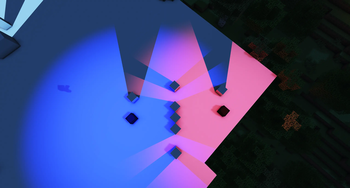
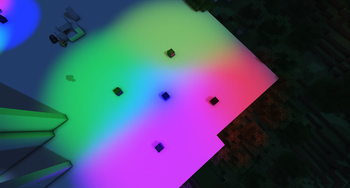
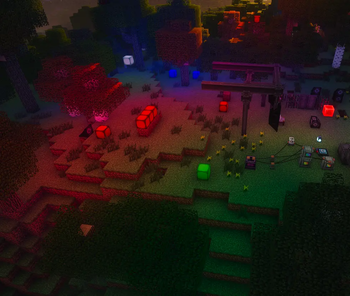
About this Mod
Veil Iris Lights Compat
Brings Veil shader effects and dynamic lights into the active Iris shaderpack pipeline.
Minecraft 1.21.1 · NeoForge · Client-side only · Current version: 1.4.0
Veil effects normally render outside a shaderpack's G-buffer. With Iris shaders enabled, they can disappear, use incorrect depth, or stop contributing visible light.
Veil Iris Lights Compat, shortened to VILC, translates compatible Veil shaders for Iris and adds dedicated render passes for standard Veil point and area lights. Version 1.4.0 also keeps those lights visible when Iris is installed but no shaderpack is active.
Features
- Renders compatible Veil effects through active Iris shaderpacks
- Translates Veil vertex and fragment behavior into Iris G-buffer programs
- Supports opaque and translucent Veil effects
- Uses Iris
EntitiesTransprograms when available - Provides a dithering fallback for unsupported translucent paths
- Integrates compatible Veil geometry into Iris shadow rendering
- Automatically rebuilds translated shaders after shaderpack reloads
- Supports standard Veil point lights
- Supports standard Veil rectangular area and cone lights
- Mixes multiple differently colored lights
- Reconstructs world positions and surface normals from shaderpack depth
- Adds angle-dependent diffuse lighting
- Supports configurable voxel occlusion and block shadows
- Uses perceptual color normalization for more even RGB brightness
- Preserves visible surface texture under bright and overlapping lights
- Uses a single controlled shaderpack light pass to avoid excessive saturation
- Provides a dedicated depth-based framebuffer pass while shaderpacks are disabled
- Automatically switches between the native framebuffer and Iris shaderpack passes
VILC does not add blocks or gameplay content by itself. It renders lights created through Veil by other mods, including YesMenn! Colored Lights.
In-Game Configuration
Open the configuration through the mod list or with O by default.
Quality Presets
| Preset | Point Lights | Area Lights | Surface Normals | Voxel Shadows |
|---|---|---|---|---|
| Performance | 24 | 8 | Fast | Disabled |
| Balanced | 48 | 16 | Fast | Enabled |
| High | 96 | 32 | Detailed | Enabled |
Every performance option can also be changed independently:
- Point-light budget from 1 to 96
- Area-light budget from 1 to 32
- Detailed surface normals
- Voxel shadows
Appearance controls update live:
- Exposure
- Color strength
- Color saturation
- Neutral lift
- Luminance normalization limit
The Reset button only restores appearance controls. Custom light budgets and quality options remain untouched.
Configuration is stored in config/veil_iris_lights.json.
Debugging
- Adds active pass state and light counts to the F3 debug screen
- Supports BetterF3
- Shows configured point- and area-light budgets
- Reports voxel-occlusion and rendering state
Requirements
| Dependency | Requirement |
|---|---|
| Minecraft | 1.21.1 |
| NeoForge | 21.1.228 or newer |
| Iris | 1.8.14 beta 1 or newer |
| Veil | 4.1.4 or newer |
| Sodium | 0.8.12 beta 1 or newer |
Install VILC only on clients. Dedicated servers do not need it.
Mod Developer Support
Mods using Veil's standard PointLightData and AreaLightData automatically use VILC's compatible light passes. A direct Java dependency on VILC is not required for standard lights.
Blocks containing a light source can opt out of self-occlusion through:
#veil_iris_lights:non_occluding
Client mods may also register blocks directly:
VeilIrisLightOcclusion.registerNonOccluding(
    ResourceLocation.fromNamespaceAndPath("example", "light_block")
);
Custom Veil light renderer types outside the standard point- and area-light APIs require separate integration.
Compatibility Notes
- Shaderpacks differ significantly, so unusual pipelines may still need specific compatibility work
- Voxel shadows use a camera-centered 64 x 64 x 64 block grid
- Complex partial block models are approximated
- Leaves use partial voxel transmission rather than texture-alpha sampling
- Occlusion outside the available voxel grid cannot be perfectly reconstructed
- Light budgets limit how many visible Veil lights are processed per frame
Works Well With
- YesMenn!(soon!) for configurable RGB Colored Lights
- Other mods using Veil point or area lights
- BetterF3 for extended debug layouts
Made by YesMenn!
Available Versions
How to Install Veil Iris Lights Compat [VILC] on Your Server
Order Server
Order a Minecraft Java server with at least 3 GB RAM (4 GB recommended).
Set neoforge Loader
In the panel under "Egg", select the neoforge loader and matching Minecraft version (1.21.1).
Install Mod
Open the mod browser in the dashboard and search for "Veil Iris Lights Compat [VILC]". Click "Install" – done! Alternatively, upload the .jar via SFTP to the /mods folder.
Compatibility
Mod Loaders
Minecraft Versions
1.21.1
Server-side
✗ UnsupportedRecommended RAM
4 GB(min. 3 GB)Frequently Asked Questions
Veil Iris Lights Compat [VILC] server crashes on startup – what to do?
Most common cause: wrong neoforge version or insufficient RAM. Check the server log (latest.log) for "OutOfMemoryError" or "Mixin" errors. With Mado Hosting: ensure at least 3 GB RAM is allocated and the loader matches the mod version (1.21.1). You can switch loaders with one click in the panel.
Is Veil Iris Lights Compat [VILC] compatible with neoforge?
Veil Iris Lights Compat [VILC] officially supports neoforge for Minecraft 1.21.1. The Mado dashboard automatically detects incompatible loader combinations.
Server lagging with Veil Iris Lights Compat [VILC] – how to optimize performance?
Recommended RAM: 4 GB (per 8 players). Use /spark profiler to check if Veil Iris Lights Compat [VILC] consumes the most tick time. Common fixes: reduce server view-distance to 8-10, install "performant" or "starlight" as supplementary mods on Forge. With Mado Hosting, your server runs on NVMe SSDs with dedicated CPU cores for minimal latency.
Similar Mods

![[ETF] Entity Texture Features](https://cdn.modrinth.com/data/BVzZfTc1/af683d206d50b05258d865b0d6e4aa2f2cee12f2_96.webp)
![[EMF] Entity Model Features](https://cdn.modrinth.com/data/4I1XuqiY/6e5bbd0d06b1741bfdab6c0cfab6de8fdaf0064c_96.webp)



Rent Modded Server
Install Veil Iris Lights Compat [VILC] with just one click on your server.