
Velaris Core
Velaris Core is a lightweight Fabric client mod designed for QoL, PvP and HUD improvements
Screenshots


About this Mod
⚡ Velaris Core
A lightweight Fabric PvP utility & performance mod designed to enhance combat awareness, visual clarity, and gameplay smoothness — without unnecessary bloat.
Minecraft • Fabric • PvP Utilities • Performance Improvements
🚀 Overview
Velaris Core enhances the Minecraft PvP experience with useful gameplay utilities, visual indicators, and internal performance optimizations while remaining lightweight and fully configurable.
The goal of Velaris is simple:
Provide powerful PvP utilities while keeping the client fast, minimal, and distraction-free.
Every feature is designed to improve gameplay awareness and responsiveness while preserving a vanilla-friendly experience.
✨ Current Features
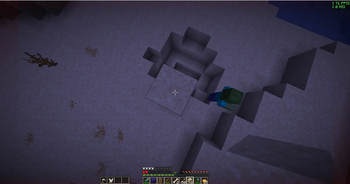
👁️ SnapLook
Quickly check behind you without turning your character.
When activated, your camera temporarily rotates behind your player while your character continues facing forward. This allows you to monitor opponents chasing you during combat.
Default Keybind:Left Alt
Use Cases
- Checking if an enemy is chasing you
- Tracking players during fights
- Maintaining situational awareness in PvP
🔍 Zoom
Allows you to zoom in for better visibility when aiming, scouting, or building.
Holding the zoom key smoothly reduces your field of view, making distant objects easier to see.
Default Keybind:C
Benefits
- Better long-distance visibility
- Improved aiming during PvP
- Useful for building and scouting
💡 Fullbright
See clearly in dark environments such as caves, nighttime, or underground areas.
Fullbright removes darkness limitations, allowing you to maintain visibility without using gamma adjustments.
Benefits
- Clear visibility in caves
- Easier exploration underground
- Better awareness during night combat
🎯 Dynamic Crosshair
A smarter crosshair that adapts based on what you're targeting.
The crosshair dynamically reacts to entities and blocks, providing clearer visual feedback during combat and general gameplay.
Highlights
- Better targeting visibility
- Minimalistic design
- Useful during fast-paced PvP
🛡️ Armor HUD
Displays your armor durability directly on your screen.
Instead of opening your inventory during combat, you can quickly monitor your armor condition.
Benefits
- Prevents unexpected armor breaks
- Improves combat awareness
- Saves time during fights
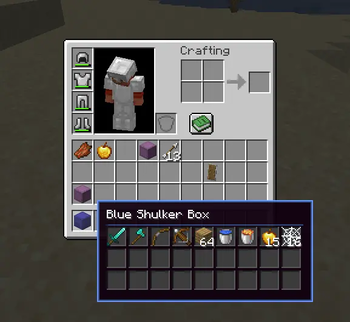
📦 Shulker Preview
Preview the contents of a Shulker Box without placing it.
Simply hover over a shulker box in your inventory to instantly view its stored items.
Benefits
- Faster inventory management
- Helpful for storage systems
- Saves time while organizing items
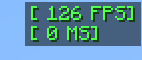
📊 FPS & Ping Display
Displays your FPS (Frames Per Second) and network latency directly on your screen.
This helps you quickly monitor performance and detect lag during gameplay.
Useful for
- Identifying lag spikes
- Monitoring connection stability
- Checking client performance
❤️ Low Health Warning
A subtle vignette effect appears when your health becomes critically low.
This visual warning helps alert you during intense combat situations so you can react quickly.
⚡ Performance Optimizations
Velaris includes internal optimizations that improve overall gameplay smoothness while keeping resource usage low.
These optimizations reduce unnecessary work done by the client during rendering and gameplay updates.
Examples
- Reduced unnecessary rendering operations
- Improved particle handling
- Smarter entity visibility checks
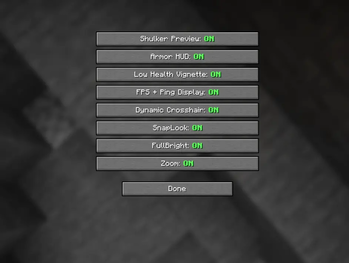
⚙️ Configuration Menu
Velaris includes a built-in configuration menu allowing you to control every feature.
From the menu you can:
- Enable or disable individual features
- Customize your gameplay experience
- Keep the client minimal and tailored to your preferences
Open Config Menu
Default Keybind:Right Shift
🎮 Designed For
Velaris Core is designed primarily for:
- PvP players
- Competitive Minecraft gameplay
- Lightweight client enhancements
- Players who prefer performance-focused mods over large client packs
📦 Installation
- Install Fabric Loader
- Download Velaris Core
- Place the
.jarfile inside your.minecraft/modsfolder - Launch Minecraft using Fabric
🔮 Planned Features
Velaris Core is actively being developed and more features are planned for future updates.
📊 CPS Counter
Displays your current Clicks Per Second, useful for PvP players monitoring their clicking speed.
🎯 Hit Color Indicator
Highlights entities when they are hit, making combat feedback clearer and easier to track.
👀 Player Direction Indicator
Shows the direction nearby players are facing, improving situational awareness during fights.
🧠 Smart Performance Mode
Automatically enables additional performance optimizations when FPS drops during intense gameplay situations.
🧱 Block Outline Enhancer
Improves the visibility of block outlines while targeting blocks, making building and breaking more precise.
💬 Philosophy
Velaris focuses on clarity, awareness, and performance.
Instead of overwhelming players with dozens of features, Velaris provides carefully chosen utilities that enhance gameplay while keeping Minecraft feeling vanilla and responsive.
Available Versions
How to Install Velaris Core on Your Server
Order Server
Order a Minecraft Java server with at least 3 GB RAM (4 GB recommended).
Set fabric Loader
In the panel under "Egg", select the fabric loader and matching Minecraft version (1.21.11).
Install Mod
Open the mod browser in the dashboard and search for "Velaris Core". Click "Install" – done! Alternatively, upload the .jar via SFTP to the /mods folder.
Compatibility
Mod Loaders
Minecraft Versions
1.21.11
Server-side
✗ UnsupportedRecommended RAM
4 GB(min. 3 GB)Frequently Asked Questions
Velaris Core server crashes on startup – what to do?
Most common cause: wrong fabric version or insufficient RAM. Check the server log (latest.log) for "OutOfMemoryError" or "Mixin" errors. With Mado Hosting: ensure at least 3 GB RAM is allocated and the loader matches the mod version (1.21.11). You can switch loaders with one click in the panel.
Is Velaris Core compatible with fabric?
Velaris Core officially supports fabric for Minecraft 1.21.11. The Mado dashboard automatically detects incompatible loader combinations.
Server lagging with Velaris Core – how to optimize performance?
Recommended RAM: 4 GB (per 8 players). Use /spark profiler to check if Velaris Core consumes the most tick time. Common fixes: reduce server view-distance to 8-10, install "performant" or "starlight" as supplementary mods on Forge. With Mado Hosting, your server runs on NVMe SSDs with dedicated CPU cores for minimal latency.
Similar Mods


Rent Modded Server
Install Velaris Core with just one click on your server.