
Version Builder
Build the perfect minecraft version for you! Make a version using only your favorite features from older and newer versions.
Screenshots
About this Mod
Version Builder
Version Builder lets you create your own custom Minecraft profile by mixing and matching features from different eras of the game.
Instead of committing to one exact version, you can start from modern Minecraft and toggle individual features on or off to build the experience you want.
What it does
With Version Builder, you can control things like:
- Structures
- Mobs
- Biomes
- Items and gear
- Experimental mechanics
- Legacy visuals and sounds
That means you can build combinations like:
- modern gameplay with older-style textures and menu vibes
- newer worlds without specific structures or mobs
- a stripped-down survival experience without certain items
- a version mashup that feels like your own custom update path
Features
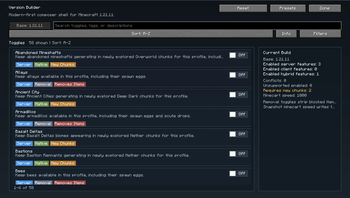
- Toggle many worldgen features such as structures and biomes
- Enable or disable mobs, items, and related content
- Restore older-style presentation with legacy-inspired textures, panorama, UI, and sounds
- Control experimental features like snapshot minecart mechanics
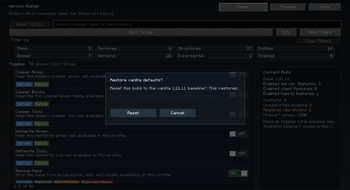
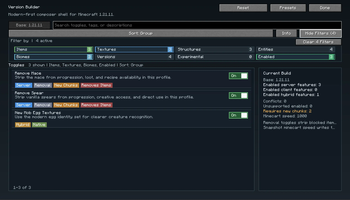
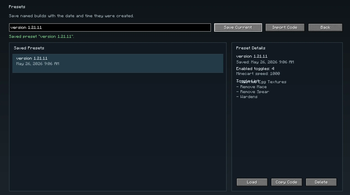
- Use presets, filters, and search to quickly build a profile
- Get warnings for high-impact toggles that remove major content
Important notes
- World generation toggles mainly affect newly generated chunks
- Some toggles remove content from gameplay entirely, including creative access in certain cases
- Some changes work best after reopening the world or restarting the game
- For multiplayer or full gameplay consistency, the mod works best when installed on both sides
Compatibility
- Minecraft
1.21.11 - Fabric
- Requires
Fabric API
Version Builder is designed for players who want more control over which Minecraft features exist in their world, without needing a full total conversion mod.
Available Versions
How to Install Version Builder on Your Server
Order Server
Order a Minecraft Java server with at least 3 GB RAM (4 GB recommended).
Set fabric Loader
In the panel under "Egg", select the fabric loader and matching Minecraft version (1.21.11).
Install Mod
Open the mod browser in the dashboard and search for "Version Builder". Click "Install" – done! Alternatively, upload the .jar via SFTP to the /mods folder.
Compatibility
Mod Loaders
Minecraft Versions
1.21.11
Server-side
~ OptionalRecommended RAM
4 GB(min. 3 GB)Frequently Asked Questions
Version Builder server crashes on startup – what to do?
Most common cause: wrong fabric version or insufficient RAM. Check the server log (latest.log) for "OutOfMemoryError" or "Mixin" errors. With Mado Hosting: ensure at least 3 GB RAM is allocated and the loader matches the mod version (1.21.11). You can switch loaders with one click in the panel.
Is Version Builder compatible with fabric?
Version Builder officially supports fabric for Minecraft 1.21.11. The Mado dashboard automatically detects incompatible loader combinations.
Server lagging with Version Builder – how to optimize performance?
Recommended RAM: 4 GB (per 8 players). Use /spark profiler to check if Version Builder consumes the most tick time. Common fixes: reduce server view-distance to 8-10, install "performant" or "starlight" as supplementary mods on Forge. With Mado Hosting, your server runs on NVMe SSDs with dedicated CPU cores for minimal latency.
Similar Mods




Rent Modded Server
Install Version Builder with just one click on your server.