
VFP ChatFilter Patch
A small modification that patches ViaFabricPlus' ViaLegacy chat filter code, allowing for customization of allowed characters.
Screenshots
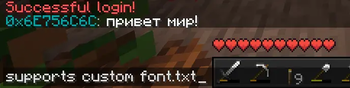

About this Mod
VFP (ViaFabricPlus) ChatFilter Patch is a small modification that replaces the logic of chat filter code provided in ViaLegacy library (which ViaFabricPlus uses to connect to ancient mc version servers), allowing players to configure custom behavior of chat filter or even allow any characters to be sent.
This is practically useful when joining to servers with custom defined font.txt, a set of custom characters or with all characters allowed. A vivid example: Russian b1.7.3 servers with plugins and russian version of font.txt, which is unknown for an unpatched ViaLegacy.

However, when joining to the unsupported server (i.e. using vanilla font.txt), by writing other characters the player will be kicked out with the message "Illegal characters in chat" or similar. So don't try to use it everywhere, and make sure the server has allowed these characters.
As ViaFabricPlus, this is an only client-side mod.
Configuration
This mod has a GUI configuration screen located next to the "ViaFabricPlus" button.
Within the configuration screen, there are several buttons to allow you to change the behaviour of this mod (check gallery).
Modes (First Button)
There are currently two modes available - allowing only characters from the config font.txt (located config/vfpchatfilterpatch/font.txt) or allowing any characters.
Force Reload font.txt (Second Button)
This button simply force reloads the font.txt, if the changes were made in the file and for some reason a reload is required without restarting the whole game.
Replace Sequence
If the current mode is using the characters from font.txt, then any illegal characters will be replaced with the "replace sequence". By default, it's empty, so any illegal character is removed; however, you can make it replace with other characters or even strings if needed (i.e. *, #).
License
This mod is licensed under Apache License 2.0.
Available Versions
How to Install VFP ChatFilter Patch on Your Server
Order Server
Order a Minecraft Java server with at least 3 GB RAM (4 GB recommended).
Set fabric Loader
In the panel under "Egg", select the fabric loader and matching Minecraft version (1.21.11).
Install Mod
Open the mod browser in the dashboard and search for "VFP ChatFilter Patch". Click "Install" – done! Alternatively, upload the .jar via SFTP to the /mods folder.
Compatibility
Mod Loaders
Minecraft Versions
1.21.11, 1.21.10
Server-side
✗ UnsupportedRecommended RAM
4 GB(min. 3 GB)Frequently Asked Questions
VFP ChatFilter Patch server crashes on startup – what to do?
Most common cause: wrong fabric version or insufficient RAM. Check the server log (latest.log) for "OutOfMemoryError" or "Mixin" errors. With Mado Hosting: ensure at least 3 GB RAM is allocated and the loader matches the mod version (1.21.11). You can switch loaders with one click in the panel.
Is VFP ChatFilter Patch compatible with fabric?
VFP ChatFilter Patch officially supports fabric for Minecraft 1.21.11, 1.21.10. The Mado dashboard automatically detects incompatible loader combinations.
Server lagging with VFP ChatFilter Patch – how to optimize performance?
Recommended RAM: 4 GB (per 8 players). Use /spark profiler to check if VFP ChatFilter Patch consumes the most tick time. Common fixes: reduce server view-distance to 8-10, install "performant" or "starlight" as supplementary mods on Forge. With Mado Hosting, your server runs on NVMe SSDs with dedicated CPU cores for minimal latency.
Similar Mods




Rent Modded Server
Install VFP ChatFilter Patch with just one click on your server.