Clue Scroll HUD for Vulengate
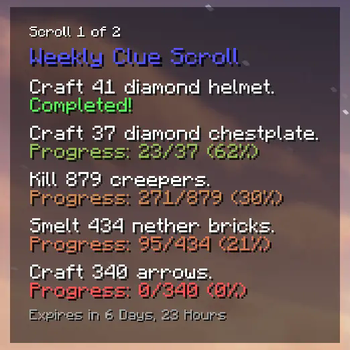
📜 A lightweight HUD mod for the Vulengate Minecraft server that displays clue scroll objectives and progress.
Screenshots

About this Mod
Overview
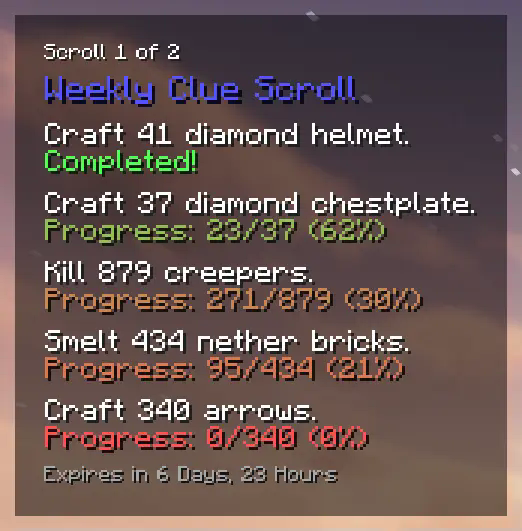
Clue Scroll HUD is a lightweight client-side mod for the Vulengate Minecraft server that displays your clue scroll objectives and progress directly on the in-game HUD. No more opening your inventory and hovering over items to check your tasks!
Features
- 📜 Automatically detects clue scrolls in your inventory.
- 🔍 Displays your scroll tiers, objectives, and progress directly on the HUD.
- ✅ Tracks task progress in real-time and highlights completed clues.
- ⏰ Shows time remaining before scrolls expire.
Dependencies
This mod has the following hard dependencies:
This mod also has an optional dependency on the Mod Menu mod.
Although Mod Menu is not required, it will make configuring this mod much easier.
Usage
- Download and install the mod and its dependencies.
- Join the Vulengate server and obtain a clue scroll in-game.
- The mod will automatically detect clue scrolls in your inventory and display information about them on-screen.
- Customise HUD appearance and behaviour in the mod’s config screen (via ModMenu, if installed as suggested).
Note: This mod is designed specifically for use on the Vulengate Minecraft server. When not playing on this server, it provides no additional functionality.
For further details, including bug reports, feature requests, and answers to frequently asked questions, please visit the mod's GitHub repository.
Copyright
This mod is an unofficial client-side mod developed for the Vulengate Minecraft server. No copyrighted or otherwise restricted resources have been used in the development of this mod. The "Vulengate" name and all associated trademarks are reserved by their respective owners.
Vulengate staff have given their consent for the development, distribution, and use of this mod.
This mod is licensed under the MIT License.
Available Versions
How to Install Clue Scroll HUD for Vulengate on Your Server
Order Server
Order a Minecraft Java server with at least 3 GB RAM (4 GB recommended).
Set fabric Loader
In the panel under "Egg", select the fabric loader and matching Minecraft version (1.21.11).
Install Mod
Open the mod browser in the dashboard and search for "Clue Scroll HUD for Vulengate". Click "Install" – done! Alternatively, upload the .jar via SFTP to the /mods folder.
Compatibility
Mod Loaders
Minecraft Versions
1.21.11, 1.21.8, 1.21.4
Server-side
✗ UnsupportedRecommended RAM
4 GB(min. 3 GB)Frequently Asked Questions
Clue Scroll HUD for Vulengate server crashes on startup – what to do?
Most common cause: wrong fabric version or insufficient RAM. Check the server log (latest.log) for "OutOfMemoryError" or "Mixin" errors. With Mado Hosting: ensure at least 3 GB RAM is allocated and the loader matches the mod version (1.21.11). You can switch loaders with one click in the panel.
Is Clue Scroll HUD for Vulengate compatible with fabric?
Clue Scroll HUD for Vulengate officially supports fabric for Minecraft 1.21.11, 1.21.8, 1.21.4. The Mado dashboard automatically detects incompatible loader combinations.
Server lagging with Clue Scroll HUD for Vulengate – how to optimize performance?
Recommended RAM: 4 GB (per 8 players). Use /spark profiler to check if Clue Scroll HUD for Vulengate consumes the most tick time. Common fixes: reduce server view-distance to 8-10, install "performant" or "starlight" as supplementary mods on Forge. With Mado Hosting, your server runs on NVMe SSDs with dedicated CPU cores for minimal latency.
Similar Mods




![[ETF] Entity Texture Features](https://cdn.modrinth.com/data/BVzZfTc1/af683d206d50b05258d865b0d6e4aa2f2cee12f2_96.webp)
![[EMF] Entity Model Features](https://cdn.modrinth.com/data/4I1XuqiY/6e5bbd0d06b1741bfdab6c0cfab6de8fdaf0064c_96.webp)

Rent Modded Server
Install Clue Scroll HUD for Vulengate with just one click on your server.